Design & image editing Advertisement
Acrobat turns text deserts into engaging graphics, podcasts, and presentations


Contents 9 sections
- In Brief: What's New in Acrobat
- From PDF Tool to Document Platform
- Understanding Documents Faster: The Four New Core Functions
- Stylize: From Plain to Presentable
- Student Spaces: From Lecture Hall to Professional Life
- How Trustworthy is AI in Documents?
- Pricing and Availability
- Five Workflows That Are Immediately Worthwhile
- Conclusion: The PDF Pile Finally Becomes Usable
Adobe has restructured Acrobat: The Adobe Productivity Agent transforms the classic PDF program into a platform that not only displays documents but also understands, visualizes, voices, and converts them into finished materials. Interactive reports, personal podcasts, a knowledge base for teams, and an analyzer for thousands of files at once – we've looked at what the new features can do and for whom the switch is truly worthwhile.
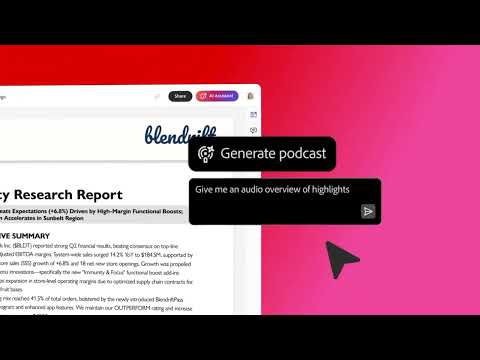
The video is only loaded from YouTube when you play it – data (including your IP address) is then transmitted to YouTube/Google. More in the privacy policy
The number with which Adobe frames the announcement is impressive: Every year, more than 400 billion PDF files are opened in Acrobat. Until now, this was mostly reading. This is where the Productivity Agent steps in – it aims to shorten the step from reading to understanding, directly in the program where the documents usually end up.

In Brief: What's New in Acrobat
- Interactive Reports & Summary Slides: Dense documents are transformed into graphics, charts, and navigable reports.
- Personal Podcasts & Audio Summaries: Documents and web links are turned into an audible conversation.
- Stylize: Simple files are transformed into professionally designed materials and presentations with Adobe Express templates.
- Knowledge Base: Teams can ask questions to entire document collections – including sync from SharePoint and Google Drive.
- Analyzer: Structured evaluations from thousands of unstructured files, such as contracts.
- Student Spaces: The free learning tool for students is now available worldwide – with new features including preparation for applications.
From PDF Tool to Document Platform
The real news lies less in a single function and more in the intent behind it. Adobe no longer positions Acrobat as just a viewer and editor but as a platform for document productivity: understanding, creating, and sharing in a single workflow. Additionally, Adobe is bringing the Acrobat functions where work is already done – among others in ChatGPT, Claude, WhatsApp, Edge, and Chrome.

“Acrobat is already the platform where millions of people read important information. Now they can also understand that information more quickly and comprehensively, allowing them to present themselves more competently and achieve their goals.”
Abhigyan Modi, SVP of the Productivity Product Group at Adobe
Understanding Documents Faster: The Four New Core Functions
1. Interactive Reports and Summary Slides
The most noticeable innovation: Acrobat converts complex documents into interactive visualizations. The AI analyzes the file, asks follow-up questions to understand intent, and builds a report with charts, images, and integrated navigation. You can skim or dive directly into a section instead of wading through 60 pages of text.
Adobe cites three typical scenarios that are also realistic for small agencies and freelancers: small and medium-sized enterprises create visual reports from business reports, growth plans, and annual accounts that the whole team understands. Marketers bundle competitive information, customer feedback, and studies. And HR departments convert survey and employee data into clear reports for management.
Practical Tip: The follow-up question mechanism is the crucial difference from a simple summary. Those who are specific when asking follow-up questions – “Focus on revenue development per channel, target audience is management” – get a far more useful report than with a vague “Summarize this.”
2. Podcasts, Audio Summaries, and Text-to-Speech Function
Documents or web links go into a PDF Space, and Acrobat can turn it into a personal podcast upon request. Adobe describes the example of a market analyst who incorporates several research reports and converts them into an audio version within minutes – listenable on the way to work or while exercising. Additionally, there are shorter audio summaries and a text-to-speech function for the desk.
For those who often procrastinate on professional reading, this is the feature with the most practical impact. Tender documents, briefings, regulatory texts, court rulings, white papers: Much of this doesn't need to be read in detail but just known. Exactly for that purpose, a 10-minute audio is the appropriate format.

3. Knowledge Base: Answers from the Entire Document Collection
The Knowledge Base in Acrobat elevates the principle from a single file to an entire collection. Teams can ask questions to trusted document collections – PDF files, Microsoft Office documents, web pages, text documents, and emails. The files are synchronized from SharePoint or Google Drive, keeping them automatically up to date.
Adobe's example: Sales teams independently pull the needed information from extensive support libraries and clarify through a simple query which procedure is best for a specific sales opportunity. Translated to smaller structures, this means that knowledge from proposals, project documentation, and manuals is no longer hidden in folders that nobody opens anymore.
4. Analyzer: Structure from Thousands of Files
The Analyzer in Acrobat targets the most unglamorous but costly part of document work: transforming unstructured data into structured insights. Conditions and clauses can be extracted from contracts and specifications to track automatic extensions, SLAs, inflation adjustments, and reporting obligations at the portfolio level. This is aimed at finance, procurement, operations, and IT teams – everywhere there are thousands of files without anyone having an overview.
Stylize: From Plain to Presentable
Once it’s clear what the document contains, the next step is about form. Stylize in Acrobat transforms plain files into designed documents with a click: resumes, invoices, reports – and, if desired, a professional presentation that clearly conveys the content from the source document.
Technically, Adobe draws on thousands of templates from Adobe Express for this. The integrated AI transfers the content in real-time to the chosen design and automatically adjusts it while maintaining the original source content completely intact. Adobe gives two examples that clearly underscore the benefits: Small businesses send offers that look as professional as those from larger competitors. And applicants transform a simple resume into a document that demonstrates the required care.

Classification: For design-savvy users, Stylize does not replace an InDesign layout or a custom-developed word-image brand. But it fills a gap that is constantly felt in daily life – namely for all the documents for which there was previously simply no budget or time for design.
Student Spaces: From Lecture Hall to Professional Life
Student Spaces in Acrobat is now available worldwide. Launched as a beta in April 2026, the learning area now has more than a million active users per month. Students create study cards, quizzes, and learning aids, build presentations, or share individual and group projects.
An AI assistant answers questions, breaks down complex topics, and provides explanations with interactive citations that directly refer to the original source. Newly added features include quotes on teaching documents, digitization of handwritten notes into personalized learning aids, and fact sheets at the push of a button. Additionally, the assistant has now also begun to help with the transition into professional life: it checks resumes, provides feedback, and prepares users for internships and job interviews.
Student Spaces runs on the web and is now also available in the Acrobat-ready app for Android. Currently, it is available worldwide in English, with more languages to follow. Additionally, Adobe announces new Acrobat Studio and Acrobat Express packages for students that include the same tools that professionals use. By the way, Student Spaces is completely free, and you only need a free Adobe account (you don't even have to be a student).
How Trustworthy is AI in Documents?
The question determines in practice whether such functions are actually used. Adobe cites four points:
- Specifically developed for PDF: The AI comes from the company that invented PDF and is designed to capture documents more accurately than general tools.
- Clickable citations: Each answer includes a reference that can be verified.
- No training with customer data: Customer data is not used to train the generative AI models, according to Adobe.
- Governance and security at the enterprise level for large organizations that want to extend AI to their entire document collection.
Particularly the second point is more than just a checkbox on the feature list in everyday work: A summary without a verifiable source cannot be reused – one with a bookmark to the original can.
Pricing and Availability
- The new audio and visualization features are included in the Acrobat Studio, Acrobat Express, and Acrobat AI Assistant Plus plans.
- Knowledge Base and Analyzer are available alongside these features in Acrobat Studio for enterprises.
- Student Spaces is available worldwide for free in English, with more languages to follow.
Five Workflows That Are Immediately Worthwhile
Feature lists are one thing – here are five specific workflows where the Productivity Agent saves real hours in creative and agency work:
- Transforming Briefing Piles into Podcasts: Place all documents of a new client project in a PDF Space and have them summarized as audio. Listen to it once before the kickoff meeting and go into the call with an overview.
- Competitive Analysis as an Interactive Report: Read business reports, studies, and website texts of competitors and build a navigable report with charts that can be shown directly to clients.
- Enhance Offers with Stylize: Send the existing standard offer through an Adobe Express template once and keep it as a basis for a well-designed template.
- Project Knowledge via Knowledge Base: Connect the project folder from SharePoint or Google Drive instead of searching through old documentation for every follow-up question.
- Keep Contracts in Check with Analyzer: Extract contract durations, automatic extensions, and price adjustment clauses from all service and license agreements – once set up, this saves time every year.
Conclusion: The PDF Pile Finally Becomes Usable
Many AI tools from recent years have been isolated applications: another tab, another subscription, another place to upload files. Adobe's approach is different – the features are located where the documents already are. Those who work professionally with tenders, studies, contracts, or reports gain not just a new feature but a different way of working: no longer needing to read everything, but strategically understanding and being able to call up the citation at any time.
It will be interesting to see how well the interactive reports function with truly messy source files – scanned attachments, poorly tagged tables, mixed-language documents. If you have your own experiences with the Productivity Agent, feel free to share them in the comments.
Frequently Asked Questions About the Adobe Productivity Agent
What is the Adobe Productivity Agent in Acrobat?The Productivity Agent is the AI layer that Adobe introduced in Acrobat in September 2026. It bundles several functions: interactive reports and summary slides, podcasts and audio summaries from documents, enhancing plain files with Stylize, as well as Knowledge Base and Analyzer for teams. The intent behind it: Acrobat should no longer be just a PDF viewer but a platform for understanding, creating, and sharing documents.
Which subscription do I need for the new AI features?According to Adobe, the audio and visualization features are included in the Acrobat Studio, Acrobat Express, and Acrobat AI Assistant Plus plans. Knowledge Base and Analyzer are only available in Acrobat Studio for enterprises. In our test with a regular Creative Cloud Pro subscription, generating podcasts, creating presentations, generative summarization, AI Assistant, and PDF Spaces were already available at no additional cost, albeit with a usage limit. So it’s worth checking your own account under All Tools before adding anything.
How do I turn a PDF into a podcast?Open acrobat.adobe.com in your browser and go to All Tools. In the AI Assistant category, you will find the tile to generate a podcast. For a single file, select it directly there. If you want to merge several documents, first create a PDF Space, upload all the sources, and let it generate a shared podcast. Processing takes a few seconds to a few minutes, depending on the scope.
Where can I find Stylize in Acrobat?Adobe describes the way via the Acrobat homepage in the browser under Create and then Stylize a PDF. The document then opens in Adobe Express. According to the documentation, the feature is enabled for all Acrobat Pro and Acrobat Standard customers, except for enterprise customers in Germany, Japan, and the US government sector. In practice, the rollout is staggered: In our Creative Cloud Pro test, the menu option was not available. As an alternative, Create Presentation works, which also builds a designed version from a plain document.
Are my documents used to train the AI?Adobe indicates that customer data is not used to train its own generative AI models. Each answer contains clickable citations, allowing verification of which part of the document a statement comes from. For businesses, governance and security features are also added. It’s important to note: For some AI queries, files are processed in the cloud. With particularly sensitive documents, this should first be clarified with your IT department and data protection officer.
Is Student Spaces free and available in German?Student Spaces is free and available worldwide since September 2026. It runs in the browser and in the Acrobat-ready app for Android. The feature set includes study cards, quizzes, automatic citations, digitization of handwritten notes, and an assistant that checks resumes and prepares for job interviews.
Is it worth switching to Acrobat Studio?That depends on whether you need the team functions. For individual users, the AI features included in Acrobat Pro cover most use cases, as long as the usage limit suffices. Acrobat Studio becomes interesting as soon as Knowledge Base and Analyzer come into play, meaning if you want to ask questions to entire document collections or extract structured data from thousands of files. According to the Adobe pricing overview, Acrobat Studio was around 30 euros per month in September 2026, and the AI Assistant add-on for Acrobat Pro was around 6 euros. Check the current conditions before making a purchase in your Adobe account.
More on the Topic at TutKit.com
Do you want to get more out of Adobe Acrobat and your documents? In our tutorials and templates, we show you step by step how to create, edit, and design PDFs professionally – and how to integrate AI meaningfully into your daily work.
- Reference Card Adobe Acrobat: Keyboard Shortcuts and Tips for Printing
- Sharp Acrobat Recipes: Mastering PDF Editing
- AI & Trends: Practical Courses on ChatGPT, Claude, Gemini, and Midjourney
- Templates for Quotes, Invoices, and Delivery Notes
- PowerPoint Templates for Professional Presentations
Sources and Additional Links
Comments
Register and comment.
Continue reading


