So that guests line up for confirmation: Create the right invitations quickly and easily. You'll receive 10 card designs in A5 portrait format, A5 landscape format and square versions. Each design is also available in smartphone format - ideal for sending digitally via WhatsApp etc. Simply download now, customize in Word, InDesign or Affinity Publisher and send out the invitation cards today.
10 inviting designs for confirmation invitation cards
Easily editable and fully customizable in Word, InDesign and Affinity Publisher
Exactly your format: A5 portrait, A5 landscape and square layouts
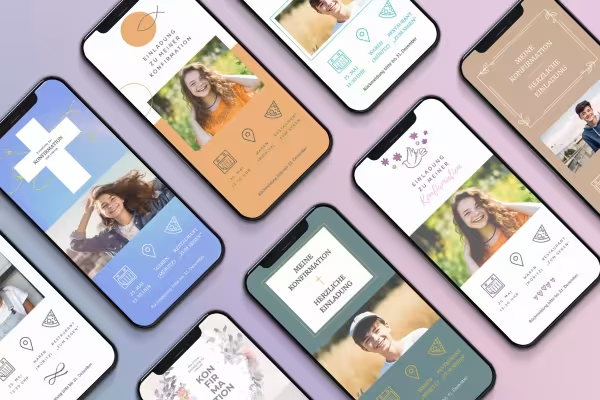
Every design in smartphone format, ideal for sending with Google Pixel, iPhone and co.
This is the perfect way to welcome guests to your confirmation: Grab the templates and design high-quality invitation cards with ease.
content
Details of the content
Confirmation – Templates for invitation cards in A5 portrait format & smartphone format
Confirmation - Template for invitation card "Frame" (A5 portrait)
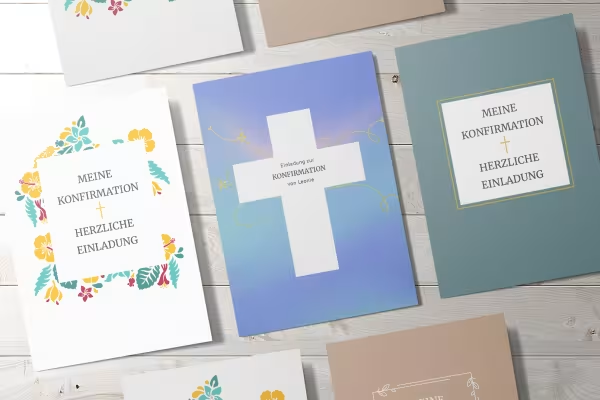
Frame - just the right frame for confirmation invitation cards: Get this template and customize it in Word, InDesign or Affinity Publisher. Change the text and colors as you wish and add a photo. Your invitation is ready! You can prepare it as a folding card in A5 portrait format or you can use the smartphone format for digital mailing, which is also included.
Confirmation - Template for invitation card "Simple" (A5 portrait)
Simple. Elegant. Inviting. If you're inviting guests to a confirmation and want a design that is as understated as it is eye-catching, we recommend this template for a folded card in A5 portrait format. You can edit it in Word, InDesign and Affinity Publisher. And can also be sent digitally with the smartphone layout included. Get started right away.
Confirmation - Template for invitation card "Flowers" (A5 portrait)
If you want to send a colorful invitation to your upcoming confirmation, it's best to use our Flowers design. It features lots of flowers around your invitation text. The template for a folded card in A5 portrait format can be edited in Word, InDesign and Affinity Publisher. You also receive a layout in smartphone format for digital mailing. Download the template. Customize. And send it out today!
Confirmation - Template for invitation card "Sky" (A5 portrait)
This template for a folding card in A5 portrait format is a truly heavenly design for your confirmation invitation cards. You can fully edit the layout in Word, InDesign and Affinity Publisher. And if you want to send your invitations digitally: Use the smartphone format that is also included, which is ideal for sending via WhatsApp, for example.
Confirmation - Template for invitation card "Frame" (A5 portrait)
Confirmation - Template for invitation card "Simple" (A5 portrait)
Confirmation - Template for invitation card "Flowers" (A5 portrait)
Confirmation - Template for invitation card "Sky" (A5 portrait)
Confirmation – Templates for invitation cards in A5 landscape format & smartphone format
Confirmation - Template for invitation card "Celebrate" (A5 landscape)
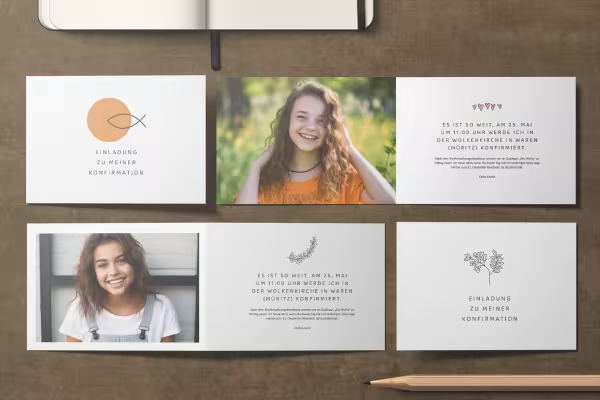
A branch as the main design element on the front and inside, plus a photo and your invitation text - download this template for a confirmation invitation card and send out your invitations today. You'll also receive the Celebrate design as a folded card to print out in A5 landscape format and in smartphone format for digital delivery. All editable in Word, InDesign and Affinity Publisher.
Confirmation - Template for invitation card "Fish" (A5 landscape)
The fish as a symbol and circular design element, plus a photo and the invitation text - get this template for a confirmation invitation card and send your invitations to your guests today. The fish design is available as a folded card to print out in A5 landscape format and in smartphone format for digital delivery. Easy to edit in Word, InDesign and Affinity Publisher.
Confirmation - Template for invitation card "Dove flight" (A5 landscape)
A dove, a few flowers and a lot of heart - this is what your confirmation invitation card could look like. Download this template for a folded card in A5 landscape format, customize it in Word, InDesign or Affinity Publisher and send out the invitations today. And if you want to send them digitally via smartphone, you can also use the matching layout in the dove flight design.
Confirmation - Template for invitation card "Celebrate" (A5 landscape)
Confirmation - Template for invitation card "Fish" (A5 landscape)
Confirmation - Template for invitation card "Dove flight" (A5 landscape)
Confirmation – Templates for square invitation cards and in smartphone format
Confirmation - Template for invitation card "Confirm" (square)
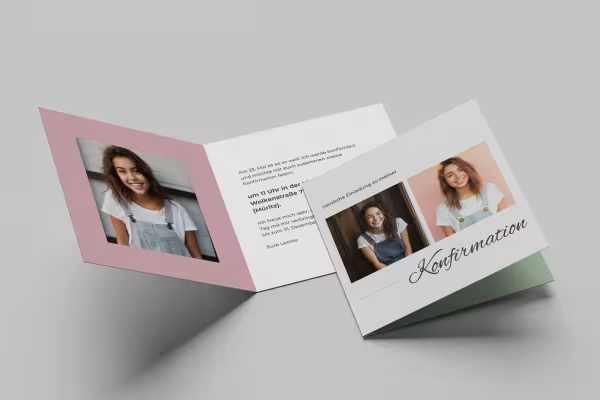
Confirmation is coming up and you want to invite your guests? Then use this template for invitation cards and send out your invitations today. The layout is available for editing in Word, InDesign and Affinity Publisher. In addition to the square folded card (145 mm × 145 mm), you also receive a version in smartphone format for digital mailing. Simply download, customize, send out and look forward to the acceptances.
Confirmation - Template for invitation card "Roses" (square)
Fully prepared on the front, back and inside: If you would like to create a confirmation invitation card, we recommend this template for a square folded card (145 mm × 145 mm). Open it in Word, InDesign or Affinity Publisher and customize it as you wish. If you would like to send your invitation digitally, the rose design is also available in smartphone format.
Confirmation - Template for invitation card "Smile" (square)
With this template for an invitation card, you can invite people to a confirmation in an attractive design. You can edit the square folded card (145 mm × 145 mm) with designed front, back and inside pages in Word, InDesign and Affinity Publisher. Insert your photos. Adjust the text and colors if necessary. That's it! And if you want to send your invitations digitally, you can also get the smile design in a practical smartphone format.
Confirmation - Template for invitation card "Confirm" (square)
Confirmation - Template for invitation card "Roses" (square)
Confirmation - Template for invitation card "Smile" (square)
Examples of use
Open gallery
Create confirmation invitations quickly and easily with the templates.
Open gallery
Customize text. Insert photo. You can edit all templates in Word, InDesign and Affinity Publisher.
Open gallery
There is a choice of A5 portrait, A5 landscape and square designs.
Open gallery
Ideal for digital delivery: all invitation cards are also available in smartphone format.
Comments (0)
Comment now „Confirmation invitation templates (Word, InDesign, Affinity Publisher)“