Snow textures: Snowflake images for Photoshop & Co

Snow textures: Snowflake images for Photoshop & Co

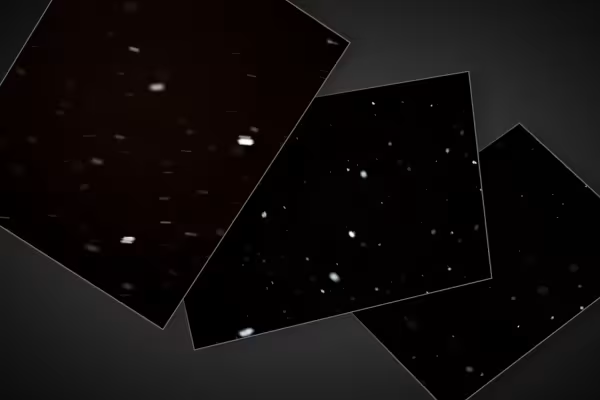
With the 31 high-resolution snow textures, you can give any scene a magical winter look. Simply add the pre-snowflakes to your photos and composings using Photoshop and other common image editing programs. Let it snow!

  • 31 snowflake images with falling snowflakes against a black background
  • Quick and easy to use in your photos and composites with the help of blending modes
  • JPG files, can be used with any image editing software; image size: 7,360 px × 4,912 px
  • Ideal for wintery, Christmassy images, photos and layouts

The snow trickles softly but effectively - with these snowflakes, frosty times are always on the horizon in your pictures. Get the package and give Mother Hulda a good shake!

content

Details of the content

snowflakes

High-resolution images, textures & overlays: Snowflakes 1

High-resolution images, textures & overlays: Snowflakes 1

High-resolution images, textures & overlays: Snowflakes 2

High-resolution images, textures & overlays: Snowflakes 2

High-resolution images, textures & overlays: Snowflakes 3

High-resolution images, textures & overlays: Snowflakes 3

Examples of use

  • Snowflake images for incorporation into photos and compositing.
    Open gallery
    These snowflake pictures are included.
  • Open gallery
    Example: The scene isn't cool enough yet? Then add the missing snow.
  • Open gallery
    Example: Use the snowflake textures for atmospheric density.
  • Open gallery
    Example: Let the wintry flakes dance in your composings and artwork.

help video for application

Video tutorial: How to use the snowflake overlays in your pictures

Your pictures are already cool, but not cool enough? Then simply add falling snowflakes to them. We'll show you how to use the overlays in Photoshop in this video tutorial. This way, your photos and image compositions will always look frosty.

6 minutes · free of charge
Comments (5)

Comment now „Snow textures: Snowflake images for Photoshop & Co“

