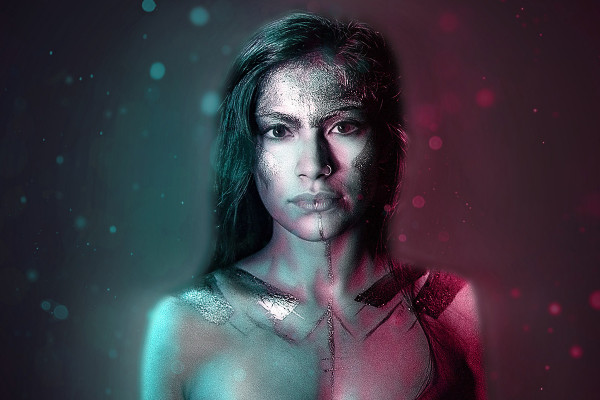
Photoshop action "2Light": Atmospheric double lighting for your photos

Photoshop action "2Light": Atmospheric double lighting for your photos

Perhaps your subject is still undecided? Perhaps they are walking between two worlds? Maybe they feel torn or even lost? - Start this Photoshop action to tell an atmospherically dense story with your photos. Without further ado, your subject is illuminated by two lights of different colors, while shimmering particles float through the air. The result: attractive, gripping - fascinating!

  • Welcome to the 2Light zone: illuminate your motifs with two lights of different colors.
  • Fascinating effects: Shimmering particles intensify the atmosphere of your pictures.
  • Easy to use: Select the subject, Photoshop creates the effect and you adjust the color.
  • Compatible: Achieve fascinating results in Photoshop CS6 and Photoshop CC.
  • Includes Photoshop action, sample file as well as PDF and video quick guide

Add mystical to futuristic-looking double lighting to your photos - very easily, in just a few simple steps - with this Photoshop action.

content

Details of the content

Photoshop action "2Light

Photoshop action "2Light": Atmospheric double lighting for your photos

Photoshop action "2Light": Atmospheric double lighting for your photos

Examples of use

  • Portrait of a man, double lighting effect applied using a Photoshop action
    Open gallery
    Example: Use this action to add double lighting of different colors to your photo.
  • Open gallery
    Example: It almost seems as if the woman is wandering through a fascinating dream world.
  • Open gallery
    Example: Whether mystical or futuristic - this action leaves plenty of room for interpretation of your images.
  • Open gallery
    Example: Simple application - create a selection of your image and start the action. Done.
  • Open gallery
    Example: Afterwards, you can further adjust the colors of the double lighting.

help video for application

Instructions for the Photoshop "2Light" action: How to create the double lighting effect

Use the Photoshop "2Light" action to create an atmospheric double lighting effect on your photos. To do this, load the action and the sample file into Photoshop, create a selection of your subject and start the action. Watch this video tutorial by Matthias Petri to see how to proceed step by step and further customize the result to your liking.

8 minutes · free of charge
Comments (8)

Comment now „Photoshop action "2Light": Atmospheric double lighting for your photos“

