
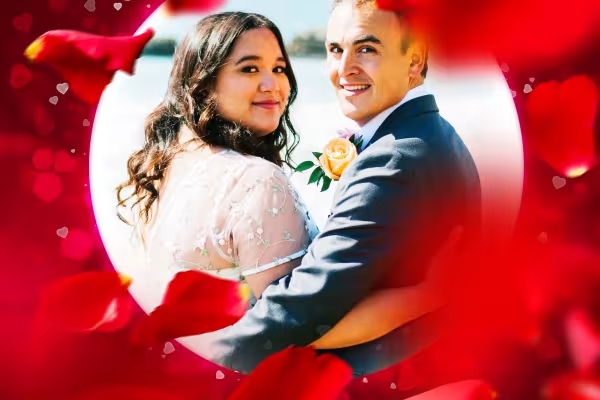
Photoshop action "Romantic love rush": Bokeh & rose petals

Photoshop action "Romantic love rush": Bokeh & rose petals

It's so easy to transform your photos into heart-warming romantic pictures: Activate the Photoshop action and a beguiling love rush of heart lights, bokeh effects and red rose petals will flood the scenery almost automatically. The result: an emotional, personal photo gift for anyone in love.

  • Photoshop action Romantic love rush for a boost of emotion in your photos
  • Easy to use, so you can quickly edit multiple images
  • Start the action, place the rose petals and define your background color
  • Ideally suited for partner, couple and bridal couple photos - for love
  • Perfect for weddings, Valentine's Day or as a love gift in between
  • Includes: action, brushes, pictures with rose petals; instructions as video and PDF

Whether wedding, anniversary or Valentine's Day, partner, single or couple portrait - this is your gift idea! Start the campaign and tickle pure romance out of your photos.

content

Details of the content

Photoshop action Romantic "Liebesrausch": Bokeh & rose petals

Photoshop action "Romantic love rush": Bokeh & rose petals

Photoshop action "Romantic love rush": Bokeh & rose petals

Examples of use

  • Open gallery
    Example: Ideally suited for loving, emotional couple photos.
  • Open gallery
    Example: Value moments of happiness with additional emotion values.
  • Open gallery
    Example: Pure romance - create personalized photo gifts using the Photoshop action.
  • Open gallery
    Example: Blenderize the rose petals - for a look that can also stand for friendship.
  • Photo of a bride and groom surrounded by a frame with rose petals and heart bokeh, example of how to use the Photoshop action
    Open gallery
    Example: With a few tricks, you can quickly create heart-warming frames for your photos.
  • Open gallery
    Example: You can adjust the color of the effect yourself afterwards.

help video for application

Photoshop instructions: How to apply the "Romantic love rush" action to your photos

How do you use the Photoshop action "Romantic love rush"? It's simple: import the action and the brushes into Photoshop and open your image. After starting the action, insert the supplied rose petal images twice in the places where you want them. You can then adjust the color, add an additional bokeh layer and move or hide the rose petals once they have been placed. Matthias Petri explains the exact procedure in this Photoshop tutorial. Have fun creating your romantic pictures!

9 minutes · free of charge
Comments (2)

Comment now „Photoshop action "Romantic love rush": Bokeh & rose petals“

