
Acrobat Training - Basics & Tricks

- Get to know and use Adobe Acrobat in all its facets
- Editing PDFs, creating PDF forms, accessibility, automation and more.
- Choose your preferred learning method: through video training or as a text tutorial
With this training you will increase your PDFectivity, create interactive, accessible and print-safe PDF documents yourself and speed up your work by using clever automation!
30 Videos, 533 minutes
The surface
Overview of the Acrobat workspace
11 minIn this video training I give an overview of the Acrobat 11 interface with the start screen, the tools, comments and sharing area as well as the quick tools.
Customize workspace and quick tools
15 minIn this video training, I will show you how to customize your own workspace, place frequently used tools at the top as icons for quick access and export or import customized workspaces for use on other computers.
The Acrobat navigation bar
13 minIn this video training, I explain how to use the navigation bar, show you how to show and hide it, show and hide navigation buttons and finally reset it to the default setting.
The Acrobat default settings
23 minIn this video training, I will show you how to use the preferences to customize Acrobat to your needs. Here you can define, for example, how documents are displayed when the program is started, what font size comments should have or in which program an object should be opened for subsequent editing.
Keyboard shortcuts in Acrobat
20 minIn this video training, I will show you how to use keyboard shortcuts to speed up your work with Acrobat.
PDFs for the Office environment
Create PDF documents with Acrobat
11 minIn this video training I show you the different ways in which PDF files can be created.
Merging files with Acrobat
7 minIn this video training, I show you how to merge several different files into one PDF file.
PDF portfolios with Acrobat - Part 1
20 minIn this video training, I will show you how to create a PDF portfolio from a wealth of different files and entire folders within an appealing interface based on Flash technology, within which websites can be displayed with their full functionality or movies can be played.
PDF portfolios with Acrobat - Part 2
14 minIn this video training, I will show you how to convert native files in a PDF portfolio to PDF format, how to integrate web content such as websites or YouTube videos into the portfolio and finally how to save a complete portfolio as a website.
Enriching PDF files with Acrobat - Part 1
29 minIn this video training, I explain how to enrich PDF files with additional information such as headers and footers or backgrounds and watermarks. I also show you how to insert layers and bookmarks and how to use Bates numbering for differentiated pagination of complex structured documents.
Enriching PDF files with Acrobat - Part 2
19 minIn this video training, I explain how to add additional files as attachments to PDF files and enrich them with audio, video, 3D and Flash content.
Redacting and cleaning up PDF files with Acrobat
11 minIn this video training, I explain how you can black out or remove both text passages and graphic elements in PDF files. I also show you how to remove meta information such as comments, file attachments, hidden text, links, bookmarks, form data, etc. from documents.
Extract images and text from PDF files and save them as Office documents with Acrobat
8 minIn this video training, I explain how to extract and save images from PDF files for other uses. I also show you how to save PDFs as image or Office files.
Edit PDF files
Edit pages with Acrobat
19 minIn this video training, I explain how to rotate, delete, crop, extract, replace or insert pages from other PDF documents in a PDF document.
Define article sections and reading direction with Acrobat
12 minIn this video training, I explain how you can use the "Add article section" tool to systematically define sections in a multi-column PDF document to make it easier to read on screen.
Editing texts and objects with Acrobat
15 minIn this video training, I explain how to edit text and objects such as images or graphics in a PDF document.
I also show you how to create links to other pages in the document, websites or files.
Comments
Annotation and commenting tools in Acrobat
17 minIn this video training, I explain how to use the different annotation and commenting tools in Acrobat to communicate when collaborating with other users.
Graphic marking tools in Acrobat, export and import comments
22 minIn this video training, I show you how to use the graphic markup tools and explain how to search, filter, import and export comments in the comment list to Word, including the integration of text changes, and finally how to create a comment summary.
Automate actions
Define, export and import actions in Acrobat
13 minIn this video training, I will show you how to define and apply your own actions using the action wizard and how to export or import them for use at other workstations.
Standard actions in Acrobat
22 minAcrobat comes with many actions for various purposes as standard. They are not all located in the action wizard, but have been placed in different locations. In this video training, I will show you how to use these actions to optimize, clean up, reduce file size and compare different versions of the same file.
Forms
Create forms in Acrobat
32 minIn this video training, I will show you how to create interactive PDF forms from existing PDF or Office files.
Distribute forms and manage returns with Acrobat and FormsCentral
18 minIn this video training, I'll show you how to distribute forms via email with Acrobat and manage the responses. Alternatively, I show how to manage such a process with Adobe FormsCentral.
Barrier-free
Making documents accessible with Acrobat - Overview
19 minIn this video training I give an overview of how to set up PDF documents in such a way that people with visual or other disabilities also get the greatest possible benefit and information content from the file.
Making documents accessible with Acrobat - Editing details
15 minIn this video training, I show in detail how PDF documents can be subsequently tagged or edited, how the reading direction can be adjusted or the "text wrap" view mode activated to provide a clean structure for accessible use.
prepress
PDF export - Acrobat default settings
23 minIn this video training you will learn which settings are required in InDesign's export dialog as a prerequisite for outputting an imageable PDF file.
The print production tools in Acrobat
30 minIn this video training I explain how to use the most important print production tools such as the output preview and show how to convert colors, correct hairlines, add printer's marks and reduce transparencies.
Preflight profiles in Acrobat - Overview
14 minIn this video training course, you will get an overview of the options for checking PDF files intended for printing for their suitability for printing using various profiles.
Define your own preflight profiles in Acrobat
20 minIn this video training I show you how to create your own profile for checking files that are intended for output in sheetfed offset printing.
Define user-defined checking and correction rules in Acrobat
10 minIn this video training, I will show you how to create a single rule for checking or correcting files.
Tips and tricks
Fixing common problems with PDF files with Acrobat
32 minIn this video training I will show you common problems with PDF files intended for printing and how to solve them.
Examples of use
-
 Learn how to handle PDF files correctly!
You might also like

Live your layout now!

20 sets in 4K (4096 × 4096 px, 300 DPI) as JPG plus Photoshop patterns, calibrated to the fill method

More style, more power, more templates!
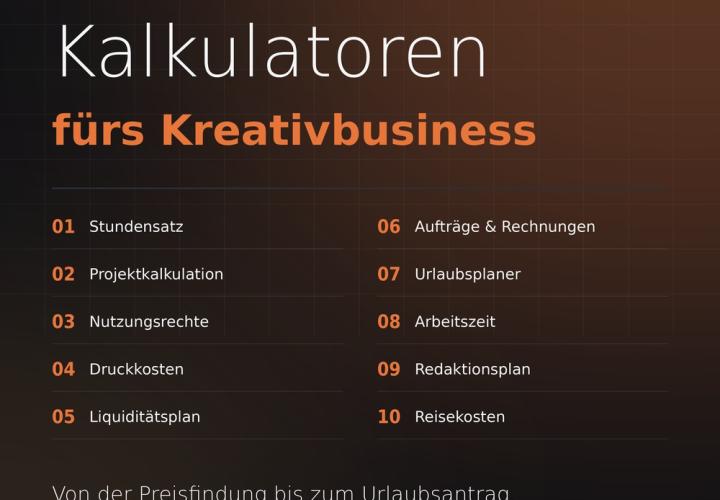
Prices, projects, vacation, working hours, and travel expenses
Comment now „Acrobat Training - Basics & Tricks“