
Photoshop Workshop DVD - Effects for Typography, Layout & Photo - Vol. 2 (free)

- Numerous layout, photo, and typographic effects
- Use digital painting effects and create entire photo composites
- Contains working files, styles, and actions for various effects and tutorials
- Free: Simply watch the video training and get started right away! (below are the individual free videos for streaming)
Use art to break boundaries! Apply inspiring new perspectives and make your media even more perfect in the end!
41 Videos, 1029 minutes
Layout & Photo (free)
Dragan effect
32 minWith the Dragan effect, named after the Polish photographer Andrzej Dragan, portraits obtain an interesting and distinctive look. How to recreate this effect in Adobe Photoshop is explained in this workshop. A graphics tablet is used during the editing process. Its usage is recommended for a better result - however, it is not mandatory.
Download for free now - a thank you from our trainers to the many viewers of their videos over the past years.
Young to old - Aging effects using morphing techniques
46 minWhen it comes to the aging effect, the goal is to artificially age a young face. To do this, a second source image is used and the age is "transplanted" onto the face of the young woman.
Download now for free - a thank you from our trainers to the many viewers of their videos over the past years.
Paint a 80s look onto a portrait photo
49 minIn this video training, I will show you how to transform a portrait into an image with an 80s look. I use a graphics tablet for this and draw these effects on my picture. By skillfully combining different layer modes and individual coloring, exciting works are created. Download now for free - a thank you from our trainers to the many viewers of their videos over the past few years.
Retro photo look
11 minIn this video training, I want to show you how to create a retro look for your photos using a few simple adjustment layers and a texture. You can then save the whole thing as an action, and with just one click, you can repeat the effect for the next image. However, the fine-tuning of the colors should be done afterwards. Download now for free - a thank you from our trainers to the many viewers of their videos over the past years.
Lomo effect in Photoshop
13 minIn this video training, I would like to show you how to recreate the so-called Lomo Effect in Photoshop. Lomo comes from Lomography, a style in photography. This style originated from the 35mm camera "LOMO Compact Automat". The images produced by this camera are usually blurry, hazy, high-contrast, and slightly darkened at the edges. In the end, we are replicating the image defects of this camera. However, this distinct style has its own beautiful charm, so it can no longer be really considered as "defects". Download now for free - a thank you from our trainers to the many viewers of their videos over the past few years.
Image aging effects - aging images with textures and fill methods
17 minLetting an image age digitally is a relatively simple thing to do in Photoshop. What I need are a few filters and suitable textures that I overlay with my image. Then a little fine-tuning and my image has aged by a century. Download now for free – a thank you from our trainers to the many viewers of their videos in recent years.
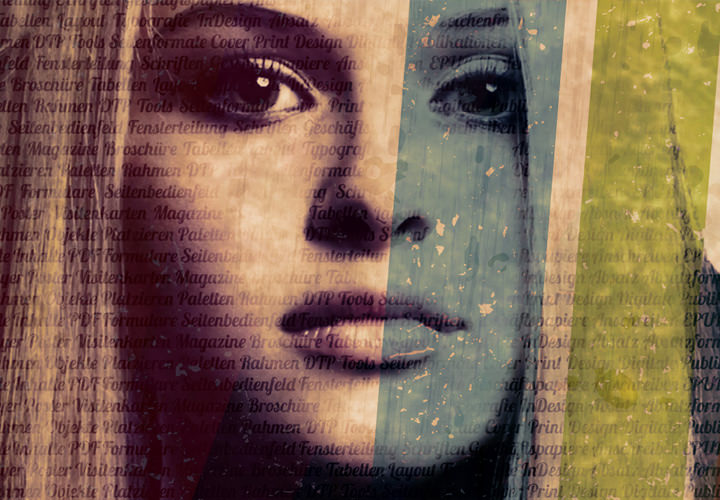
Continuous color background effect
14 minIn this video training, I want to show you how to create a nice background effect. In this case, predetermined colors of the foreground image (in this case our woman) continue as brushes. This abstract effect is especially a nice enhancement for portraits and works very well in combination with a trendy image like this one.
The working files consist of the complete PSD that was created during the video training. Download it now for free - a thank you from our trainers to the many viewers of their videos over the past years.
Fire effect on face - Part 1
37 minIn Fire Face Part 1, different work steps are explained. First, we will edit the portrait, create fire-like backgrounds as texture, and then start editing our image as a composition using stock images with flames as the theme. The goal is to model the face in such a way that the impression is created that this face is being decomposed by fire, through arranging different flame fragments. This video training is structured to explain the techniques in an exemplary way and is suitable for both beginners and advanced users. Download now for free - a thank you from our trainers to the many viewers of their videos over the past years.
Fire effect on face - Part 2
28 minIn Fireface Part 2, we will edit the image as a composition using stock images with flames as a motif. The goal is to model the face by arranging different flame fragments in such a way that gives the impression that this face is being decomposed by fire. This video training is structured to explain the techniques exemplarily and is suitable for beginners and advanced users alike. Download for free now - a thank you from our trainers to the many viewers of their videos over the past years.
Smoke dancer
49 minThe smoke dance tutorial describes a way to combine smoke and figures in such a way that it appears as if a figure is moving through a smoke tower. Download now for free - a thank you from our trainers to the many viewers of their videos over the past few years.
Glow contour effect
31 minIn this video training, I will explain how to create interesting light contour effects using layer overlay and a graphics tablet. Download now for free - a thank you from our trainers to the many viewers of their videos over the past years.
Hellfire photo effect with just a few clicks including action
7 minIn this video training, I will show how to create a hell effect from a photo with just a few clicks. Additionally, I will explain how to record an action from it and apply it to different photos.
I have included the Hell Action as a working file. Now download it for free - a thank you from our trainers to the many viewers of their videos over the past years.
Smashing portrait - the pixelation effect
25 minThe pixel sorting effect vividly demonstrates how easily a creative look can be achieved using simple Photoshop tools. We need the layer masks, a few blending modes, and a filter. The smashing portrait is ready. Download for free now - a thank you from our instructors to the many viewers of their videos over the past years.
Puzzle storm from photo
21 minIn this video training, I show how easy it is to remove puzzle pieces from a photo and let them fly around. All with masks and Smart Objects. There are also many tips for creating your own brushes and their settings. Download now for free - a thank you from our trainers to the many viewers of their videos over the past years.
Create a divided photo - 3 clever options
24 minIn this video training, I will show how to create a cool photo split effect. I will take three different approaches. Many tips and tricks are of course included. Download now for free - a thank you from our trainers to the many viewers of their videos over the past years.
Artwork Planet 4 Seasons - Four Seasons
53 minThis video training is based on the design by Debby, who participated with her version in the 2D Advanced Contest in January 2010 and wrote the tutorial Artwork Planet for it. The essential editing steps were taken from it and will be shown in modified form in this video training. Download now for free - a thank you from our trainers to the many viewers of their videos over the past years.
Create a photomosaic
16 minIn this video training, I want to show how easy and quickly a photo mosaic can be created. At first glance, a photo mosaic may seem like a very time-consuming task. But that is not the case when I use Photoshop effectively. Now download for free - a thank you from our trainers to the many viewers of their videos over the past years.
Create 3D photo cube with just a few clicks
8 minA photo cube is always a popular way to showcase pictures from the wedding, the last vacation, the first day of school, or other occasions. With the 3D features, a photo cube can be created in less than five minutes, easily and effortlessly. Download now for free - as a thank you from our trainers to the many viewers of their videos in recent years.
3D speed effect destructive and non-destructive
11 minIn this video training, I show how to create a stunning 3D speed effect with just a few clicks. In the second part of the video training, the focus is on achieving the same effect using only a Smart Object and Smart Filters, allowing you to change settings at any time. Download for free now - a thank you from our trainers to the many viewers of their videos over the past years.
3D electrical diagram created with few filters
9 minIn this video training, I show how an electrical diagram can be created using just a few filters. Furthermore, there are tips on how to handle actions and smart objects. A big thank you to MrScorpio, who inspired me. The action is included as a working file. Download now for free - a thank you from our trainers to the many viewers of their videos over the past years.
light veil effect
24 minIn this video training, I explain the creation of a misty light contour. This form of editing can be used and applied in various ways, often used for screen backgrounds or as a design element on websites. Furthermore, this editing option can also be used to create custom brush shapes.
Working files are available for both examples shown. Download for free now - a thank you from our trainers to the many viewers of their videos over the past years.
Magma texture including action
7 minIn this video training, I show how a magma texture is created. I also provide many tips on handling the recording of actions. I was inspired by a tutorial by MrScorpio. The complete action is included as a working file. Download now for free - a thank you from our trainers to the many viewers of their videos over the past years.
Typography (free)
Floral font in Photoshop
42 minIn this tutorial, I want to show you how to create a font in a floral style. The font consists of leaves, flowers, vines, and for fine-tuning, there is also a ladybug. In terms of difficulty, the whole process is relatively simple, but it does require some patience and, above all, good stock images. I will show you how you can master it perfectly. Download now for free - a thank you from our trainers to the many viewers of their videos over the past years.
Grid effects for typography
19 minIn this video training, I would like to explain the simple but very creative effect of stitching patterns along letters. For this purpose, I will show how to create a brush preset and use it as a stitching pattern. As an additional value, I will demonstrate how a denim texture can be created in a few steps, which can then be used as a letter pattern. Download now for free - a thank you from our trainers to the many viewers of their videos over the past years.
Create text from stones
8 minIn this video training, I will show how to create a text from stones. Tips are given on handling clipping masks and channels. Download for free now - a thank you from our trainers to the many viewers of their videos over the past years.
Water font effect - Variant 1
8 minIn this video tutorial, I want to show you how you can create an aqua font using the layer effects of Photoshop in a simple way. An aqua font requires a font that is not too linear; in the video tutorial, I use the Croobie font. Download now for free – a thank you from our instructors to the many viewers of their videos over the past years.
Waterfont effect - Variant 2
8 minIn this video tutorial, I want to show you how to create an aqua text effect. We will use some stock images of water droplets and layer effects. Creating the text is relatively easy. Now download for free - a thank you from our trainers to the many viewers of their videos over the past years.
Water-filled glass text - animated
30 minHere is shown how to create a text filled with water. Primarily layer styles will play a role, which mainly contribute to the success of this effect.
In the working files, among other things, the necessary contours are included. Download now for free - a thank you from our trainers to the many viewers of their videos over the past years.
Animated glitter text
8 minHere we create an animated glitter text in very simple steps. This relies on noise filters and a star brush. Armed with these tools, a glittering text can be created in no time at all. Download for free now - a thank you from our trainers to the many viewers of their videos in recent years.
3D glass text
16 minHere is shown how to create a glassy looking 3D text using layer effects. In addition, creating reflections using Adobe's standard brushes. Download now for free - a thank you from our trainers to the many viewers of their videos over the past few years.
Digital maleffects (free)
Mosaic effect - thanks to smart object various results
8 minIn this video training, I show how to create a mosaic text effect. I mainly focus on working with smart objects/smart filters and thus show different end results. Download for free now - a thank you from our trainers to the many viewers of their videos in recent years.
Oil painting with Pixel Bender and default tools
14 minOil paintings have a special charm, and in this video training I explain two ways to digitally generate oil paintings. First, I use the Adobe Photoshop built-in oil paint dab tool, and later on, the oil paint filter from the Pixel Bender Photoshop plug-in. Both results are compared and special features of working with the Pixel Bender plug-in are discussed. Download for free now – a thank you from our trainers to the many viewers of their videos over the past years.
Pastel painting effect
40 minBased on a photo, this video training demonstrates how to recreate a pastel painting effect on canvas using filter layers, various layer modes, and layer masks. The use of a graphics tablet is optional. Download now for free - a thank you from our trainers to the many viewers of their videos in recent years.
Pointillism - digital painting effects in a dotted style
14 minThe Pointillism is a painting style of Post-Impressionism. Prominent representatives were Georges Seurat, Paul Signac, and Paul Baum. The dot style applied by these artists can be more or less easily imitated with Photoshop. How to do it is shown in this video training. Download now for free - a thank you from our trainers to the many viewers of their videos in recent years.
Digital painting in the style of frescoes
5 minSometimes it is the small, simple techniques that can convince with their brevity and effectiveness. Such an example is the "Glowing Edges" filter in subtractive application, which gives an image a painterly fresco look with just a few clicks. Download now for free - a thank you from our trainers to the many viewers of their videos over the past years.
Watercolor painting effects
54 minThis video training shows 2 different examples of how to create a watercolor painting effect in Adobe Photoshop. The first example is a rather simple effect with just a few editing steps, while the second one is a bit more elaborate. Some filters, layer styles, adjustment layers, and of course brushes are used, as well as an optional graphics tablet. Download now for free - a thank you from our trainers to the many viewers of their videos over the past years.
Fractal sphere effect using plug-ins
28 minIn this tutorial, I would like to show you a way to easily achieve interesting light contour effects in Adobe Photoshop using optionally available plug-ins. This technique is especially suitable for detailed images. Basically, this technique represents the fastest method to create such effects in Adobe Photoshop. Nevertheless, the time required for preparation and post-processing - especially when isolating subjects from the background using layer masks - should not be underestimated. Download now for free - a thank you from our trainers to the many viewers of their videos over the past years.
Creation of snowflakes - 4 instructions
17 minIn this video training, I will show how easy it is to insert snowflakes into a photo. And because it's so simple, I will demonstrate 4 approaches to creating snowflakes (via filters, brushes, and plug-ins). I have attached a snow brush as the working file. Download now for free - a thank you from our trainers to the many viewers of their videos over the past years.
Mutter Erde
83 minWorlds are being created here! A planet emerges from a photo of clouds. But how do you conjure the right light into space? We witness a glowing sunset and integrate Mother Earth into the atmospheric scene, which is built up with fill methods and brushes. Download now for free - a thank you from our trainers to the many viewers of their videos over the past years.
Photo composing: LIQUID PERFORMANCE - Part 1
46 minIn this video training, I show not only the isolation of the model, but also the other dynamic components that are part of an extraordinary and slightly surreal composite. Brush tips in Photoshop as well as real photographed colors blend fantasy and reality in a breathtaking way here. The bizarre journey from fluidity to the realism of a dance pose begins here. Download for free now - a thank you from our trainers to the many viewers of their videos over the past years.
Photo composing: LIQUID PERFORMANCE - Part 2
49 minIn this workshop, I will show not only the isolation of the model, but also the other dynamic components that are part of an extraordinary and slightly surreal composite. Brush tips in Photoshop as well as real photographed color blend fantasy and reality in a breathtaking way here. The bizarre journey goes from fluidity to the realism of a dance pose. Now download for free - a thank you from our trainers to the many viewers of their videos over the past years.
Examples of use
-
 Photoshop Effects Vol. 2
You might also like

Full power, more inspirations, maximum WOW effect!
Live your layout now!

20 sets in 4K (4096 × 4096 px, 300 DPI) as JPG plus Photoshop patterns, calibrated to the fill method

100 presets in 5 themes · each look in .xmp, .dng, and .costyle · for desktop and smartphone
Comment now „Photoshop Workshop DVD - Effects for Typography, Layout & Photo - Vol. 2 (free)“