Photoshop actions for photographers and photo editors

Photoshop actions for photographers and photo editors

Photoshop actions 1 Videos · 0.1 h Video training · English Michael Baierl by Michael Baierl

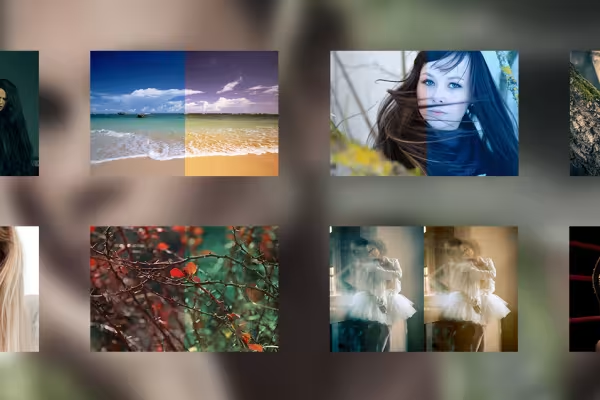
Great effects give images the ultimate extra touch and create exciting eye-catchers. However, if you don't feel like creating these image effects manually and time-consuming yourself, this package is for you, because creativity stacks up! Expand your effects repertoire in Photoshop with 60 fantastic actions from PSD-Tutorials.de that create true works of wonder with just one click.

  • 60 Photoshop actions from the workflow of Photoshop artists Michael Baierl and Mike van Doorn
  • Automatically magical - first-class image looks with just one click to edit your images
  • Color mood, high-contrast looks, retouching (frequency separation, dodge & burn) & Co.
  • Actions may be used for private and commercial projects (!)

With this action package especially for photo editors and photographers, you can get wonderful looks & styles in your pictures with one click and save a lot of time for better pictures!

content

1 Videos, 5 minutes

Actions for looks and styles

Photoshop action: Split toning orange and cyan - outdoor and fashion photos in a new and modern look

Photoshop action: Split toning orange and cyan - outdoor and fashion photos in a new and modern look

Photoshop action: Split toning blue and red - gives photos a slightly surreal touch

Photoshop action: Split toning blue and red - gives photos a slightly surreal touch

Photoshop action: High-pass look for portraits - skin tones are lightened and contrasts are enhanced

Photoshop action: High-pass look for portraits - skin tones are lightened and contrasts are enhanced

Photoshop action: Create red lightleak/light spot

Photoshop action: Create red lightleak/light spot

Photoshop action: Create a blue lightleak/light spot

Photoshop action: Create a blue lightleak/light spot

Photoshop action: Split toning yellow and blue - spice up landscapes and portraits with fresh colors

Photoshop action: Split toning yellow and blue - spice up landscapes and portraits with fresh colors

Photoshop action: Create Dodge&Burn layer

Photoshop action: Create Dodge&Burn layer

Photoshop action: Frequency separation - remove skin blemishes/hair without affecting the brightness/color

Photoshop action: Frequency separation - remove skin blemishes/hair without affecting the brightness/color

Photoshop action: Microdetails - get every last detail out of photos

Photoshop action: Microdetails - get every last detail out of photos

Photoshop action: Newspaper look

Photoshop action: Newspaper look

Photoshop action: Warm picture mood

Photoshop action: Warm picture mood

Photoshop action: Cold picture mood

Photoshop action: Cold picture mood

Photoshop action: Fog effect for landscape shots

Photoshop action: Fog effect for landscape shots

Photoshop action: Soft skin

Photoshop action: Soft skin

Photoshop action: High-pass sharpening for even more detail in photos

Photoshop action: High-pass sharpening for even more detail in photos

Photoshop action: Desaturates photos by 50 percent

Photoshop action: Desaturates photos by 50 percent

Photoshop action: Simulate film grain

Photoshop action: Simulate film grain

Photoshop action: Contrast Boost - increase the contrast of photos at the touch of a button

Photoshop action: Contrast Boost - increase the contrast of photos at the touch of a button

Photoshop action: Average color - enhance existing color mood

Photoshop action: Average color - enhance existing color mood

Photoshop action: Lensflare - add backlight

Photoshop action: Lensflare - add backlight

Photoshop promotion: Save time with our retouching set

Photoshop promotion: Save time with our retouching set

Photoshop action: Fashion effect with blue and yellow cross-toning

Photoshop action: Fashion effect with blue and yellow cross-toning

Photoshop action: Eye-catcher cross-toning look green/red

Photoshop action: Eye-catcher cross-toning look green/red

Photoshop action: Cross-toning look in pink and green for dramatic colors

Photoshop action: Cross-toning look in pink and green for dramatic colors

Photoshop action: Black and white made easy!

Photoshop action: Black and white made easy!

Photoshop action: Hard contrasts for fantastic photos

Photoshop action: Hard contrasts for fantastic photos

Photoshop action: Warm colors for flattering pictures

Photoshop action: Warm colors for flattering pictures

Photoshop action: Dark colors for expressive photos

Photoshop action: Dark colors for expressive photos

Photoshop action: Cold image mood in soft light

Photoshop action: Cold image mood in soft light

Photoshop campaign: Go on vacation with color

Photoshop campaign: Go on vacation with color

Photoshop action: Ortone effect - softness and gentle/sensual saturation for e.g. wedding photos

Photoshop action: Ortone effect - softness and gentle/sensual saturation for e.g. wedding photos

Photoshop action: Let the sun into your heart

Photoshop action: Let the sun into your heart

Photoshop action: From Dusk till Dawn - dramatic and rich colors

Photoshop action: From Dusk till Dawn - dramatic and rich colors

Photoshop action: If you want a little more color - increase the saturation

Photoshop action: If you want a little more color - increase the saturation

Photoshop action: An old look for young pictures

Photoshop action: An old look for young pictures

Photoshop action: The wow effect among the black and white variations

Photoshop action: The wow effect among the black and white variations

Photoshop action: Cold colors for winter mood

Photoshop action: Cold colors for winter mood

Photoshop action: RAW-HDR, the extraordinary image style

Photoshop action: RAW-HDR, the extraordinary image style

Photoshop action: A timeless cross-look using raw wrapping

Photoshop action: A timeless cross-look using raw wrapping

Photoshop action: Dramatic contrast enhancement using RAW filters

Photoshop action: Dramatic contrast enhancement using RAW filters

4 Seasons

4 Seasons - action package for spring looks

4 Seasons - action package for spring looks

4 Seasons - action package for summer looks

4 Seasons - action package for summer looks

4 Seasons - action package for fall looks

4 Seasons - action package for fall looks

4 Seasons - action package for winter looks

4 Seasons - action package for winter looks

Bonus

1 Videos · 5 minutes
01 Open

Apply Photoshop actions to videos: Here's how

Most of the Photoshop actions from "Photoshop actions for photographers and image editors" can also be applied to existing videos. How to do this is explained here.

01

Apply Photoshop actions to videos: Here's how

5 min Open

Examples of use

  • Editing images with Photoshop actions takes just one click
    Open gallery
    Editing images with Photoshop actions takes just one click
  • Open gallery
    From before to after with just one action.
  • Open gallery
    A combination of several actions + a little bit of retouching results in this.
  • Open gallery
    The result is a combination of several actions + a little retouching and the use of textures.
  • Open gallery
    Here, the color was only optimized with a click. The result looks much better straight away.
  • Open gallery
    Many actions optimize the color values or the sharpness etc.

help video for application

Photoshop tutorial: How to use the actions

And action! In this how-to video, Michael Baierl explains how to proceed so that the actions really do have an effect on your photos in just a few clicks. Load actions, apply actions - see how it works.

7 minutes · free of charge
Comments (103)

Comment now „Photoshop actions for photographers and photo editors“