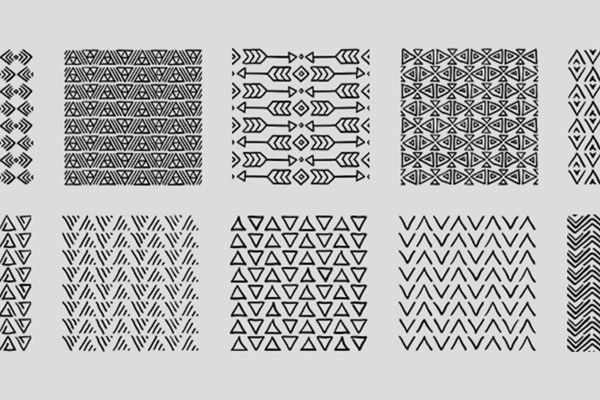
50 ornaments: vector patterns for Adobe Illustrator and Affinity Designer

50 ornaments: vector patterns for Adobe Illustrator and Affinity Designer

Ornate decoration wherever you look! Download 50 vector-based patterns to add elegant ornaments to small and large areas. Easy to use in Illustrator and Affinity Designer - visual versatility for your backgrounds!

  • 50 vector-based ornaments for decorative patterns in your backgrounds
  • Seamlessly join the shapes in Adobe Illustrator and Affinity Designer as textures
  • Freely scalable in size and a real ornament for both large and small areas
  • Ideally suited for the background of lettering and banners, for example

Do you always need structures for backgrounds? - Then pull out the right shapes from this package and apply them to the surface with just a few clicks!

content

Details of the content

50 ornaments for download: patterns for Adobe Illustrator and Affinity Designer

Vector-based ornaments for Adobe Illustrator and Affinity Designer: Triangles

Vector-based ornaments for Adobe Illustrator and Affinity Designer: Triangles

Vector-based ornaments for Adobe Illustrator and Affinity Designer: squares, diamonds

Vector-based ornaments for Adobe Illustrator and Affinity Designer: squares, diamonds

Vector-based ornaments for Adobe Illustrator and Affinity Designer: Textile-like textures

Vector-based ornaments for Adobe Illustrator and Affinity Designer: Textile-like textures

Vector-based ornaments for Adobe Illustrator and Affinity Designer: Round elements

Vector-based ornaments for Adobe Illustrator and Affinity Designer: Round elements

Vector-based ornaments for Adobe Illustrator and Affinity Designer: Complex geometries

Vector-based ornaments for Adobe Illustrator and Affinity Designer: Complex geometries

Examples of use

  • Preview the 50 vector-based ornaments for Adobe Illustrator and Affinity Designer
    Open gallery
    Example: These 50 vector-based ornaments for Affinity Designer and Adobe Illustrator are included.
  • Example: Decide for yourself how closely meshed the patterns in your backgrounds are displayed.
    Open gallery
    Example: Decide for yourself how closely meshed the patterns in your backgrounds are displayed.
  • Example: Also use the ornaments as textures for your lettering.
    Open gallery
    Example: Also use the ornaments as textures for your lettering.

help videos for application

Adobe Illustrator instructions for using vector-based ornaments

With the help of vector-based ornaments, you can easily create richly shaped backgrounds or textured overlays for your lettering. The patterns are available in EPS, SVG and AI format so that you can do this in Adobe Illustrator. Watch this video tutorial to see how easy it is to fill even large areas with textures using the patterns in Illustrator.


6 minutes · free of charge

Affinity Designer instructions for using the vector-based ornaments

With the help of vector-based ornaments, you can easily create richly shaped backgrounds or textured overlays for your lettering. The patterns are available in EPS, SVG, AFDESIGNER and, above all, AFPALETTE and AFSTYLES formats to help you do this in Affinity Designer. Watch this video tutorial to see how easy it is to fill even large areas with textures using the patterns in Affinity Designer.

6 minutes · free of charge
Comments (0)

Comment now „50 ornaments: vector patterns for Adobe Illustrator and Affinity Designer“