Imagine you have to prepare a landing page for a client pitch by Thursday, and the blank canvas in Photoshop is staring back at you. This is exactly where Claude Design comes in. Anthropic's AI tool turns your description into a first interactive design that exists as code. In this guide, you'll learn what Claude Design is exactly, how it differs from traditional design programs, and which tasks it is suited for, from landing pages and presentations to app interfaces.
The video is only loaded from YouTube when you play it – data (including your IP address) is then transmitted to YouTube/Google. More in the privacy policy
Key Takeaways
- Claude Design generates complete layouts, interfaces, and design directions from text descriptions, so you don't have to start with a blank surface.
- Its greatest strength lies in speed and iteration: From the initial thought to the first draft often takes only a few minutes.
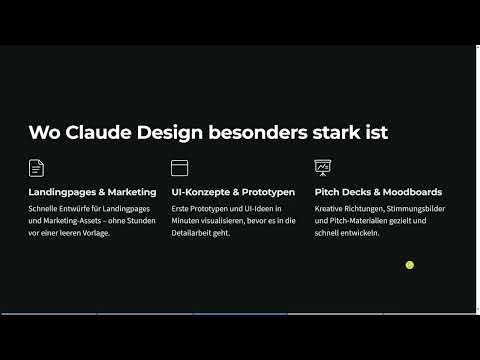
- The tool is particularly strong for landing pages, marketing material, UI prototypes, pitch decks, and mood boards.
- It does not replace detail work. You still do the fine-tuning in Figma or Photoshop.
- To use it, you need a paid Claude subscription.
Step-by-Step Guide
Step 1: Understand the Basic Principle
Claude Design follows a different principle than traditional tools. You describe an idea in text form, that is, as a prompt, and the system generates complete layouts, interfaces, and design directions from it. Depending on the design type, Claude additionally presents you with a questionnaire of about ten questions. In it, you can describe your ideas in great detail. The more precise your answers are, the better the result will fit. So don't just enter a keyword, but also the target audience, mood, and content.

Step 2: Recognize the Difference from Figma, Canva, and Photoshop
Figma, Canva, and Photoshop begin with a blank surface. There you place elements yourself, unless you fall back on templates, as you can do with Canva, for example. With Claude Design, by contrast, you start with an idea that you first formulate as text. Alternatively, you can also upload template images. The work thus shifts more toward brainstorming and text-based conceptualization. You first consider what task the design should fulfill, and then let the first layout emerge.
Step 3: Create Landing Pages and Marketing Material
Its greatest strength shows with landing pages and marketing assets such as paid ads material, posters, or templates. Instead of working for hours in Photoshop, you generate a draft in a few minutes. Suppose you want to propose a new landing page to a company. Then you have Claude Design draft a page, show it as an image or as a complete design, and test the idea before investing development time.

Step 4: Set Up UI Concepts and Prototypes
The tool is also a great help for interfaces and prototypes. Instead of building every screen directly in Figma, you get a first prototype within minutes. However, the actual detail work remains. You still refine spacing, components, and interactions in Figma or Photoshop. Claude Design provides the foundation, and the elaboration follows afterward.
Step 5: Develop Pitch Decks and Mood Boards
Pitch decks and mood boards are among the most common fields of use. You can describe your presentation as text or have a language model such as ChatGPT, Gemini, or Claude draft it in text form and generate a visual presentation from it. Uploaded documents or case studies also serve as a basis. You then adapt the result in PowerPoint or Canva, for example with fonts, colors, sizes, or images. The basic framework, which otherwise costs a lot of time, is thus ready after a short time.
Step 6: Use Speed and Iteration
The real strength lies in speed. You get from idea to first draft in minutes and don't have to wait for a designer to deliver a draft that may end up being rejected. Iteration is just as important. You quickly run through variants, adjust colors, and switch between different ideas. Especially in early phases, when the direction is still open, this saves you a lot of time.

Step 7: Idea Generation for App Interfaces
Claude Design is also suitable for creative exploration without technical hurdles. You can have UI designs created for apps, even if you have had hardly any experience with interface design so far. This helps especially when you want to convey an idea to a web developer or graphic designer. Instead of describing it over pages and pages, you show a concrete example that makes the idea tangible.
Step 8: Choose the Right Subscription
The range of features depends on your subscription. The course uses the Claude Pro version, which is the first paid entry-level plan. Since the tool only works in paid versions, you should check before you start which plan fits your needs.
Step 9: Keep an Eye on Consistency, Limits, and Tokens
By the end of the course, you should be able to use Claude Design purposefully for design. Good prompting is crucial for this, because prompts for Claude Design differ from normal chat requests. You will learn to define a fixed workflow for your project so that good results are not left to chance, but appear repeatable and professional. You will also find out where the limits lie, how often you run into them, and how to combine instructions so that you save tokens. The real skill therefore does not lie in clicking certain buttons, but in consistently producing good designs.

Summary – Claude Design: Overview of Use Cases and Possibilities
Claude Design is an AI tool from Anthropic that generates layouts, interfaces, and design directions as code from text descriptions. You don't start with a blank canvas, but with an idea. Its strengths show in landing pages, marketing materials, prototypes, pitch decks, mood boards, and idea generation for apps. Your biggest advantage is the speed from thought to draft as well as fast iteration. For fine-tuning, Figma or Photoshop remain useful, and you need a paid subscription to use it. In the rest of the course, you will learn how to achieve consistent results and understand the limits of the tool.
FAQ
What is Claude Design?Claude Design is an AI tool from Anthropic that generates interactive designs as code from a text description.
Do I need to know how to code?No, you work without code and describe your idea in text form.
Does Claude Design replace Figma or Photoshop?No, it is mainly suited for a quick start and for prototypes. Detailed work usually still takes place in traditional programs.
Which projects is Claude Design best suited for?It works particularly well for landing pages, marketing materials, UI concepts, pitch decks, and mood boards.
Can I use my own documents as a basis?Yes, you can upload documents or case studies and have a pitch deck created from them, for example.
What does it cost to use?Claude Design only works with paid versions. The course uses Claude Pro.

