Have you ever had AI create a website or a dashboard and ended up with a result that works, but looks nothing like what you had in mind? The cause is rarely the technology. Most of the time, the prompt lacks design language. In this guide, you will learn how to control style, mood, and aesthetics through your wording. You will practice using specific terms to reliably achieve the look and feel you want, and you will learn how to fine-tune results with tweaks.
The video is only loaded from YouTube when you play it – data (including your IP address) is then transmitted to YouTube/Google. More in the privacy policy
Key Takeaways
Key Takeaways
- The more specific your message, the closer the result will be to what you envision.
- Functional prompts describe what should be created. Design prompts describe how it should look.
- Industry, target audience, and brand impression are important levers for style.
- Vague adjectives like "modern" or "high-quality" achieve little. Technical design terms deliver much better results.
- Tweaks are suited for fine-tuning, but you should define fundamental decisions such as dark mode directly in the prompt.
Step-by-Step Guide
Step 1: Formulate the Message Clearly
Before you even think about colors or fonts, you should know what your project is supposed to communicate. State the message, state the function of the elements, and explicitly tell the AI what should be animated and what should not. For example, if you want to build in a live chat in which users fly in, write exactly that in your prompt. Otherwise, the animation will simply be missing, because the AI does not expect it.

Step 2: From Functional to Design Prompt
Most people prompt purely functionally: "Create a dashboard for me" or "Create a website for me." The result is usable, but generic. Therefore, always add the layer of appearance. A prompt like "Create a green IT dashboard for me" already contains a design decision, but leaves all further details open. With every prompt, also think about the question of how the interface should feel.

Step 3: Use Style Terms for Industry and Target Audience
Terms like minimalist, editorial, modern, brutalist, clean, or futuristic give the AI a clear direction. It becomes even more effective when you also name the industry and target audience, for example a SaaS product aimed at developers, or a brand that is oriented toward Apple's premium segment. Comparisons with well-known design languages also help. Keep in mind that the same function can look completely different in different styles.
Step 4: Name Design Features Specifically
It is often worthwhile to explicitly name individual features. Say whether you want a lot of white space or rather densely packed content. Specify whether you want strong typography, whether flourishes are allowed, whether the design should look round or angular, and whether it may be reminiscent of the 2010s. Color palette and shadows are just as important: a reduced palette or many colors, soft or hard shadows. These details often make the decisive difference.
Step 5: Fine-Tune with Tweaks
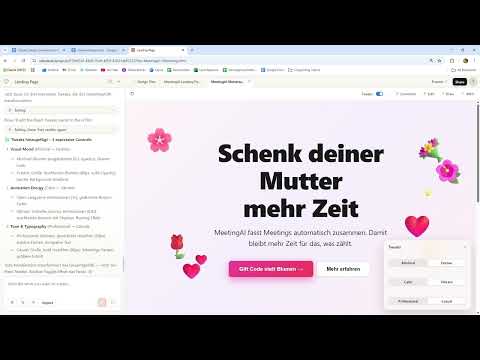
After the first generation, you can use the tweaks to adjust specific settings. In the example, the color was changed from a dark red, rather loud shade to a lighter red, and the design was also supposed to look somewhat more three-dimensional and minimalist. In addition, the tone can be set between professional and casual. For the tweaks, choose terms like "calm" to make the effect quieter. Tweaks are ideal for fine work, but they quickly reach their limits with big decisions.

Step 6: Define the Style Directly in the Prompt
You should not try to change fundamental decisions such as dark mode or a bento grid layout afterward via tweaks. Mention them right away in the initial prompt. So instead of "create a website," you write "create a clean website in dark mode with a bento grid layout." With such a specification, you avoid detours and save yourself several revision steps.
Step 7: Use Design Language Instead of Adjectives
Words like "modern" or "high-quality" are easily said, but very unspecific for the AI. Use technical terms instead. "Make it modern" then becomes "modern editorial design with an asymmetric layout and oversize typography." "Make it futuristic" can become "futuristic interface with glow effect and soft gradients." The more precise the design language, the more reliably the result will match your taste.
Step 8: Describe Imagery and Interaction
With online shops, too, the difference between vague and concrete prompts becomes apparent. Instead of "create an online shop," you can describe "a premium e-commerce store with luxury branding and minimalist imagery." Add which color palette should apply, for example monochrome colors with lots of white space, and which interactions should be built in, such as elegant micro-interactions. If you lack the right terms, ChatGPT or Gemini can help you formulate your prompt.

Step 9: Review the Result and Refine It Step by Step
Not every specification is implemented right away. In the example, the Bento Grid was adopted, but the dark mode was not. Therefore, check the result point by point against your specifications. If something is missing, phrase your change request precisely and iterate in small steps. This way you quickly see which terms the AI implements reliably and where you need to refine.

Step 10: Find the Right Level of Detail
In the end, it comes down to dosage. Your original prompt and your change requests should be detailed enough to clearly define style and mood. Too many specifications, such as the exact length or every animation step, can on the other hand dilute the results. So pay attention to the right balance: as specific as necessary, as open as possible.
Summary – Controlling Style and Aesthetics: A Guide to Claude Design with Prompts
Style and aesthetics can be controlled deliberately through language. You achieve this by clearly stating your message, using design terms from your industry, target audience, and design language, and defining fundamental decisions directly in the prompt. You then handle fine adjustments with tweaks and step-by-step refinements. If you practice these steps, your results will get closer to your vision with every attempt.
FAQ
Do I need to know technical design terms to write good prompts?You don't have to be a designer, but the more technical terms you know, the more precise your prompt will be. Even a few terms like white space, editorial design, or Bento Grid make a big difference.
When should I use tweaks instead of a new prompt?Tweaks are suitable for fine-tuning such as color shades, tonality, or the subtlety of effects. Fundamental decisions such as dark mode or layout, on the other hand, you should define directly in the initial prompt.
Can I use ChatGPT or Gemini to improve my prompts?Yes, both tools are well suited for fleshing out imprecise prompts and supplementing them with suitable design terms. Afterwards, check whether the result really matches your vision.
How many details make sense in a prompt?A prompt should clearly define style, mood, and important design features. Too many details, such as for every single animation or length, can dilute the results. It's better to start specific and refine step by step.


