
Editing images & photos in Photoshop: 100 techniques you should know

- How it works: 100 Photoshop techniques for editing images and photos
- Retouching portraits: Nose, mouth, eyes, skin, teeth ... this is how you make adjustments
- Overlays: How to generate smoke, rain, flames and more out of nothing.
- Effects: How to create cool looks, for example in comic, oil paint and pixel style
- Photoshop functions: all blending modes explained, using LUTs, Camera Raw
- Much more: create shadows, crop objects, change colors ...
- 1 training, 12 hours, 100 Photoshop techniques - a tutorial by Andreas Lang
Photoshop tools in practical use! Start the training and learn techniques that you should definitely know for your image editing.
101 Videos, 729 minutes
This is what awaits you in the Photoshop tutorial
Photoshop techniques: 1 | Intro
1 minThis is what you can expect in this Adobe Photoshop course.
Techniques in Adobe Photoshop
Photoshop techniques: 2.1 | 3 ways to color
14 minIn this tutorial, I will show you three options for coloring.
Photoshop techniques: 2.2 | Sharpening images
7 minHere you will be shown how to sharpen a picture.
Photoshop techniques: 2.3 | Remove image noise
3 minHow to remove noise from an image is shown here.
Photoshop techniques: 2.4 | Blender-if function
15 minFind out here what you can do with the Blender-if function and how it works.
Photoshop techniques: 2.5 | Remove specular reflection
8 minThis section shows you how to remove a spectacle mirror.
Photoshop Techniques: 2.6 | Camera Raw Filter Functions Part One
11 minAll the important functions of the Camera Raw filter are explained here.
Photoshop Techniques: 2.7 | Camera Raw Filter Functions Part Two
11 minAll the important functions of the Camera Raw filter are explained here (second part).
Photoshop Techniques: 2.8 | Copy & Transfer Color Grading
8 minHow to copy and transfer color grading is shown here.
Photoshop techniques: 2.9 | Dodge & Burn
11 minHere you will be shown the popular dodge-and-burn technique in a simplified way, without having to use the dodge and burn tool.
Photoshop techniques: 2.10 | Remove color cast from an image
3 minIn this tutorial, I will show you how to remove color casts from an image.
Photoshop techniques: 2.11 | Frequency separation
11 minHere you will be shown how to use frequency separation and what it is used for.
Photoshop techniques: 2.12 | Make face unrecognizable
3 minIn this tutorial, I will show you how to make a face or certain areas unrecognizable.
Photoshop techniques: 2.13 | Crop glass
14 minThis part is about how to crop glass.
Photoshop techniques: 2.14 | Powdering the skin
12 minThe skin powdering technique is shown in this video using a practical example.
Photoshop techniques: 2.15 | Smooth skin
3 minHere you can learn how to smooth blemished skin afterwards.
Photoshop techniques: 2.16 | Remove skin redness
3 minIn this tutorial, I will show you how to remove reddened skin.
Photoshop techniques: 2.17 | Change skin tone
3 minHere you will be shown how to change your skin tone.
Photoshop techniques: 2.18 | Remove blemishes and spots
6 minThis video is about removing blemishes and spots using various methods.
Photoshop techniques: 2.19 | Replace sky
8 minHere you will be shown how to replace the sky.
Photoshop techniques: 2.20 | Straighten horizon
3 minYou can find out how to straighten the horizon in this section.
Photoshop techniques: 2.21 | Create artificial light
5 minOne way to create artificial light is shown in this video.
Photoshop techniques: 2.22 | Soften highlights
5 minYou can find out how to reduce the intensity of the lights here.
Photoshop Techniques: 2.23 | Create, export & import LUTs
8 minIn this tutorial, I will show you how to create, export and import LUTs.
Photoshop techniques: 2.24 | Blend mode explained
37 minHere I will go through each of Photoshop's blending modes with you and show you a few practical examples.
Photoshop techniques: 2.25 | Insert object into a glass
5 minThis video shows you how to realistically insert an object into a glass.
Photoshop techniques: 2.26 | Remove object or person
14 minI'll tell you how to remove an object or person here.
Photoshop techniques: 2.27 | Moving objects
3 minWhich tool you need to move an object is shown here.
Photoshop techniques: 2.28 | Inserting a person into an image
5 minHere you will learn how to realistically insert a person into another picture in order to maintain the color scheme of the picture.
Photoshop techniques: 2.29 | Change color and recolor areas
5 minYou can find out how to change the color of a certain area here.
Photoshop techniques: 2.30 | Creating realistic reflections
9 minHere you will learn how to create a realistic mirror image.
Photoshop techniques: 2.31 | Create shadows
16 minThis tutorial will show you how to create a realistic shadow.
Photoshop Techniques: 2.32 | Removing tonal value breaks/banding
6 minTone value distortions in an image occur from time to time, and that's exactly why I'm showing you how to remove them here.
Photoshop techniques: 2.33 | Rescue blurred photos
10 minHere we show you how to rescue a blurred photo.
Photoshop techniques: 2.34 | Pixelate many faces
3 minIn this tutorial, I'll show you a method for pixelating lots of faces quickly and easily.
Photoshop techniques: 2.35 | Create water reflection
11 minHere I show you how to create a water reflection.
Photoshop techniques: 2.36 | Change perspective
6 minHere I'll show you how to change your perspective.
Image editing in Adobe Photoshop
Photoshop techniques: 3.1 | Making people look older
3 minHere I'll show you a technique that can make people look older or younger.
Photoshop techniques: 3.2 | Reduce eyes and mouth
5 minThis video deals with the topic of reducing the size of eyes and mouth. You can create really funny effects with this.
Photoshop techniques: 3.3 | Lighten & color eyes
6 minThis part is all about working on the eyes. I'll show you how to brighten and color your eyes.
Photoshop techniques: 3.4 | Open & insert eyes
7 minHere you will be shown how to open eyes or realistically insert the eyes of another person.
Photoshop techniques: 3.5 | Editing facial proportions
4 minHow to edit facial proportions with just a single filter is shown here.
Photoshop techniques: 3.6 | Remove dark circles under the eyes
4 minThis part is about how to remove dark circles.
Photoshop techniques: 3.7 | Create tattoo
11 minYou can find out how to create a realistic tattoo from any image here.
Photoshop techniques: 3.8 | Enlarge breasts
2 minHere you will be shown how to enlarge or reduce the size of a woman's breasts.
Photoshop techniques: 3.9 | Remove double chin
5 minTo remove a double chin, we only need a few steps. You can find them out here.
Photoshop techniques: 3.10 | Create photo collage
9 minI'll show you how to create a photo collage, for example for the pictures from your last vacation, here.
Photoshop techniques: 3.11 | Replace face part one
8 minIn this tutorial, I will show you a method for realistically replacing a face.
Photoshop techniques: 3.12 | Face swap part two
5 minThere is another method for realistically replacing a face.
Photoshop techniques: 3.13 | Create googly eyes
3 minThis part shows you how to create googly eyes.
Photoshop techniques: 3.14 | Create HDR image
5 minThis tutorial shows you exactly how to create an HDR image with Photoshop.
Photoshop techniques: 3.15 | HDR toning
3 minHere we will use HDR toning together.
Photoshop techniques: 3.16 | Create Instagram grid
3 minThis part shows you how to create an Instagram grid.
Photoshop techniques: 3.17 | Complete face editing
18 minThis tutorial includes a complete face editing with retouching, color adjustments and much more.
Photoshop techniques: 3.18 | Replace head
16 minThis video shows you how to replace a head.
Photoshop techniques: 3.19 | Adding make-up
7 minHere you will be shown how to apply make-up afterwards.
Photoshop techniques: 3.20 | Making people look younger
5 minThis section shows you how to make a person look younger.
Photoshop techniques: 3.21 | Creating mockups for picture frames and cell phones
12 minWe will create a realistic mockup for a picture frame and a cell phone together here.
Photoshop techniques: 3.22 | Enlarge muscles
15 minThis video shows you techniques to increase muscle size.
Photoshop techniques: 3.23 | Create passport photo
8 minHow exactly you can create a passport photo and what you need for it is shown here.
Photoshop techniques: 3.24 | Make person thinner
6 minThis part is about how to make a person thinner.
Photoshop techniques: 3.25 | Create piercing
9 minHere you will be shown how to realistically apply a piercing from another picture.
Photoshop techniques: 3.26 | Create product photos
7 minIn this video, I show you how to create product photos.
Photoshop techniques: 3.27 | Remove red eyes
2 minYou can find out exactly how to remove red eyes here.
Photoshop techniques: 3.28 | Correcting a crooked nose
5 minIn this section, I will show you how to correct a crooked nose.
Photoshop techniques: 3.29 | Create T-shirt mockup
11 minHere I show you how to create a T-shirt mockup.
Photoshop techniques: 3.30 | Whiten teeth & remove stains
9 minHere you will be shown a technique for whitening teeth and removing stains.
Photoshop techniques: 3.31 | White balance automatic & manual
3 minIn this video you will learn how you can easily adjust the white balance.
Creating overlays in Adobe Photoshop
Photoshop techniques: 4.1 | Create single drops
6 minIn this tutorial, we will create realistic drops together.
Photoshop techniques: 4.2 | Create candle flame
6 minHere I show you how to create a candle flame.
Photoshop techniques: 4.3 | Create smoke
15 minHow to create a realistic smoke overlay is shown here.
Photoshop techniques: 4.4 | Create rain
6 minIn this video, I'll show you how to create a rain overlay that you can use for your images.
Photoshop techniques: 4.5 | Create rainbow
6 minIn this section, I'll show you how to create a realistic rainbow with a color gradient.
Photoshop techniques: 4.6 | Create spotlight
6 minHere you will be shown how to create a spotlight.
Photoshop techniques: 4.7 | Create snow
4 minWe will create a snow overlay together for your winter pictures.
Photoshop techniques: 4.8 | Create snowflake
7 minHere I show you how to create a snowflake.
Photoshop techniques: 4.9 | Create sun & sun rays
7 minYou can find out how to create a realistic sun and sunbeams here.
Photoshop Techniques: 4.10 | Create Sparkles
5 minIn this section, we will create realistic sparkle brushes.
Photoshop techniques: 4.11 | Create water droplets
6 minHere I show you how to create a water droplet overlay.
Effects in Adobe Photoshop
Photoshop techniques: 5.1 | Comic effect
7 minIn this tutorial, I'll show you how to create a comic effect from any photo.
Photoshop techniques: 5.2 | Dither effect
3 minYou can find out how to create a cool dither effect here.
Photoshop techniques: 5.3 | Double exposure effect
9 minIn this part, I'll show you how to create a double exposure effect from two images.
Photoshop techniques: 5.4 | Dual-tone effect
5 minHere I'll show you exactly how to apply a dual-tone effect to an image.
Photoshop techniques: 5.5 | Geometric effect
7 minIn this video, I show you how to give a photo a geometric effect.
Photoshop techniques: 5.6 | Glitch effect
5 minThis part shows you how to apply a glitch effect to a photo.
Photoshop Techniques: 5.7 | Create Golden Statue
6 minI will show you here how you can create a realistic golden statue from an object or person.
Photoshop techniques: 5.8 | Create halftone image
4 minHere I show you how to create a Halftone image.
Photoshop techniques: 5.9 | High-key effect
8 minThis video shows you how to apply a high-key effect.
Photoshop techniques: 5.10 | Low-key effect
6 minYou can find out how to apply a low-key effect to a photo here.
Photoshop techniques: 5.11 | Create oil painting
5 minHere we create an oil painting from a normal photo using just one filter.
Photoshop Techniques: 5.12 | Create Pixel Artwork
5 minYou can find out how to create a pixel artwork here.
Photoshop techniques: 5.13 | Polaroid effect
7 minThis tutorial shows you how to create a Polaroid effect.
Photoshop techniques: 5.14 | Create polygon image
14 minHere you will be shown how to create a polygon image from many small triangles.
Photoshop techniques: 5.15 | Create portrait art
14 minIn this part, I'll show you how to create portrait art.
Photoshop techniques: 5.16 | Create black and white image
2 minHow to create a black and white image is shown here.
Photoshop techniques: 5.17 | Colorize black and white image
2 minHere I show you how to color a black and white image.
Photoshop techniques: 5.18 | Create silhouette from photos
6 minI'll show you how to create a silhouette from a photo here.
Photoshop techniques: 5.19 | Insert text next to image
5 minIn this tutorial I will show you how to insert text next to an image.
Photoshop techniques: 5.20 | Tiny Planet effect
6 minThis tutorial shows you exactly how the well-known Tiny Planet effect works.
Photoshop techniques: 5.21 | Blending two images
6 minThis video shows you how to cross-fade two images to create a cool effect.
Photoshop techniques: 5.22 | Convert photo to vector
4 minHere you can find out how to apply a vector effect to a normal photo.
Examples of use
-
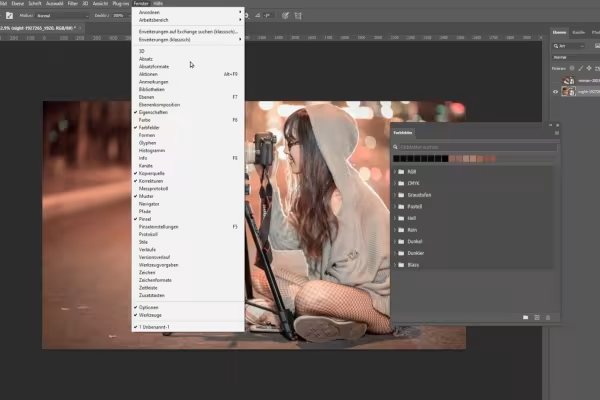 The tools of Photoshop in practical use! How to use them in practice.
 -
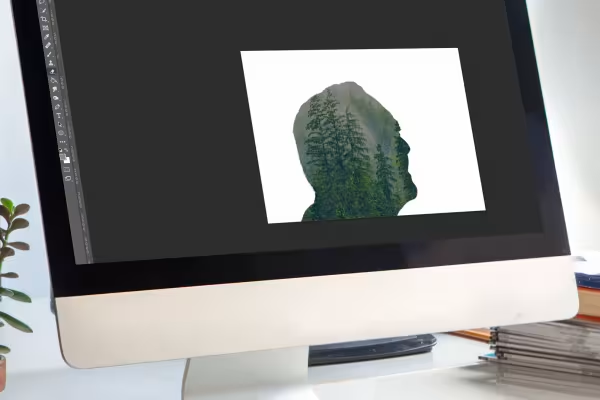 Learn how to create various effects in Photoshop, such as this picture-in-picture composition.
 -
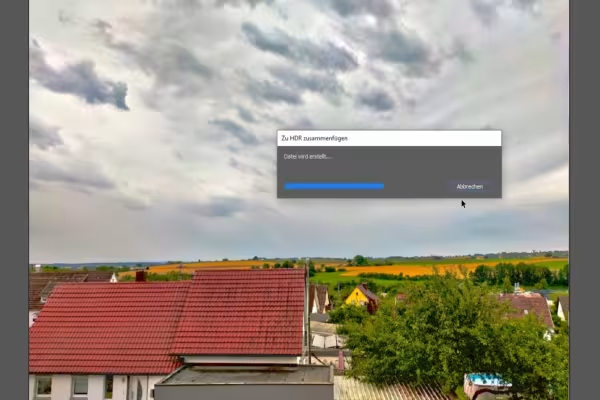 Learn how to create spectacular images, for example using HDR.
 -
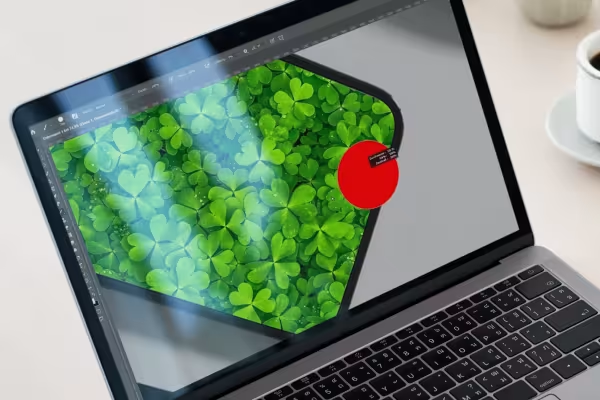 Would you like to create your own mockups? You'll learn how in this training course.
 -
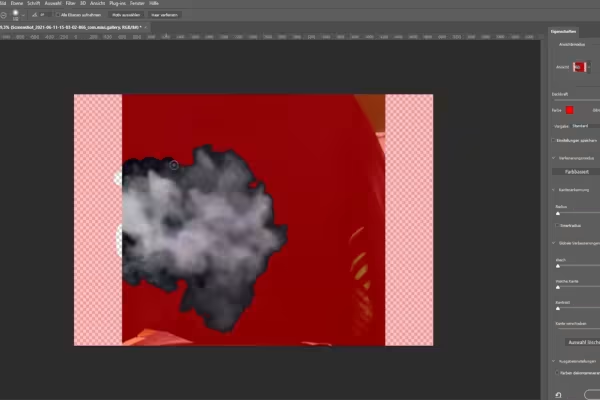 100 techniques in Photoshop - and you can create realistic overlays such as smoke and rain.
You might also like

20 sets in 4K (4096 × 4096 px, 300 DPI) as JPG plus Photoshop patterns, calibrated to the fill method

100 presets in 5 themes · each look in .xmp, .dng, and .costyle · for desktop and smartphone

Full power, more inspirations, maximum WOW effect!

More style, more power, more templates!
Comment now „Editing images & photos in Photoshop: 100 techniques you should know“