Drawing hair - 100 brushes for Photoshop, Affinity Photo & Co

Drawing hair - 100 brushes for Photoshop, Affinity Photo & Co

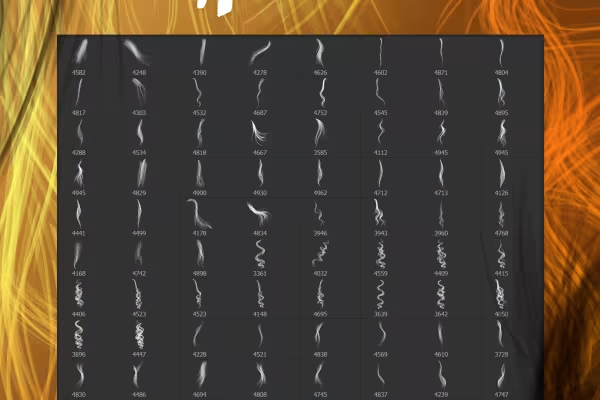
Drawing hair in Photoshop, Affinity Photo, GIMP and co? - A hairy affair in the truest sense of the word! - Actually. Because with these 100 brushes, you can draw hair with just a few clicks. Adjust the size and color and easily add the strands to your portraits.

  • Drawing hair made easy: 100 brushes you can use to incorporate hair into portraits
  • For fine hair results: Adjust the size and color of the strands precisely
  • Ideally suited for realistically filling and embellishing hairstyles
  • Applicable in Photoshop, GIMP, Affinity Photo, Photoshop Elements, Adobe Fresco and PaintShop Pro

For wind and frizz, breakage and split ends, wherever hair may be missing: you pull out the digital comb and the virtual wig to add strands and fill in hair.

content

Details of the content

Hair drawing - 100 brushes for Photoshop, Affinity Photo & Co

Drawing hair - 10 brushes with strands for Photoshop and Co (Version 01)

Drawing hair - 10 brushes with strands for Photoshop and Co (Version 01)

Drawing hair - 10 brushes with strands for Photoshop and Co (Version 02)

Drawing hair - 10 brushes with strands for Photoshop and Co (Version 02)

Drawing hair - 10 brushes with strands for Photoshop and Co (Version 03)

Drawing hair - 10 brushes with strands for Photoshop and Co (Version 03)

Drawing hair - 10 brushes with strands for Photoshop and Co (Version 04)

Drawing hair - 10 brushes with strands for Photoshop and Co (Version 04)

Drawing hair - 10 brushes with strands for Photoshop and Co (Version 05)

Drawing hair - 10 brushes with strands for Photoshop and Co (Version 05)

Drawing hair - 10 brushes with strands for Photoshop and Co (Version 06)

Drawing hair - 10 brushes with strands for Photoshop and Co (Version 06)

Drawing hair - 10 brushes with strands for Photoshop and Co (Version 07)

Drawing hair - 10 brushes with strands for Photoshop and Co (Version 07)

Drawing hair - 10 brushes with strands for Photoshop and Co (Version 08)

Drawing hair - 10 brushes with strands for Photoshop and Co (Version 08)

Drawing hair - 10 brushes with strands for Photoshop and Co (Version 09)

Drawing hair - 10 brushes with strands for Photoshop and Co (Version 09)

Drawing hair - 10 brushes with strands for Photoshop and Co (Version 10)

Drawing hair - 10 brushes with strands for Photoshop and co (version 10)

Examples of use

  • 100 brushes for drawing hair in Photoshop, Affinity Photo and more
    Open gallery
    100 strands that you click directly into your portraits as a brush motif to draw hair
  • Open gallery
    Example: Uncombed, frazzled, tousled by wind and weather? Simply replace a few strands!
  • Open gallery
    Example: The hairstyle could look thicker? - Then add some extra hair.

help video for application

Video tutorial: How to use the hair brushes in Photoshop and tips on how to use them

Hair is often a particular challenge when retouching portraits. If you want to draw hair and thus enhance a hairstyle, it's best to use our 100 brushes with hair motifs. Stefan Riedl shows you how to use these in Photoshop in the video tutorial. Select the right strand of hair, adjust the size and color and click the hair into your image on a new layer. See how you can achieve a convincingly realistic result in the end!
18 minutes · free of charge
Comments (24)

Comment now „Drawing hair - 100 brushes for Photoshop, Affinity Photo & Co“