
Maybe you are sitting in front of an empty document right now and wondering whether you should write your thesis in Word or in LaTeX. Both programs are suitable for academic texts, but they differ greatly in how they work. In this guide, you will get to know the strengths and weaknesses of both programs. You will find out where Word scores, where LaTeX has the edge, and how to make the decision for yourself.
The video is only loaded from YouTube when you play it – data (including your IP address) is then transmitted to YouTube/Google. More in the privacy policy
Key Takeaways
Word is easy to learn and shows you the result directly as you write. LaTeX requires a longer learning period, but in return offers professional equation typesetting, stable processing of large documents, and is free of charge. Which program is better depends on your field of study, your prior knowledge, and the requirements of your department.
Step-by-Step Guide
Step 1: Understanding the "What You See Is What You Get" Principle in Word
Word's biggest advantage lies in its direct display. Whatever you type, format, or move, you immediately see it just as it will look when printed in the end. You don't have to plan for an intermediate step and can get started without any prior knowledge. For many students, this is exactly why Word remains the first choice.

Step 2: Using Track Changes in Word for Corrections
When your supervisor or a proofreader reviews your work, Word offers Track Changes. Here, requested changes are marked directly in the document and can be traced. You can see at a glance what was changed where, and you can accept or reject the suggestions individually. This feature is very practical in everyday use and has no comparable equivalent in LaTeX.

Step 3: Using Word's Equation Editor
Word has a built-in equation editor. Compared to LaTeX it is less powerful, but it is sufficient for most formulas in term papers, bachelor's theses, and many master's theses. If you only occasionally need individual equations, you don't have to learn new software for that.

Step 4: Recognizing Word's Limits with Large Documents
As the size grows, Word can become a problem. With extensive theses containing many figures, cross-references, and chapters, the program often responds sluggishly or becomes unstable. Therefore, pay attention early on to how your document is developing, and save regularly. If you are planning a very long thesis, it is worth taking a look at LaTeX.
Step 5: Getting to Know How LaTeX Works
LaTeX is not a word processor in the classic sense, but a markup and programming language. You write your text together with commands in a source file and then have it compiled. Only then is the finished document produced, usually as a PDF. At first this feels unfamiliar, but it is exactly this principle that ensures a clean separation of content and design.
Step 6: Creating Complex Formulas and Graphics with LaTeX
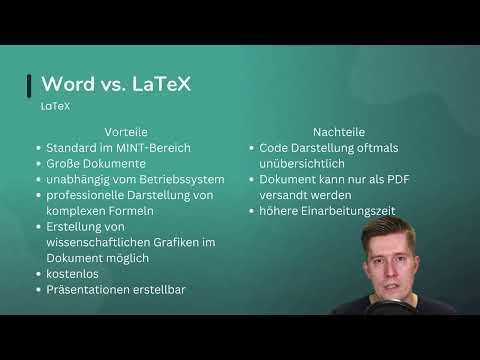
This is where LaTeX plays out its greatest strength. Even very complex formulas can be displayed professionally and cleanly. In addition, you can create scientific graphics directly in the document, for example with the TikZ package. This keeps figures and text in a consistent layout, and you can control data and presentation precisely.

Step 7: Keeping Presentations and Costs in Mind
LaTeX is free and can be used regardless of the operating system. In addition, you can also create presentations from a LaTeX document, which saves you time for talks about your research. If you decide to go this route, you will find in-depth courses on this topic that make getting started easier.
Step 8: Realistically Assessing the Disadvantages of LaTeX
LaTeX also has clear weaknesses that you should not underestimate. The source code can quickly become confusing, and while writing you don't immediately see which part you are currently editing. Finished documents can usually only be shared as PDF, which limits collaboration. For corrections, you usually have to work with color markings or comments, since there is no Track Changes feature like in Word. In addition, there is a significantly longer learning period, which you should definitely include in your planning.

Step 9: Making the Decision
In the end, there is no objectively better program. Before you commit, first check whether your chair or your institute provides ready-made templates for Word or LaTeX. Such templates save you a lot of formatting work. If there are no requirements, choose the program you feel comfortable with and that works best for you. What matters is that the tool does not restrict you in your work.

Summary – Word or LaTeX: Which Program Is Right for Your Academic Work
Word impresses with its ease of use, direct display, track changes mode, and short learning curve. However, it reaches its limits with very large documents. LaTeX offers excellent equation typesetting, stable handling of extensive texts, graphics via TikZ, and the option to work for free. In return, it demands more learning time, a certain amount of programming effort, and is less flexible when collaborating. Choose the program that fits your requirements, your field of study, and your preferences. Both tools enable good academic work.
FAQ
Is Word suitable for a thesis?Yes, for most bachelor's and master's theses Word is sufficient, provided the document is not extremely extensive and you find the equation editor adequate for your equations.
Why is LaTeX so commonly used in STEM fields?LaTeX is a standard in STEM fields because it displays complex formulas precisely, handles large documents reliably, and many scientific journals offer LaTeX templates for publications.
Can I use LaTeX on any operating system?Yes, LaTeX is available independently of the operating system and is free of charge, so you can work with it on Windows, macOS, or Linux.
Do I have to compile the code in LaTeX to see the result?Yes, you have to compile the source code for the document to be created. The preview only shows you the result after this step.
How long does it take to learn LaTeX?The learning time is significantly longer than with Word. Plan for several weeks to get started if you practice regularly, so that you can confidently handle commands and packages.
Should I follow the requirements of my chair?Yes, if your chair provides Word or LaTeX templates, use these templates, because they save you time on formatting.

