

Imagine you're copying the same customer data from a spreadsheet into your management software for the fifth time on a Monday morning. Tasks like this cost time and nerves, but they don't move you forward professionally. This is exactly where automation comes in. This crash course shows you how to use visual tools to have recurring processes taken care of, without writing a single line of code. By the end, you'll be able to launch your own automations and free up time for tasks that truly deserve your attention.
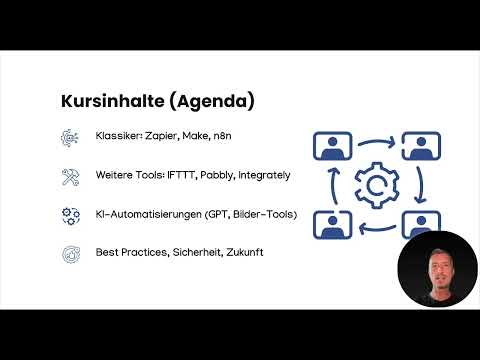
The video is only loaded from YouTube when you play it – data (including your IP address) is then transmitted to YouTube/Google. More in the privacy policy
Key Takeaways
- Automation takes over repeatable, time-consuming tasks and creates room for more important activities.
- Visual platforms like Make or n8n require no programming knowledge; you simply connect building blocks with each other.
- The greatest impact comes when you combine automations with artificial intelligence, for example for summaries or content creation.
- Practice beats theory: Build your automations step by step and consolidate what you've learned with the quizzes after each lesson.
Step-by-Step Guide
Step 1: Understand the Learning Goals and Course Structure
Before you get started, it's worth taking a look at the process. The course is practice-oriented: You see every step on screen, learn where to find the tools, which settings are important, and how registration works. You can follow along directly. By the end, you will have built at least three working automations yourself and will receive templates, checklists, and quizzes for deeper learning.

Step 2: Understand Why Automation Is Worthwhile
Many tasks in everyday work repeat daily, are time-consuming, and are often not very fulfilling. Automation means that a tool takes over these routines as soon as a defined event occurs. The result is less stress and more time for activities that require quality.

Step 3: Identify Typical Tasks That Can Be Automated
Think about which activities you perform regularly. Typical candidates are moving data between two programs, preparing social media posts, or automatically sorting incoming emails. Write down two or three tasks from your daily routine. They form the basis for your first own automations later in the course.
Step 4: Assess the Benefits for You and Your Team
Automation is not meant to eliminate jobs. What matters is that employees can use the time gained for more demanding tasks or to further improve existing work results. If you want to convince colleagues of an automation, show them concretely how many minutes per week it frees up.
Step 5: Understand the Connection Between Automation and Artificial Intelligence
Classic automations follow fixed rules. You unlock their real strength when you integrate artificial intelligence. A tool can then, for example, understand texts, evaluate content, or formulate responses. This creates processes that can also handle unstructured information.

Step 6: Follow an Example Scenario from the Inbox
Imagine a tool that automatically scans your emails, recognizes important messages, and creates a summary from them. Another scenario automatically generates posts for various platforms based on a topic. We'll look at such processes together in the course. As you follow along, pay attention to which trigger starts the process and which steps follow afterward.
Step 7: Get to Know the Platforms Make and n8n
Make and n8n are among the best-known platforms for automations. In the course, I'll show you how to sign up, how the interface is structured, and whether you need to download or install anything. Many functions can be used entirely in the browser. Take your time to see how modules and connections relate to each other, because every further automation builds on this.

Step 8: Try Everyday Helpers Like IFTTT and Zapier
Besides the large platforms, there are simple services for everyday use. IFTTT is well suited for small connections between apps and devices. Zapier and Integromat also connect applications without programming and offer many ready-made templates. Try one of these services first before venturing into more complex processes.
Step 9: Building AI Automations with GPT and Image Generators
In the next section, you will connect platforms with language models like GPT, image creation tools, and other AI applications. A typical workflow could look like this: A new message arrives, a language model summarizes it, and the result automatically ends up in the right folder. Make sure to check each intermediate step before you permanently activate the workflow.
Step 10: Observing Best Practices and Security
Good automations are clear, well documented, and regularly reviewed. Store access credentials securely, think about which data a tool is allowed to see in the first place, and test new workflows with sample data first. The future of automation is also covered in the course, so that you can put developments into context early on.
Step 11: Starting the Course Without Any Prior Knowledge
You don't need to be a programmer or have any technical prior knowledge. The course builds up step by step. If you already have experience with AI, you will still find new ideas on how to make your work even more efficient. Start now with the next module, in which you will get to know the well-known automation tools and create your first automation.

Summary – Automation Explained Simply: Automating Routine Tasks with Tools and AI
Automation takes recurring tasks off your hands and creates time for more important things. With visual platforms like Make or n8n, supplemented by simple everyday helpers, you build workflows without programming. Only the combination with artificial intelligence brings the greatest benefits, for example with summaries or when creating content. If you implement every step in practice and work through the quizzes directly after each lesson, you will end up with your own working automations and a solid understanding of how to use them sensibly.
FAQ
Do I need programming skills to build automations?No, the tools work visually, and you connect individual building blocks with each other with a click of the mouse.
Do I have to install anything to use Make or n8n?Both platforms can be used in the browser, and an installation is usually not necessary.
Does automation replace jobs?No, the aim is to save routine time so that people can devote themselves to more demanding tasks.
Which tools are suitable for beginners?Everyday helpers like IFTTT or Zapier are suitable for getting started, while Make and n8n offer more possibilities.
What is the best way to learn in the course?Work through the quizzes directly after each lesson and rebuild the automations shown yourself, and the knowledge will become firmly established.
