

You want to set up an automation, but you don't have time for lengthy configurations? Then Integrately is worth a look. The platform relies on prebuilt workflows that can often be activated with a single click. In this guide, I'll walk you through the interface step by step, show you the AI support, and explain what the free plan can do.
The video is only loaded from YouTube when you play it – data (including your IP address) is then transmitted to YouTube/Google. More in the privacy policy
Introduction
Many automation tools require you to put together every step yourself. That is powerful, but it costs time and nerves. Integrately takes a different approach: you choose a ready-made automation, connect your accounts, and activate it. The platform is therefore aimed primarily at beginners and anyone who wants to see results quickly without delving deep into the technology. I'll show you how to get started, how to find suitable templates, and how to make your own adjustments.
Key Takeaways
Integrately is particularly suitable for quick, simple automations between common apps. Over 1,300 applications can be connected, and a large portion of the templates are ready to use immediately. Complex branching with if-then logic is missing in the free plan, but you can get started without any prior knowledge. An AI can create an automation for you from a text description, and you always have to log in to your accounts yourself.
Step-by-Step Guide
Step 1: Create a Free Account
Getting started is straightforward. Go to the Integrately website and click on "Get started for free". You can register with your Google account, with Facebook, or with an email address. The video shows signing up via Google, and thanks to single sign-on the connection goes pleasantly fast.

After logging in, you land directly in the dashboard. There you see the question "What would you like to automate?", which is where the work begins.

Step 2: Explore the Automation Library
Before you build anything, it's worth taking a look at the library. Integrately offers a large collection of ready-made workflows that you can search by app. With the "See all apps" function, you open the overview of all supported applications. There you can, for example, check what a tool like Aweber can do and which other services it can be connected with.

The search bar at the top helps you search specifically for an app like Gmail or for terms like "Newsletter". Note that some premium apps are paid. They are marked separately in the list.

Step 3: Create an Automation with the AI
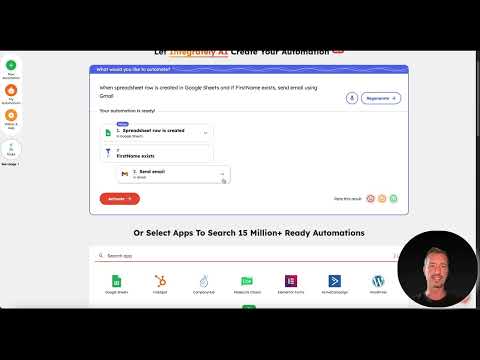
If you don't know exactly which workflow fits, you can use the AI. Simply enter in plain words in the input field what should happen. In the video, the instruction is: when a new row is created in a Google Sheet and the first name is present, an email should be sent. The AI then starts creating the workflow. Depending on load, this can take 30 to 60 seconds, so be patient.

After generating, Integrately shows you the finished suggestion. Check it briefly before you accept it. If it fits your plan, you can activate it directly.

Step 4: Select and Customize a Ready-Made Template
Alternatively, you choose a prepared automation from the library. Searching for an exact match can be tedious when there are thousands of results. Filtering by applications is therefore helpful. For example, you set Gmail as the starting point, then select Mail as the trigger and add Google Sheets as the second step. This way you narrow down the suggestions considerably.

Once the workflow is set up, you activate it with a click. After that, the automation keeps running in the background. For accounts, you have to log in to the respective services, otherwise Integrately cannot access them.

Step 5: Using the menu and help resources
In the left menu you will find the sections "New Automation" and "My Automations". There you can see all the workflows you have created. There is also a section with videos and help resources, which is very extensive. You usually don't need it to get started because the operation is self-explanatory, but it can be useful for detailed questions.
Step 6: Setting up your own triggers, for example via WordPress
A practical example shows how you set your own triggers. You want to receive a notification as soon as someone submits a form on your WordPress site. Choose the plugin WP Forms as the source element and set the event "Form is submitted". In the next step, you define the desired action, such as sending an email to your Gmail account.

Whether this makes sense depends on your daily routine. If you receive inquiries by email anyway, an additional email adds little. It's different if you are on the go and would rather receive a message on your smartphone.
Step 7: Adding an additional notification via WhatsApp
This is exactly what the WhatsApp function is suited for. You can remove the Gmail step and set a WhatsApp message instead. As soon as the form is submitted, the information reaches you directly on your phone. The configuration is comparable to the other steps: You connect your account and select the content.

Summary – Integrately in a practical test: Creating automations with one click
Integrately is a platform for quick automations with little effort. You can use ready-made templates, have the AI generate your own suggestions, or adapt existing workflows. The interface is clear, and the connection to the apps works reliably. For complex logic with branching, other tools are better suited. But if you want to see results quickly, Integrately is a good choice. The free plan with 100 tasks is suitable for trying it out and getting to know the platform.
FAQ
Is Integrately free to use?Yes, there is a free plan with 100 tasks, five automations, and a trigger check every 15 minutes. Webhooks, conditions, and premium apps are not included.
Do I need programming skills?No, the platform is intended for beginners without technical background knowledge. Configuration is done via selection fields and step-by-step guided inputs.
Can the AI create my automation completely on its own?The AI generates a suggestion based on your description. You should check the result before activating it, as the implementation does not always match your expectations exactly.
Do I have to connect my accounts?Yes, in order for Integrately to access the services, you have to log in to each app. Without this connection, the automation does not work.
What happens if I can't find a suitable template?In this case, you can use the AI or commission the Integrately team. According to the video, creating custom automations is free if you describe your request.

