

Imagine an automation has been running reliably for months, and one day you find out that customer data is sitting unprotected on a server abroad. This is exactly the scenario you should avoid with the knowledge from this tutorial. Automations often process sensitive information, and even one careless step can have legal consequences. In this guide, I will walk you through the most important points: the GDPR, handling API keys, the responsible use of cloud storage, and simple routines that help you keep track of everything.
The video is only loaded from YouTube when you play it – data (including your IP address) is then transmitted to YouTube/Google. More in the privacy policy
Key Takeaways
Process only the data you really need. This is the core of the GDPR and at the same time the most effective means against data breaches.
API keys are keys to your data. Never store them unencrypted, assign a separate key to each tool, and consistently delete keys that are no longer needed.
Cloud storage needs clear rules. Store sensitive data only in encrypted form, check access rights regularly, and additionally back up important data.
Documentation protects you. If you know which data flows through which automation, you can act quickly in an emergency and prove what happened.
Step-by-Step Guide
Step 1: Understand the Basics of the GDPR
If you work in Europe or have customers in the EU, the General Data Protection Regulation applies to you. At its core, it requires three things: You may only process data that is necessary for your purpose. You must be transparent about what happens to the data. And you are obligated to store the data securely. So before you build your first workflow, ask yourself for every data field whether you actually need it.

Step 2: Check the Storage Location of Your Tools
Many automation platforms such as Zapier or Make now offer GDPR-compliant data centers or the option to host data in Europe. However, this option only helps you if you actively select it. Therefore, check for each tool where the data is processed, and if necessary, activate the European hosting variant. Make a note of the result, because you will need it later for your documentation.
Step 3: Understand What API Keys Do
API keys connect your tools and platforms with each other. You can think of them as digital exchange keys. Whoever has a valid key can access the linked data, often without a password or a second verification being necessary. That is exactly why API keys are among the most sensitive credentials of all, and you should treat them with the same care as your main passwords.
Step 4: Store and Manage API Keys Securely
Never store API keys in plain text in text files, documents, or screenshots. Instead, use a password manager or the platform's built-in management, if available. Also create a separate key for each tool. If a key does fall into the wrong hands, it will then affect only a single connection. And as soon as you no longer need a key, delete it. An unused key is just an unnecessary risk.
Step 5: Use Cloud Storage Consciously
Automations often store data automatically in cloud services such as Google Drive, Dropbox, or OneDrive. This is convenient but comes with risks. Think in advance about which information should end up in the cloud at all. You should store sensitive data only in encrypted form. Also avoid placing files containing personal data in folders that many people have access to.
Step 6: Review the Access Rights of External Tools
It is not uncommon for external tools to receive more rights than they need for their task. A tool that is only supposed to read form data may have write and delete permissions on your entire drive. Therefore, go through your connections and revoke unnecessary permissions. This applies especially to tools that you only tried out once.
Step 7: Apply the Basic Principles for Secure Automations
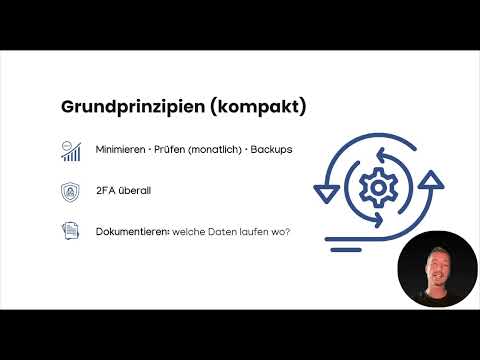
Two simple basic rules can be derived from everything said so far. The first is: Process as little data as possible. The motto "Keep it simple" helps you keep workflows lean. The second rule: Review your access regularly. Once a month is sufficient in most cases. You don't have to keep this check in your head. Simply set up a recurring workflow or a reminder that automatically reminds you of it.

Step 8: Create backups and enable two-factor authentication
You should also back up important data locally or in a second cloud storage. That way, your information is preserved even if a service goes down or an account is locked. Two-factor authentication is just as important. Enable it wherever it is offered, which is now the case on almost all platforms. An attacker who only knows your password won't get any further with it.
Step 9: Create transparency and document data flows
If you work in a business context, clearly document which data runs through your automation. Record where the data comes from, which tools process it, and where it ends up. This overview is important not only for the GDPR, but also in everyday work. If someone asks which data is affected, you can answer immediately and don't have to search for long.
Step 10: Walk through a practical example
Imagine a typical scenario: Interested people sign up for a newsletter via a form. The data automatically moves into your CRM system, a welcome email is sent, and at the same time an entry is created in a Google spreadsheet. That is certainly practical. However, check three points: Does every tool involved work in compliance with the GDPR? Is the data not stored longer than necessary? And does only the authorized person really have access to the spreadsheet? These are exactly the questions you should ask for every workflow of your own.

Step 11: Create a checklist and tick it off regularly
Create a checklist in which you record which data is processed and stored by whom and by which tool. Go through it at regular intervals and tick off each item. That way you stay on the safe side in the long term and spot changes early, for example when a new tool is added.
Summary – Automating safely: Getting a handle on the GDPR, API keys and cloud storage
Automation is a powerful tool, but it only unfolds its benefits if you use it safely and responsibly. Pay attention to data minimization, check storage locations and access rights, manage API keys carefully, and protect your data with backups and two-factor authentication. Document your data flows so that you can provide information at any time. When implemented correctly, data protection and security are not a brake, but the foundation for your workflows running stably and your customers trusting you.
FAQ
Question: Do I have to comply with the GDPR as a private individual too?Answer: For purely private purposes, the GDPR generally does not apply, as long as you engage exclusively in personal or family activities. However, as soon as you work in a business context or for customers, the rules apply.
Question: How often should I check my API keys?Answer: Once a month is usually enough. Delete keys that are no longer needed and check whether all connections are still required.
Question: Can I store API keys in a spreadsheet?Answer: No, do not store them in plain text in spreadsheets, documents or screenshots. Use a password manager or the platform's security features instead.
Question: Is cloud storage with encryption enough for all data?Answer: Encryption is important, but it does not replace checking access rights or data minimization. Only store the data you really need.
Question: Why should I use two-factor authentication?Answer: It protects your account even if someone knows your password, since a second proof, such as a code on your smartphone, is also required.
Question: What is the benefit of documenting data flows?Answer: It shows which data runs through which tools, makes it easier to provide information to customers and authorities, and helps you react quickly in an emergency.

