

Imagine you didn't have to write a single line of code and could still build an AI assistant that retrieves customer data, formulates suitable responses, and passes the result on to your CRM system. This is exactly what visual tools like Flowise and Langflow are for. This guide walks you through the basics of both platforms, explains the key concepts, and shows you where the path leads from simple AI queries to your own AI agents.
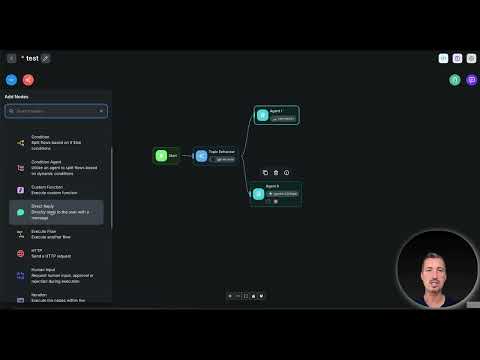
The video is only loaded from YouTube when you play it – data (including your IP address) is then transmitted to YouTube/Google. More in the privacy policy
Key Takeaways
- Flowise and Langflow are visual platforms with which you assemble AI agents and complex AI workflows via drag and drop.
- The individual functions are represented as building blocks that you connect to each other instead of programming them.
- Both tools are particularly suitable when you want to combine multiple AI models or integrate data from different sources.
- Getting started requires some familiarization, but technical understanding is not replaced by programming skills.
- The tools are a step toward automation, in which AI systems are seamlessly integrated into your existing processes.
Step-by-Step Guide
Step 1: Understand the Basic Idea
Before you open an interface, you should know what lies behind the two tools. Flowise and Langflow are tools with which you can visually create your own AI agents. An AI agent is a system that doesn't just answer a single question, but independently controls processes, obtains information, and makes decisions. Especially for advanced users, this is an exciting field, because it allows you to automate tasks that would otherwise require many manual steps.

Step 2: An Overview of the Two Tools
Flowise and Langflow are not the only solutions on the market, but they are among the established offerings and work reliably. Even major providers like ChatGPT or Gemini now offer agent functions. The difference lies in freedom: With Flowise and Langflow, you decide for yourself how your agent is built, which models it uses, and which sources it accesses. So you are not tied to the predefined functions of a single provider.

Step 3: Use the Building-Block Principle
The best way to picture both platforms is as a construction kit for AI workflows. Instead of writing code, you drag individual building blocks onto a workspace via drag and drop and connect them to each other. Each building block takes on a clearly defined task, such as receiving an input or outputting a result. The logic of your system emerges from the connections between the elements. This principle makes planning clear, because you can see every process at a glance.

Step 4: Get to Know the Typical Building Blocks
A simple workflow usually consists of a few basic elements. You need a building block for the input, such as a question or a task. Next comes a building block for accessing a language model like ChatGPT. If your system needs knowledge from a database, a building block for the database query is added. At the end is a building block for the output, which passes on the result. This structure is deliberately kept simple, but can be extended as desired.

Step 5: Plan and Test Complex Pipelines
The real strength of Flowise and Langflow shows once your requirements grow. You can visually plan and test complex AI pipelines before they run in everyday use. This is especially helpful when you work with multiple AI models or want to use different models for different subtasks. It is just as practical when you need to merge data from multiple sources, for example from databases, PDF files, or Excel spreadsheets. You immediately see where data comes from, where it flows, and at which point an error could occur.

Step 6: Think Through a Practical Example
A concrete scenario helps with understanding. Imagine an agent that automatically retrieves customer data from a database. It then has a language model formulate suitable responses and sends the result back to your CRM system via API. Such a process consists of several building blocks that work one after another. If you first sketch it out on paper and then implement it step by step in the interface, you avoid many typical beginner mistakes.

Step 7: Realistically Plan for the Learning Curve
Even though you don't have to write any code, the tools are more technical than an ordinary office application. You should plan some time to get up to speed and familiarize yourself with terms such as interfaces or APIs. Start with simple workflows, test each building block individually, and only expand your setup once the basic functions run reliably. This keeps the learning effort manageable, and you quickly gain confidence in using the platform.
Step 8: Take the Next Step Toward Automation
If you want to dive deeper into automation at some point, Flowise and Langflow are excellent tools. They show you where development is heading: toward AI systems that you put together entirely according to your needs. You regain control over models, data sources, and processes, and can integrate AI into your daily processes in a way that fits your work.
Summary – Flowise and Langflow: Visually Building AI Agents Without Code
Flowise and Langflow make it possible to design AI agents without programming. You work with building blocks that you connect via drag and drop, and can combine multiple models and different data sources in the process. The tools require a certain amount of learning, but reward you with great creative freedom. Those who start simple and gradually expand their workflows lay the foundation for their own automations.
FAQ
What is Flowise?Flowise is a visual tool with which you assemble AI workflows and AI agents from individual building blocks via drag and drop, without writing code.
What is Langflow?Langflow is another visual platform for building AI pipelines, which also works with individual building blocks and is suitable for complex processes involving multiple models.
Do I need programming skills for Flowise and Langflow?No, no programming skills are required for the basic setup, but you should familiarize yourself with technical terms such as interfaces and plan some time to get up to speed.
Who are the two tools particularly suited for?They are particularly suited for advanced users who work with multiple AI models or want to combine data from various sources such as databases, PDFs, or Excel spreadsheets.
Can I also use data from a CRM system with these tools?Yes, a typical example is an agent that retrieves customer data from a database, has a suitable response generated, and sends the result back to a CRM system via API.
Are there other solutions besides Flowise and Langflow?Yes, there are many other tools, and large providers such as ChatGPT or Gemini now also offer agent functions.
How do these tools differ from the agent functions of large AI providers?With Flowise and Langflow, you determine the structure, the models used, and the data sources yourself, whereas agent functions from large providers are usually tied to the options they predefine.

