

Stell dir ein Redaktionsteam vor, in dem ein Rechercheur Informationen sammelt, ein Autor den ersten Entwurf schreibt und ein Lektor alles korrigiert. Genau dieses Prinzip übertragen CrewAI und AutoGen auf künstliche Intelligenz. Statt einen einzelnen KI-Assistenten zu befragen, lässt du mehrere spezialisierte Agenten zusammenarbeiten, die Aufgaben untereinander weitergeben.
The video is only loaded from YouTube when you play it – data (including your IP address) is then transmitted to YouTube/Google. More in the privacy policy
In this guide, I will walk you through the CrewAI interface, show you how to set up a team of agents, and explain the role of AutoGen. I am following the video tutorial from our course. The user interfaces of these tools are evolving quickly, so some menus may look different for you. However, the basic logic remains the same.
Key Takeaways
- Multi-agent frameworks let multiple AI agents with clearly separated roles work together, such as research, text drafting, and quality control.
- CrewAI organizes this kind of collaboration through a graphical interface in which you assemble agents, tasks, tools, and integrations.
- AutoGen is a framework from Microsoft that is significantly more technical and gives you more control over how the models communicate.
- Both tools require a basic technical understanding. You need to plan ahead for costs, API access, and connections to third-party providers.
Step-by-Step Guide
The Basic Principle: Agents with Roles
Before you open a tool, you should understand the mental model. An agent is an AI with a fixed task and a fixed role. In the example from the video, there is a Research agent that searches the internet for information, a Writer agent that creates a draft from it, and a Rewriter agent that checks and corrects the result. In the end, you get a text that was produced without any intervention from you. What matters: The agents decide for themselves how to proceed within their role, and they can assign tasks to each other. Classic automations from tools like Zapier or Make, on the other hand, follow fixed rules.

Exploring the CrewAI Home Page
On the home page, you will first find information about the framework's capabilities. Well-known companies are listed there as users, and the platform describes itself as a solution for multi-agent automation. The use cases developed by the CrewAI community are helpful. There you can filter specifically by categories such as "AI Automation" and see which automations already exist. This gives you a feel for what is realistically achievable with agent teams.

Using Ready-Made Templates
A major advantage is the pre-built templates. They are already structured so that agents, tasks, and workflows interact sensibly. You only need to equip them with your own access data, so-called credentials, so that they can access your accounts. Especially at the beginning, this saves you a lot of time because you can learn from a working example instead of building everything from scratch. Each template also has its own FAQ section.

Open Source, Webinars, and Blog
A look at the site also shows that CrewAI is available as an open-source project. You can install it locally on your computer, for example via pip. The webinars, which present new features and improvements to agents, are also worthwhile, as is the blog with news about the framework and its practical use.

Setting Up the Cloud Trial Version
If you do not want to install it yourself, the cloud trial version is a good option. You sign up, create an account, and get to the backend. There, on the left side, you will find the sections Build, Operate, and Manage. This separation makes sense, because in the Build section you design your automations, while in the Operate section you monitor them.

Understanding the Build Section
Under Build, you will find the Automation Studio and the Marketplace. The Marketplace contains the templates that you can adopt and customize. When looking at the details, pay attention to the cost notes. In the video, for example, costs for the OpenAI API and for the search service Serper are mentioned. Every request to a model or a search is billed, so you should keep an eye on your usage.

Creating and Configuring Agents
In the next step, you create a new agent. To do this, you assign a role, for example "Content Researcher", a goal (Goal), and a backstory (Backstory). This information controls how the agent thinks and acts. Then you select the available tools. An important tool is the Fetch Web Tool, which the agent can use to retrieve and analyze web pages. You can also select or create new Crews, that is, groups of agents.

Setting Up Integrations with Slack, Gmail, and More
Under Integrations, you connect external services such as Gmail, Google Drive, Slack, or Notion with your agents. The connection is usually made through authentication with your account. A practical example from the video: if you connect Slack, your agent can process requests or post status reports. If an error occurs in your agent team, it can be reported directly to a Slack channel. Such events that trigger an action are called triggers.

LLM Connections and Environment Variables
Under LLM Connections, you store the language models your agents should use, such as GPT-4o mini. For this, you need API access from the respective provider. Under Environment Variables, you define global variables that are available in all automations, for example keys or configuration values. In the Resources section, you will find documentation, a blog, and video tutorials. The video tutorials are particularly well suited for getting started.

Generating an Automation via Prompt
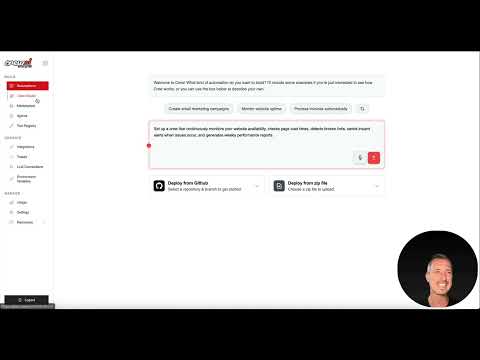
Now it gets exciting. In the Automation Studio, you can load a template, for example "Monitor Website Uptime". The system creates a suitable prompt from it, which you can submit or adjust. The platform then generates a workflow consisting of several steps. In the video, this process took about a minute and a half. Afterwards, you can see how the individual processes are linked together, such as retrieving the website, the evaluation by the model, and sending the result by email.
Checking and Connecting the Finished Workflow
The generated workflow is a starting point, not a finished product. You can identify missing connections by the warning symbols. In the example, Gmail was not yet connected, so you have to connect this element separately. You can also delete, rearrange, or relink building blocks. A step that doesn't fit the goal can thus be changed in a targeted way without having to recreate the entire workflow.

Using Crew Studio for Complex Teams
In Crew Studio, you can model entire teams, for example for an email marketing campaign. You describe the project, and the platform creates agents such as an Email Template Designer, an Audience Segmentation Specialist, and a specialist for performance analysis. While the system is "thinking", you can see how the individual crew members are created one after another. Each agent handles a part of the process, and the results flow into the respective application, such as HubSpot. If errors occur, a notification can be sent by email.

A Practical Example: The Content Agent
A manageable example is well suited for getting started: a content team for articles with quality assurance. For this, you need three agents. The Content Researcher researches topics and sources, the Content Writer writes the article based on these results, and the Content Editor reviews and optimizes the text. After starting, you can see how the tasks are worked through one after another. In "Running" mode, you can see the progress of each step.

Starting the Run and Viewing the Result
After starting, the interface shows which agent is currently working and which tasks have been completed. The research step uses the search service Serper, which also incurs costs. As soon as the editor is finished, the article is ready. One thing stands out: the result is initially not saved anywhere. You therefore have to explicitly instruct the agent to store the text in a file.

Setting Up Storage in Google Drive
So that the article ends up in a file, you add an instruction to the Content Editor, for example: After completion, create a text file and write the information into it. Then you have to establish the connection to Google Drive. In the video, this didn't work on the first attempt; Google denied the permission. Only on the second try did the connection work. So plan for some patience with such steps and check the permissions carefully. It is also useful to include the date and time in the file name so that multiple runs are not overwritten.

Repeating and automating the process
The last part of the practical example is about repetition. You can have the workflow run automatically every hour or every day. Each run then generates a new file. This logic corresponds to a team in a company: a project manager assigns the task, a programmer implements it, and then colleagues review the code and the result. With CrewAI, you map exactly this sequence digitally.

AutoGen: the technical counterpart
Finally, it is worth taking a look at AutoGen. The Microsoft Research project page provides information on features, research publications, videos, and documentation. Community channels such as GitHub, Discord, and LinkedIn are also linked. AutoGen is particularly suitable for developers who want to define how different models communicate with each other. Installation is done via pip. Afterwards, you start the AutoGen Studio interface with a command in the terminal. Using it seems simple, but there is a lot of technology behind it. If you do not have programming skills, a tool with a mature interface like CrewAI is the better starting point.


Summary – CrewAI and AutoGen: How AI agents work together as a team
CrewAI and AutoGen show where automation is heading: away from rigid rules, toward teams of AI agents that make decisions independently and distribute tasks among themselves. CrewAI offers you a graphical interface with templates, integrations, and a cloud trial version. AutoGen is aimed at technically proficient users who want to design the communication of the models themselves. Both tools require getting up to speed, patience with connections, and an eye on costs. Those who proceed step by step, first adopting a template and then adding their own agents, quickly gain a solid understanding of multi-agent systems.
FAQ
What is the difference between CrewAI and AutoGen?CrewAI organizes the collaboration of multiple agents via a graphical interface, while AutoGen is a technical framework from Microsoft in which you yourself define how models communicate with each other.
Do I need to know how to program to use CrewAI?For getting started with templates and the cloud interface, no deep programming skills are required, but a basic technical understanding will help you significantly.
What does it cost to run a team of agents?The costs arise mainly from API access to language models such as OpenAI and from search services such as Serper, which are displayed transparently in the backend.
What is a trigger?A trigger is an event that sets off an action, for example an error message that is automatically sent to a Slack channel.
Why isn't my result being saved?The agent only saves if you explicitly instruct it to, and a connection to a storage service such as Google Drive must exist for this.
Is AutoGen free?AutoGen is an open-source project from Microsoft, but using the connected language models via APIs still incurs costs.

