

Imagine your robot vacuum starting automatically as soon as you leave the house, or new photos landing in your Dropbox without any further effort. That's exactly what IFTTT is made for. The name stands for "If This Then That", meaning "If this happens, then do that". You don't need any programming knowledge for it, just an account and a few minutes of time. In this guide, you'll learn how to get to know the service, how to correctly assess the pricing models, and how to set up your first automation.
The video is only loaded from YouTube when you play it – data (including your IP address) is then transmitted to YouTube/Google. More in the privacy policy
Key Takeaways
Key Takeaways
- IFTTT works on the "If-Then" principle: A trigger starts an action.
- Ready-made automations are called applets. You only have to select them and connect them to your account.
- The service is particularly suitable for smart home devices, social media posts, and simple reminders.
- The free version allows you two free applets. For more features, there are the Pro and Pro Plus variants.
- Complex workflows are only possible to a limited extent with IFTTT. For large companies, other tools are better suited.
Understanding the Basic Principle
Before you sign up, it's worth taking a look at the conceptual model. Every automation consists of two parts: a trigger, the so-called "If" part, and an action, the "Then" part. A classic example: If you upload a new photo to Instagram, then it is automatically saved in your Dropbox. You don't have to copy or move anything manually.
This pattern can be applied to countless everyday situations. The service offers over 900 services for this, meaning services and devices that can be connected with each other.

Discovering Typical Use Cases
IFTTT becomes especially exciting in the smart home. For example, you can have your Philips Hue lamp turn on as soon as you come home. It's equally possible for your robot vacuum to start when you leave the apartment. Your garage door can also be integrated this way: If you open it, the light in the hallway turns on.
In the area of social media, the service is suitable for so-called cross-posting, meaning publishing a post on several platforms. You can also set up reminders, for example for a rain forecast on your smartphone.
Exploring the Home Page
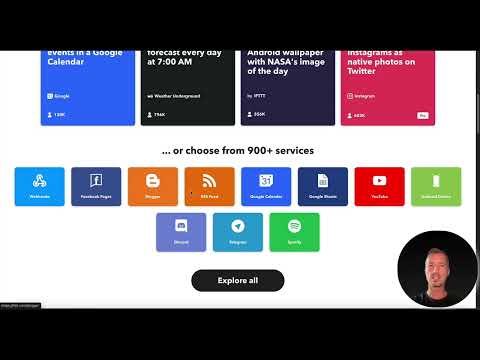
Open the IFTTT website in your browser. On the home page, you'll directly find examples of applets that give you a quick impression. One example is the daily weather forecast at 7 a.m. that is sent to your phone. Another applet sets NASA's picture of the day as the wallpaper on your Android device every day.
If you want to see more, click on "Explore All". There you'll see not only applets but also services and stories. Using the search function, you can specifically search for terms such as "Gmail" or "email".


Assessing the Pricing Tiers Correctly
Before you get started, you should know what the individual versions offer. The free version costs nothing and stays free permanently. It includes two applets that you can use completely freely. For beginners, that is often enough for the first experiments.
According to the video, the Pro variant allows up to 20 applets and offers faster access. The Pro Plus version removes the limit and enables unlimited applets. It also offers the connection of multiple accounts, for example if you own several Instagram accounts, as well as prioritized support. The prices depend on the payment method. Therefore, check them yourself on the page before signing up, as conditions can change.


Creating an Account and Logging In
You can either register anew or simply log in with an existing account. Signing in is possible with a Google, Apple, or Facebook account. This saves you from having to create an additional password. After logging in, you land in the backend, where all your applets, services, and stories are managed.

Choose a suitable applet
In the backend, you now browse for an automation that really helps you in everyday life. Simple examples are well suited for getting started, such as saving new photos or sending RSS feeds to WordPress. Choose an applet and read the description carefully. It states which services are connected and which trigger starts the action.

Connect an applet to your accounts
The process becomes especially clear using the example "RSS to WordPress". Click on the applet and follow the instructions for connecting. You will be redirected to WordPress.com. There you enter your blog URL, your username, and your password. IFTTT then automatically creates new posts on your WordPress site based on the RSS source.
The procedure is similar for all applets. You click on "Connect", confirm the prompts, and the automation is already active.


Create your own applet
If no suitable applet exists, you can build a rule yourself with "Create your own applet". You then choose a trigger and an action from the available services. Newer versions additionally offer the option to enter a short description, which an AI translates into an applet. Note, however, that the possibilities are limited. IFTTT is lean software and not a full-fledged automation platform.

Implement smart home automations
The benefit really shows in the smart home. For example, set up a rule that starts your robot vacuum as soon as you leave the apartment. Another rule turns on the hallway light when the garage door opens. Such small automations can be implemented in a few minutes and noticeably make everyday life easier.

Develop your first steps further in a targeted way
Start with the two free applets and test which automations you use regularly. If you find that you need more rules, it is worth taking a look at the Pro version. Always keep in mind that IFTTT is intended for simple processes. For complex workflows or large companies, other tools are better suited.

Summary – IFTTT guide for beginners: everyday automation with if-then rules
IFTTT makes automation accessible to everyone. You connect services and devices via simple if-then rules without having to write code. You begin with the free version, choose suitable applets, and connect them to your accounts. In the smart home and with social media posts, you quickly achieve visible results. Once you have developed a feel for automation, you can decide whether the Pro version is worth it for you.
FAQ
Is IFTTT really free?Yes, the Free version costs nothing and permanently offers two free applets.
Which devices can I connect with IFTTT?You can integrate smart home devices such as lamps or robot vacuums as well as social media channels, cloud storage, and many other services.
Do I need programming skills?No, IFTTT is a no-code platform. You choose applets and connect your accounts without writing code.
Can I create my own automations?Yes, with the "Create your own applet" function you build your own rules from a trigger and an action.
When is the Pro version worth it?The Pro version is worth it if you need more than two applets and want faster access.
What distinguishes the Pro Plus version from the Pro version?The Pro Plus version offers unlimited applets, the connection of multiple accounts, and priority support.
Is IFTTT also suitable for large companies?IFTTT is well suited for private users. For complex business processes, other tools such as n8n, Zapier, or Make are usually the better choice.

