
Photoshop workflow: Portrait in the child scheme

- Adjust the proportions of portraits of adult people to the child scheme.
- Use different Photoshop tools to deform faces.
- Learn to pay attention to fine details in your workflow and create a coherent image look.
This training is pure joy - for you as you learn the image editing methods shown, and for the people concerned as they look at their child's portraits.
8 Videos, 62 minutes
Intro to the video tutorial
What you can expect in this Photoshop course
Find out how trainer Marco Kolditz goes about it in this Photoshop tutorial.
Portrait in the baby schema
Photoshop workflow: Portrait in the child scheme - 1 Introduction and proportions
In the first video, video trainer Marco Kolditz introduces you to his image idea and makes initial adjustments to the proportions of the male model's face.
Photoshop workflow: portrait in child scheme - 2 eyes and chin
In this video, video trainer Marco Kolditz shows you how he adjusts the areas of the eyes and chin so that they fit the familiar childlike shape.
Photoshop workflow: portrait in child scheme - 3 Face rounder, nose smaller
In keeping with the childlike scheme, the person portrayed should have a smaller nose and the head should appear rounder. In this video, Marco Kolditz shows you his method for achieving these goals.
Photoshop workflow: Portrait in child scheme - 4 Reduce body and background
In addition to the head, the body of the person depicted should of course also be adapted. In this video, the body is scaled down accordingly and merged with the rest of the image.
Photoshop workflow: Portrait in child scheme - 5 Skin softer and oil look
In order to do further justice to the childlike scheme, the model's skin should of course also appear younger and therefore softer. In this video, Marco Kolditz shows you exactly how to do this and also creates a painterly look.
Photoshop workflow: Portrait in the child scheme - 6 Increase contrasts
To give the picture more depth, trainer Marco Kolditz paints with light and shadow in this video.
Photoshop workflow: Portrait in the child scheme - 7 final steps
In the last video of this video training, Marco Kolditz rounds off the finished picture with a few final steps.
Photoshop workflow: Portrait in the child scheme - 1 Introduction and proportions
11 min OpenExamples of use
-
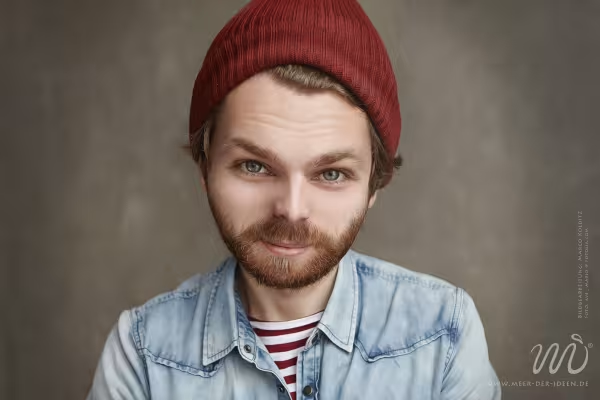 Blur portraits of people - learn how in this Photoshop tutorial!
You might also like

Full power, more inspirations, maximum WOW effect!

Save time with artificial intelligence

Photo editing & image composition

More style, more power, more templates!
Comment now „Photoshop workflow: Portrait in the child scheme“