
Creative portrait editing in Photoshop: Composing "The Sunglasses"

- Give your portraits a graphic look that looks like it has been applied to stone
- Add design elements with a sketch-like appearance to your photos
- Portrait retouching: remove distortions and sharpen individual areas and the overall image
- How to incorporate textures into your portraits to create exciting photo effects
- Create eye-catching design elements with a scribble look using Photoshop tools
Expand your style repertoire with a sun-kissed look and your Photoshop know-how with creative portrait editing methods.
5 Videos, 62 minutes
Intro to the video tutorial
What you can expect in this video training
1 minIn this video training course, you will watch Marco Kolditz as he gives a portrait a graphic and graphic look.
Creative portrait editing in Photoshop: The sunglasses
Creative portrait editing in Photoshop: Composing "The Sunglasses" - 1 Removing and sharpening distortions
16 minIn this video, trainer Marco Kolditz prepares the source image material for further processing by removing noise and partial sharpening.
Creative portrait editing in Photoshop: Composing "The Sunglasses" - 2 contours and texture
12 minWith the help of a special filter, a specific layer mode and various layer style settings, trainer Marco Kolditz gives the composing in this video a graphic look and structure.
Creative portrait editing in Photoshop: Composing "The Sunglasses" - 3 polygons
21 minIn this video, graphic elements in the form of polygons are added to the composing, which are then adapted to the rough look of the rest of the image material using masks.
Creative portrait editing in Photoshop: Composing "The Sunglasses" - 4 scribbles and final steps
13 minIn the final steps, trainer Marco Kolditz loosens up the composing with the help of various scribbles and rounds off the image with a final filter.
Examples of use
-
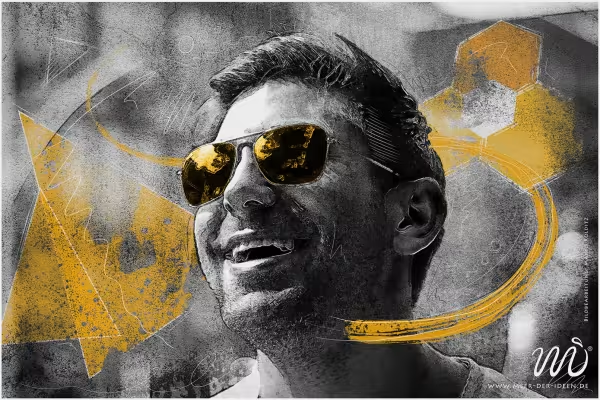 Learn step by step how to create this summer-cool look and apply it to your portraits.
You might also like

For Midjourney, Adobe Firefly and ChatGPT
Here you learn from real-world practice

20 sets in 4K (4096 × 4096 px, 300 DPI) as JPG plus Photoshop patterns, calibrated to the fill method

100 presets in 5 themes · each look in .xmp, .dng, and .costyle · for desktop and smartphone
Comment now „Creative portrait editing in Photoshop: Composing "The Sunglasses"“