
Affinity Photo Tutorial: Composing a Christmas angel

- Affinity Photo Tutorial in German: Follow a complete composing workflow.
- Get to know the Affinity Photo functions (even) better using a practical example.
- Free up motifs, create a metal look and a snow globe.
- Use brushes to let the snowflakes fall and merge the motifs into a coherent whole.
- Find out what to look out for in a photomontage.
Improve your know-how in the use of Affinity Photo and create a first-class composite. This tutorial is a must-have for your Affinity workflow!
8 Videos, 91 minutes
The Christmas angel
Compositing in Affinity Photo: Christmas angel - 1 dancer with metal look
9 minIn this video, trainer Marco Kolditz prepares the dancer for the release and gives her a metallic look beforehand.
Compositings in Affinity Photo: Christmas angel - 2 dancer cut out
15 minAffinity Photo offers various options for cropping objects. In this video, trainer Marco Kolditz crops the dancer using the quick mask.
Compositing in Affinity Photo: Christmas angel - 3 wings cut out by path
17 minWhat would a Christmas angel be without wings? In this video, the wings for the angel are cut out using a path and optimized for placement behind the angel.
Compositing in Affinity Photo: Christmas angel - combine 4 wings and dancer
17 minIn this video, trainer Marco Kolditz positions the cropped wings behind the dancer, thus combining both cropped positions and giving the wings a matching metallic look.
Compositing in Affinity Photo: Christmas angels - 5 rocks to cut out and place
8 minThe Christmas angel is supposed to stand on a rock - which of course also needs to be cropped. In this video, Marco Kolditz shows you another way to crop an object using Affinity Photo.
Compositing in Affinity Photo: Christmas angels - preparing and placing 6 balls
6 minThe Christmas angel is to be placed inside a snow globe. In this video, trainer Marco Kolditz presents an exciting way to create a glass snow globe with Affinity Photo.
Compositing in Affinity Photo: Christmas angels - create 7 snows
9 minIn this video, you'll learn how to make it snow inside the snow globe using a customized brush!
Compositing in Affinity Photo: Christmas angels - 8 background and final steps
9 minLet's get to the finale! In this video, trainer Marco Kolditz puts the finishing touches to his Christmas compositing "The Christmas Angel" with a few tricks!
Examples of use
-
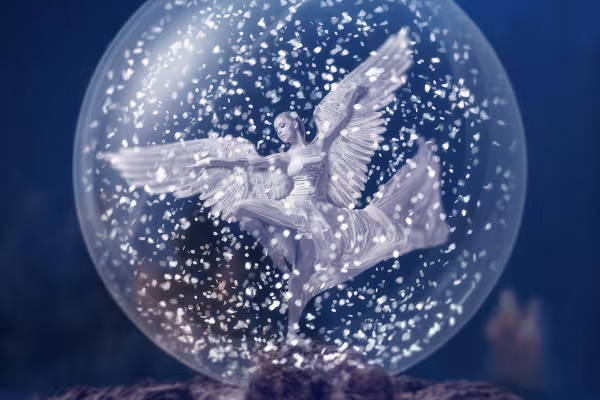 This Christmas angel is created in the German Affinity Photo tutorial and you join in!
You might also like
7 template sets in 4 design lines – A4 PDF with crop marks, plotter SVG, JPG/PNG, PPTX, DOCX and XLSX

20 sets in 4K (4096 × 4096 px, 300 DPI) as JPG plus Photoshop patterns, calibrated to the fill method

More style, more power, more templates!

100 presets in 5 themes · each look in .xmp, .dng, and .costyle · for desktop and smartphone
Comment now „Affinity Photo Tutorial: Composing a Christmas angel“