
Urban image montage in Photoshop: Artwork "The big city"

- From idea and source image to artwork: How to develop a creative image montage in Photoshop
- Get to know methods for cropping people, house facades and hair
- Work more specifically with Photoshop tools, e.g. to create raster effects or curvatures
- Learn from Photoshop pro Marco Kolditz how to combine individual image elements in an atmospheric way
Because your Photoshop skills can still grow: Treat them to an instructive and inspiring photo montage training course.
6 Videos, 64 minutes
Intro to the video training
This is what awaits you in the video training "Urban image montage in Photoshop: Artwork "The big city""
1 minYou will learn how your Photoshop skills on the subject of image montage can grow even further.
Urban collage in Photoshop: The big city
Urban image montage in Photoshop: Artwork "The big city" - crop 1 woman
16 minIn this video, video trainer Kolditz shows you how to crop the woman in the compositing, how to crop intricate details such as hair and how to prepare her and her reflection for use in the other videos.
Urban image montage in Photoshop: Artwork "The big city" - 2 Prepare facade
10 minIn this video you will learn how to bend a formerly straight house wall, remove the final house facade from the background and prepare it for use in later videos for placement in compositing.
Urban image montage in Photoshop: Artwork "The big city" - Prepare 3 buildings
17 minWatch this video to find out how to add an additional building to the skyscrapers in the background of the compositing, adjust it correctly in terms of perspective, create reflections and adjust the color of the building to match the rest of the image.
Urban image montage in Photoshop: Artwork "The big city" - 4 Place woman and building
14 minAfter you have seen in the previous videos how the woman of the composing, the house facade and the skyscrapers were prepared for the composing, all elements are now placed in the composing and color-matched to each other.
Urban image montage in Photoshop: Artwork "The big city" - 5 style conversion
6 minFinally, video trainer Marco Kolditz shows you in this video how he gives his composing "The Big City" an interesting graphic effect and atmospheric color look.
Examples of use
-
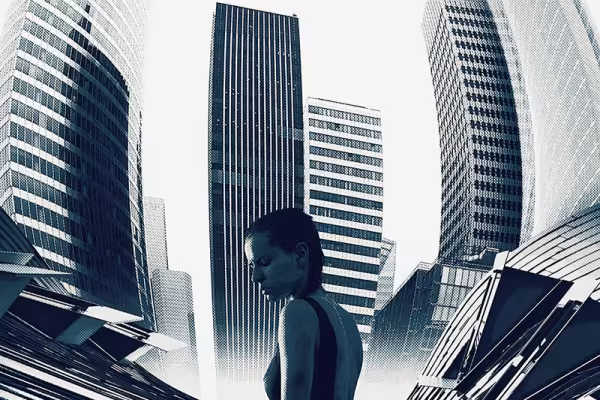 Learn methods of image montage and what is important in a composition.
You might also like

20 sets in 4K (4096 × 4096 px, 300 DPI) as JPG plus Photoshop patterns, calibrated to the fill method

Full power, more inspirations, maximum WOW effect!

More style, more power, more templates!

100 presets in 5 themes · each look in .xmp, .dng, and .costyle · for desktop and smartphone
Comment now „Urban image montage in Photoshop: Artwork "The big city"“