
Photoshop composing tutorial: The spirit of sport

- Step by step: follow the entire process of creating a compositing in Photoshop
- Learn how to crop subjects with different tools and then place them in the composing
- Create a more three-dimensional appearance with the help of light and shadow
- Create brushes, customize them and use them to create floating threads and a glitter effect
- Use filters and layer modes to give your composing the right look and style
Now the ball is in your court: combine several source images into a harmonious composition! Get a sporty composing tutorial to combine even better in Photoshop.
8 Videos, 80 minutes
Intro to the video tutorial
What you can expect in this tutorial
1 minHere you can find out what to expect in this tutorial.
Compositing in Photoshop: the sports spirit
Photoshop composing tutorial: The sports spirit - prepare 1 basketball player
16 minIn this video, trainer Marco Kolditz demonstrates how to remove the background from the player for compositing and how to prepare it for placement in the composing.
Photoshop composing tutorial: The sports spirit - place and adjust 2 players
15 minIn this video you will learn how to place the prepared player in the composing, how to make it more vivid by using light and shadow and how to adjust the color for further work on the picture.
Photoshop composing tutorial: The sports spirit - create and customize 3 brushes
7 minIndividual brush tips are required for the further creation of the compositing. In this video, you will learn how to create two customized brushes and adapt them optimally for further use.
Photoshop composing tutorial: The sports spirit - paint and mask 4 threads
16 minIn this video, you will learn how to paint ghostly threads with the previously set up brush tips and thus "bring the spirit of sport to life".
Photoshop composing tutorial: The sports spirit - lighten and darken 5 threads
7 minIn this video, trainer Marco Kolditz uses light and shadow to make the spirit of sport more vivid - learn about the tools and techniques needed to do this.
Photoshop composing tutorial: The sports spirit - 6 particles to paint and adjust color look
14 minWith the help of a previously created particle brush, you can give the sports spirit a glitter effect and you will also learn how to adjust the color look of the compositing.
Photoshop composing tutorial: The sports spirit - 7 final steps
4 minIn this video, trainer Marco Kolditz shows you his final steps to round off his composition "Der Sportsgeist".
Examples of use
-
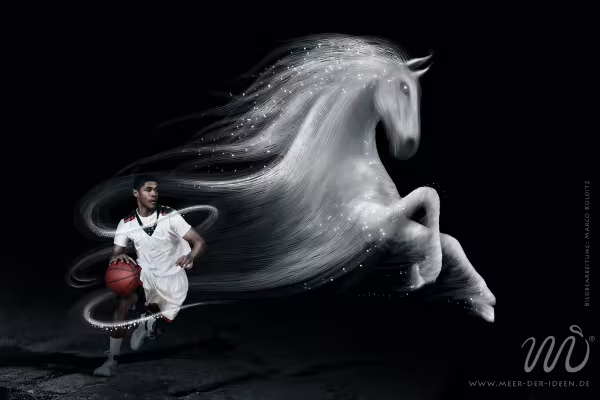 Photoshop composing with a basketball player and a horse representing sportsmanship.
You might also like

Full power, more inspirations, maximum WOW effect!

20 sets in 4K (4096 × 4096 px, 300 DPI) as JPG plus Photoshop patterns, calibrated to the fill method

100 presets in 5 themes · each look in .xmp, .dng, and .costyle · for desktop and smartphone

More style, more power, more templates!
Comment now „Photoshop composing tutorial: The spirit of sport“