
A logo that looks just as sharp on a business card as it does on a building facade is hard to achieve with pixel graphics. With vector graphics it works, because lines and shapes are described mathematically and can therefore be scaled as much as you like. This is exactly where Affinity Vector comes in.
The video is only loaded from YouTube when you play it – data (including your IP address) is then transmitted to YouTube/Google. More in the privacy policy
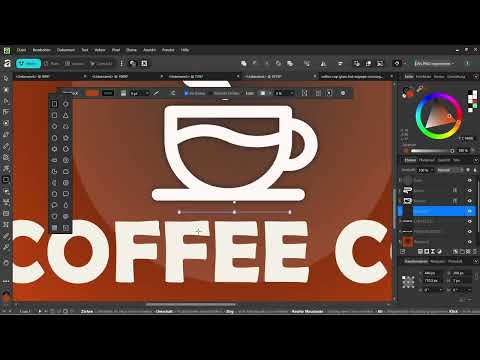
In this video course, you will follow a project from the first idea to the finished social media graphic: a complete branding for a coffee shop with logo, icons, color palette, and typography. You don't need any prior knowledge. The course starts from zero, and you will learn step by step how to work with the pen tool, combine shapes into professional logos, and export your work cleanly.
Key Takeaways
- Vector graphics stay razor-sharp at any size, which is why they are ideal for logos and icons.
- A branding consists of several building blocks: logo, icons, colors, and typography work together.
- The pen tool is the central tool you use to create precise shapes.
- Professional logos are often created by skillfully combining simple basic shapes.
- The export determines whether your graphic works for social media, web, or print.
Step-by-Step Guide
Understanding the Course and Its Goal
At the beginning, the course introduces itself and makes clear what you are working toward. The goal is not a single image, but a cohesive visual identity for a coffee shop. Decide right now that you will coordinate all elements with one another so that they look like they come from a single source.

Why Vector Graphics Are the Right Choice for Logos
The tool is aimed at everyone who wants to create logos, icons, and graphics that always stay razor-sharp, no matter how large you scale them. While working, make sure you design your graphic not for a specific size, but for every size. A logo on a coffee cup and the same logo on an advertising banner must both look clean.

Viewing the Branding as a Complete Package
A branding is more than a logo. In the course, the logo, icons, colors, and typography are created together. If you think of these four areas together from the start, you avoid breaks in the design later on. The typeface should match the character of the logo, and the colors should also be found again in the icons.

From First Impression to Finished Result
The logo is the first thing customers see, and that is why it comes at the beginning of the project. Starting from this first element, you develop the rest of the visual identity. The path leads to a finished social media graphic that you can use right away. This way, in the end you don't just have drafts, but a piece of work you can publish immediately.

The Result as a Social Media Graphic
A social media graphic shows how your branding works in everyday use. Take the time to check your logo, your colors, and your typeface in a real-world application. If everything works together harmoniously, you have achieved the goal of the project.

Working with the Pen Tool
The pen tool is the most important tool for precise vector shapes. With it, you place points and curves that produce exactly the shape you want. First practice simple lines and curves before tackling more complex motifs. With a bit of patience, you will quickly get a feel for controlling the curves.

Combining Shapes into Professional Logos
Many professional logos consist of simple basic shapes such as circles, rectangles, and arcs. The course shows you how to combine these shapes with one another to create a distinctive mark. Make sure your logo remains recognizable even in a reduced form. A good logo works in black and white just as well as in color.

Exporting cleanly
The export comes at the end. Choose the format and settings to suit the intended use. For print you need different presets than for a graphic on the web. Before exporting, check the margins, the colors, and the legibility of the text once more so that the result looks clean everywhere.

Recreating examples and preparing for different uses
The course works with examples that you can recreate step by step. This is the best way to get to know the tools. Always keep the later place of use in mind: social media, web, or print. Each channel places different demands on your files, and that is exactly what you prepare for in the course.

Getting started with the course
You don't need any prior knowledge. The course starts with the basics and builds up step by step. Take your time to work through the individual lessons, and don't get discouraged if your first curves aren't perfect yet. Your confidence will grow with every exercise.

Summary – Coffee shop branding with Affinity Vector: designing logo, icons, and graphics
You have seen how to build a complete branding for a coffee shop with Affinity Vector. Starting from a logo that stays sharp at any size, you develop icons, colors, and typography that go well together. The pen tool allows you to create precise shapes, and combining simple basic shapes leads to professional results. Finally, you export your work to suit social media, web, or print.
FAQ
Do I need prior knowledge of graphic design to understand the course?No, the course starts from scratch and requires no prior knowledge.
Why should I create a logo as a vector graphic?Vector graphics stay sharp at any size. This way, your logo looks just as good on a business card as on a large banner.
What exactly will I learn in the course?You will learn to work with the pen tool, combine shapes into professional logos, and export your work cleanly.
What uses are the results suitable for?The results are suitable for social media, web, and print.
Which project does the course accompany?The course accompanies a complete branding for a coffee shop, including logo, icons, colors, and typography.


