
Digital Painting in Photoshop - Tutorial for digital drawing

- Explore the painterly worlds in Photoshop step by step
- Learn how to handle brushes, paint and details
- Especially for the creation of caricatures, portraits and character designs
- Practical learning: Project files are included for optimum traceability
Drawing in Photoshop can be so easy! This video tutorial takes you by the hand and shows you how to become a brush king yourself! Take a look.
23 Videos, 334 minutes
Introduction
Character Painting in Photoshop - Module 0.1 Introduction
This introductory video training will give you a brief overview of the entire tutorial and you will learn a little about me and my previous work.
Module 1
Character painting in Photoshop - Module 1.1 Basic settings
In this video training we take a quick look at the basic settings I use for a digital painting. Including important brush tips, file sizes and more.
Character Painting in Photoshop - Module 1.2 The Anatomy of the Head
We'll take a quick look at the basic anatomy of the head and I'll show you what shapes, lines and proportions I look for when I draw a portrait.
Character Painting in Photoshop - Module 1.3 Portrait Sketch
In this video training I talk a bit about drawing in general while I draw Sven in Photoshop. You'll recognize the shapes and lines I talked about in the last video training here.
Character painting in Photoshop - Module 1.4 Editing a scanned drawing
You don't necessarily have to create the drawing in Photoshop. If you prefer to draw on paper, you can of course do that too and scan it in later. In this video training, I'll explain the best way to edit it to create a finished digital painting in Photoshop.
Module 2
Character Painting in Photoshop - Module 2.1 Caricature Drawing
Module 2 deals with the topic of caricature. We use the photo references from Module 1 to create a caricature drawing. I will also explain the best way to do this and what a caricature means to me.
Character painting in Photoshop - Module 2.2 Create color palette
After the caricature drawing, we move on to color. But before we finish painting the caricature, let's take a look at an exercise that trains us to recognize and select colors. I'll also give you tips that you should keep in mind for every portrait.
Character Painting in Photoshop - Module 2.3 Caricature Painting
In this video training we will finish the caricature! To do this, we use the colors defined in the last video training, create a so-called underpainting and I refine the portrait until I am satisfied. I'll also give you general tips for painting portraits digitally, what to look out for and what to avoid.
Module 3
Character Painting in Photoshop - Module 3.1 Animal Surfaces - Feathers
In the third module, we will look at different surfaces and I will show you the best way to depict feathers. You will also get practice in using references more freely.
Character Painting in Photoshop - Module 3.2 Animal Surfaces - Scales
Let's continue with scales. As in the last video training session, we try to transfer an animal surface to a hand. But here we're going to do it a little differently.
Character Painting in Photoshop - Module 3.3 Animal Surfaces - Fur
The last and particularly demanding animal surface is the fur. I will show you what is already sufficient to achieve a convincing fur representation.
Character painting in Photoshop - Module 3.4 Painting armor
In this video training, I paint a simple suit of armor on the hand. At the same time, you'll get helpful tips when it comes to light, shadows and reflections. We don't stick strictly to the reference, but create something freer and more fantasy-like.
Character painting in Photoshop - Module 3.5 Common mistakes
Here I show you common mistakes using the nose, eyes and mouth and give you simple tips on how to avoid them. You can just as easily apply these to other things later on.
Module 4
Character Painting in Photoshop - Module 4.1 Alchemy Introduction
Let's take a quick look at the open source program Alchemy. This very alternative tool is designed for drawing the first sketch, then importing it into Photoshop and finalizing it.
Character Painting in Photoshop - Module 4.2 Alchemy Sketch
After the brief introduction, it's time to start sketching our biggest digital painting. I'll tell you what I have in mind and you can watch me sketch out the rough idea.
Character painting in Photoshop - Module 4.3 Revising a sketch
I import the Alchemy sketch into Photoshop, refine the shapes, correct proportions and prepare everything for painting with color.
Character painting in Photoshop - Module 4.4 Astronaut coloring
Let's move on to color. I'll show you a few helpful tips on how to get more variety into the picture and avoid monotonous and boring colors. Here, too, we work from dark to light.
Character painting in Photoshop - Module 4.5 Environment and posture
In the fifth part of the fourth module, we continue with our astronaut. We refine the pose, the shapes and colors and think about what the background could look like.
Character Painting in Photoshop - Module 4.6 Details and Mars Surface
In this video training, we improve the environment and paint in details. We try to depict the surface of Mars a little more convincingly and consider what the lighting situation should be like.
Character painting in Photoshop - Module 4.7 Rover
We paint the remote-controlled rover and add tire tracks and details on the surface of Mars.
Character Painting in Photoshop - Module 4.8 Details and Lighting Effects
As we have roughly finished the rover, we can now refine the monkey's head and hands. We also paint in further details and helpful lighting effects.
Character painting in Photoshop - Module 4.9 Completion and other effects
In the last video training of this module, we finish the digital painting and I show you a few Photoshop effects that can make the image more exciting and improve it.
Module 5
Character painting in Photoshop - Module 5.1 Final recommendations
And then we've already reached the end! In this video training I give a few more book recommendations, tips on drawing and other interesting links. Thank you very much for watching!
Examples of use
-
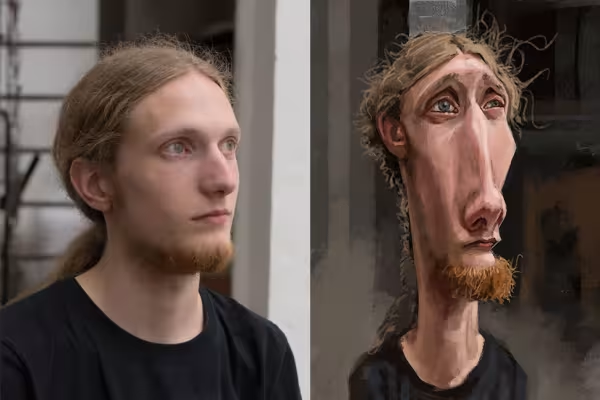 Learn to draw caricatures in Photoshop.
 -
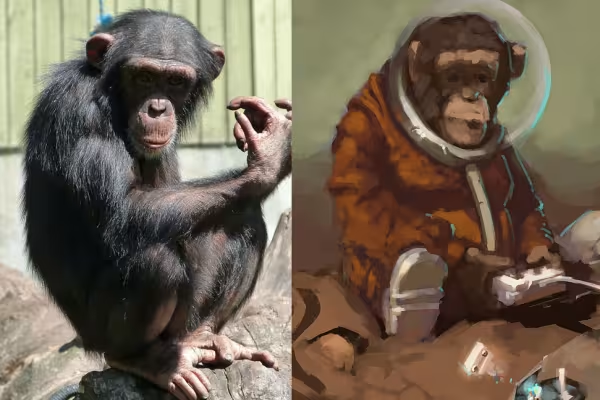 Using numerous examples, you will learn how to wield the Photoshop brush correctly.
You might also like

Full power, more inspirations, maximum WOW effect!
Live your layout now!

20 sets in 4K (4096 × 4096 px, 300 DPI) as JPG plus Photoshop patterns, calibrated to the fill method

More style, more power, more templates!
Comment now „Digital Painting in Photoshop - Tutorial for digital drawing“