
ZBrush 2019 - Video training for the update

- Over 2.5 hours of video training on the ZBrush 2019 update
- All important new features explained in detail: How to use the functions for your 3D work
- Topics: Subtool folder, Snapshot 3D, ZRemesher 3.0, ZColor, NPR, Universal Camera and more
- Learn how to apply the innovations in a practical project (with work material)
If you're going to update, you'll want to take full advantage of it - this video training will update your ZBrush skills to version 2019 with structure and guidance!
11 Videos, 164 minutes
ZBrush 2019
ZBrush 2019 - Video training for the update: 1 | Training overview
5 minThis year's ZBrush update is all about fulfilling long-awaited wishes and optimizing existing functions. All new features can also be seen on the updated ZBrush map.
ZBrush 2019 - Video training for the update: 2 | Subtool folder
19 minWith the subtool folders, Pixologic has fulfilled a long-awaited wish of many users. In addition to the new organizing option, there are also various folder operations.
ZBrush 2019 - Video training for the update: 3.1 | Snapshot 3D: Function
14 minThe almost forgotten Spotlight function gets an interesting update with the Snapshot 3D tool. Clean meshes can be created in no time at all with the help of simple alphas.
ZBrush 2019 - Video training for the update: 3.2 | Snapshot 3D: Application
18 minThe Spotlight function can also be used to create new alphas and thus more complex meshes. In addition, the Live Booleans can be used to decide how the newly created subtool should behave.
ZBrush 2019 - Video training for the update: 4 | ZRemesher v3.0
9 minThe ZRemesher v3.0 still works the same, but it has gained a lot with a new algorithm, especially for remeshing hardsurface objects. Additional options have also been added to achieve even better results.
ZBrush 2019 - Video training for the update: 5 | ZPlugin: Intersection Masker
11 minUsing the ZPlugin Intersection Masker, it is possible to create a complex mask between two meshes.
ZBrush 2019 - Video training for update: 6 | ZPlugin: ZColor
13 minThe small but powerful ZPlugin ZColor helps you to select colors and fill objects. It is also possible to save entire color palettes and to import or export them.
ZBrush 2019 - Video training for the update: 7 | Universal Camera
12 minWith the Universal Camera, Pixologic brings another long-awaited feature. It is now possible to adjust the focal length in order to have even more control over the final product. The camera settings can also be saved and transferred to other programs.
ZBrush 2019 - Video training for the update: 8 | Non-Photorealistic Rendering (NPR)
29 minWhile other renderers aim to achieve photorealistic results, ZBrush takes the opposite approach. With the extended BPR filter system and many render set presets, various graphic styles can be created in no time at all, which would be difficult to achieve in Photoshop.
ZBrush 2019 - Video training for update: 9.1 | Mini project: Door sign - Modeling
23 minIn the first part of this short workshop, a doorplate model is created. This is made easy with the help of the new Snapshot 3D tool as well as the Live Booleans and ZRemesher v3.0.
ZBrush 2019 - Video training for the update: 9.2 | Mini project: Door sign - Rendering
11 minWith the help of the Universal Camera and the render sets, you can create a wide variety of renderings directly in ZBrush and Keyshot, which can then be put together in Photoshop to create interesting artwork.
Examples of use
-
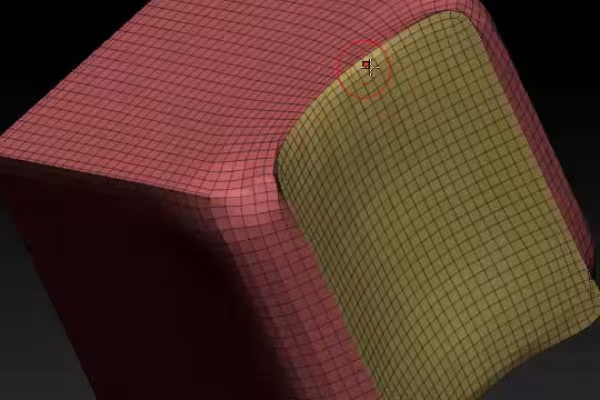 Example: ZRemesher 3.0 has so much more to offer - find out what version 3.0 has to offer in the training.
 -
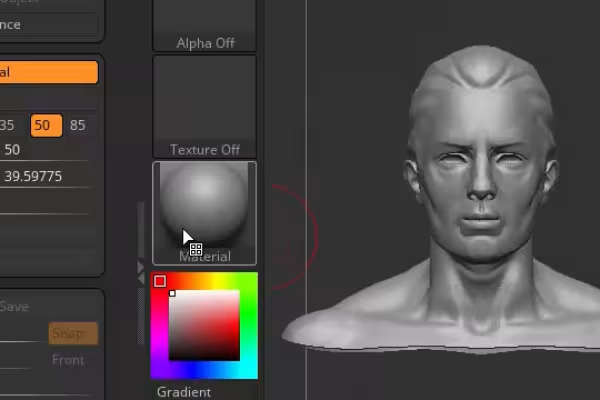 Example: The new universal camera offers you great possibilities - learn how to use them!
You might also like
Practical applications for companies
How it works. What options exist.
Produce high-quality videos

Edit films, transitions, animations, and more
Comment now „ZBrush 2019 - Video training for the update“