
Note: The transcript covers only the introduction of the video (23 seconds). The following guide therefore describes the flow and the objective of the tutorial. The specific Photoshop steps are not shown in the video itself.
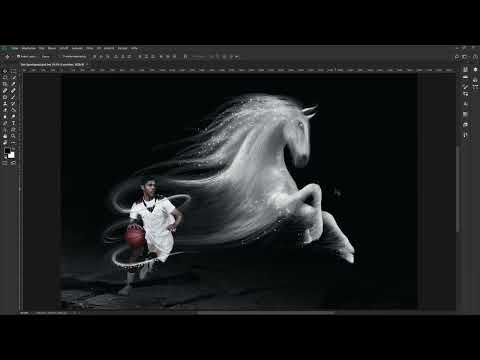
The video is only loaded from YouTube when you play it – data (including your IP address) is then transmitted to YouTube/Google. More in the privacy policy
Photoshop Composing: Recreating the Sportsgeist Image with a Big Cat
Introduction
Imagine you see an image that captivates you immediately, and you wonder how it was created. This very thought is at the beginning of this tutorial. The starting point is a composing, that is, an image montage made of several subjects that merge into a single scene. The template is a motif designed in the style of the Sportsgeist image. The difference: instead of a horse, a big cat is meant to take center stage.
The idea behind it is simple, but the execution requires patience and a good eye for light, perspective, and color. This is exactly what this video prepares you for. You get an overview of what to expect before you start working in Photoshop yourself.
Key Takeaways
You learn to build a composing from the idea to the finished image. The template is the Sportsgeist image, and the subject changes from a horse to a big cat. The goal is a coherent overall image in which all elements fit together.
Step-by-Step Guide
Step 1: Understanding the Greeting and Starting Point
The intro shows you that you can look over the author's shoulder as they work. This is helpful because you experience the entire workflow in context and don't just get to know individual tools. In this phase, pay attention to how the original image is structured: Where is the main subject located, how is the image area divided, and what mood does the image convey?

Step 2: Analyzing the Model
In the next section, the author explains that they want to implement the composing of the Sportsgeist template. Before you create layers, you should study the model closely. Ask yourself which elements shape the image, such as dynamics, direction of movement, contrast, and light source. Note down these points, as they will later serve as your guide.

Step 3: Defining the Basic Idea of the Composing
Here the central idea of the tutorial becomes visible: The Sportsgeist template serves as the foundation, but the subject is swapped. The author recently saw a similar image on the internet in which a big cat appeared instead of a horse. This change noticeably alters the effect of the image, because a big cat looks wilder and more powerful. Therefore, consider how well the new subject fits into the template in terms of orientation, size, and lighting.

Step 4: Swapping the Subject
In the course of the video, the focus is on placing the big cat in the position of the horse. With swaps like this in particular, clean masking determines the final result. Make sure that edges look soft and that no distracting fringes remain visible. Then adjust hue and brightness so that the big cat doesn't look like a foreign element.
Step 5: Implementation in Photoshop
The last section of the introduction announces how you implement such an image with Photoshop. The author wishes you lots of fun with it, and that is exactly a good attitude for creative work: try out the steps, experiment with layers, and don't shy away from corrections. Save your intermediate stages regularly so that you can return to an earlier version at any time.

Summary – Photoshop Composing: Recreating the Sportsgeist Image with a Big Cat
The tutorial presents a composing in which the Sportsgeist image serves as the template and a horse is replaced by a big cat. The path leads through analyzing the model, defining the image idea, cleanly masking and inserting the new subject, and adjusting color and light. If you keep this order in mind, getting started with your own image montage will be much easier.
FAQ
What is shown in this tutorial?The tutorial shows how to create a composing in the style of the Sportsgeist image with Photoshop, using a big cat instead of a horse.
What prior knowledge do I need?Basic knowledge of working with Photoshop is helpful, such as working with layers. To get started, however, an interest in image editing is enough.
Where does the template come from?The author saw a similar image on the internet in which a big cat appeared instead of a horse.
What is a composing?A composing is an image montage in which several subjects are combined so that they appear as one single, coherent scene.

