

Imagine you're sitting on a train and urgently need a presentation that is only stored on the company network. This is exactly where a VPN comes in. This guide takes you step by step through the basics: what a virtual private network is, how data traffic flows through it, and which connection types are common in companies and everyday life. The content comes from the introductory lesson on OpenVPN and is prepared so that you can follow it even without prior knowledge.
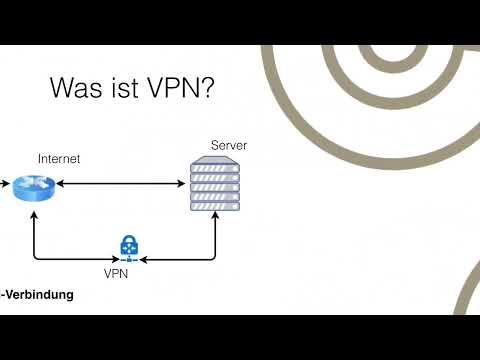
The video is only loaded from YouTube when you play it – data (including your IP address) is then transmitted to YouTube/Google. More in the privacy policy
Key Takeaways
- A VPN (virtual private network) is a closed, logical network whose participants are connected via an encrypted internet tunnel.
- The participants can be physically far apart from one another and still work as if they were sitting on the same network.
- Without a VPN, the target server can clearly attribute your request to your device. With a VPN, it only sees the address of the VPN server.
- There are three typical connection types: end-to-end, end-to-site, and site-to-site.
- A VPN protects the transmission path, but it does not replace a firewall or protection software against malware.
Step-by-Step Guide
Step 1: Understanding the Basic Principle of a VPN
The term stands for virtual private network. It refers to a closed logical network whose participants are physically separated and are nevertheless connected to one another via an internet tunnel. "Virtual" means that the connection exists only in software and is not a dedicated line. "Private" means that only authorized participants can get in.

Step 2: Following a Typical Use Case
Imagine you are on a business trip and want to access the company network to retrieve a presentation or view analytical data. First, you establish a completely normal internet connection. Then you start your VPN software, in this example OpenVPN, and log in to the company's network. From this moment on, you can work as if you were sitting in the office itself.

Step 3: Understanding the Normal Path to the Internet
Before you use a VPN, the connection runs directly: Your PC sends the request over your internet line to the website's server. The server answers the request and sends the data back to you. In the process, the server learns exactly who made the request. Operators can create statistics from this and trace from which connection a page was accessed.

Step 4: Recognizing the Risks of Open Connections
When surfing directly, you are visible to anyone who can analyze the traffic. Data traffic also flows in both directions. If a website's server is infected with malware, that data can reach your computer. A firewall can help here, but it does not always inspect traffic in depth. This is precisely the task that the firewall usually takes on, not the VPN itself. You should keep this in mind when planning your security.
Step 5: Classifying the Path via a VPN Provider
With a VPN connection, a detour is built in. You first log in to a VPN server, for example with a paid provider. From there, the VPN server retrieves the desired website and passes the response on to you. The direct path from the device to the target server is eliminated; there is only the connection via the VPN tunnel.
Step 6: Assessing the Role of the VPN Server and Its Configuration
What matters is where the VPN server is located. If it is in the USA, for example, the website sees an American address and no longer recognizes your actual location. The configuration is just as important: The server can merely pass the data through or work completely transparently, hiding everything that happens behind it. For practical use, you therefore need basic knowledge of IP addresses so that you can understand which address becomes visible and when. In the practical lesson on OpenVPN, you install a VPN server yourself and verify this effect.
Step 7: Understanding the End-to-End Connection Between Two Computers
In companies, computers from different locations often connect to each other. In an end-to-end connection, the tunnel exists directly between two PCs, for example from the computer at the branch office to the computer at the headquarters. Routing is decisive here. If the computer at the branch office can access the headquarters' network via the headquarters PC, it has the same options there as the headquarters computer. The other devices at the branch office, however, remain excluded, since only the path between the two computers is tunneled.

Step 8: Classifying field service access as an end-to-site connection
A field service employee does not connect to a specific PC, but directly to the headquarters' server or firewall. It only lets them in with access credentials, that is, with passwords or keys. Today, the key-based method is considered the more secure option. The employee gets access to presentations and company data, but not to the private data of individual colleagues. That is why the connection path ends at the company server.

Step 9: Understanding the site-to-site connection for locations
If two locations are to work together permanently, the two servers connect directly to each other. Data traffic then runs only between the servers of both locations. The branch office's computers then behave as if they were in the headquarters. Logins can be handled centrally, for example via an Active Directory domain. For users, the physical separation thus practically no longer matters.

Step 10: Looking ahead to the following lessons
You now have the basics together. The following lessons will cover the encryption methods used in VPNs, and then the practical setup of a stable end-to-end connection. It will also explain why OpenVPN is a good choice for many scenarios compared to other VPN protocols.
Summary – VPN explained: how it works, types and use cases
A VPN connects devices over the internet into a closed network and protects the path of the data in the process. Depending on the task, a distinction is made between end-to-end connections between two computers, end-to-site access for mobile employees, and site-to-site connections between entire locations. The location of the VPN server and its configuration are decisive for the result. However, a VPN does not replace a firewall or protection against malware. Once you have understood these basics, you are well prepared to practically set up a VPN connection with OpenVPN.
FAQ
What does VPN mean?VPN stands for virtual private network and describes a closed logical network whose participants are connected via the internet.
Can a VPN make me completely anonymous?No, a VPN hides your address from the target server, but does not automatically protect against all forms of tracking.
Does a VPN replace a firewall?No, the firewall checks and filters data traffic, while the VPN primarily tunnels the transmission path.
What is the difference between end-to-end and site-to-site?With end-to-end, two individual computers connect, whereas with site-to-site, two servers connect, each representing an entire location.
Why is a VPN suitable for field service employees?Employees can access the company network while on the move without having to be in the office, and in doing so only get access to the approved data.
Which login method is considered more secure today?Key-based methods are considered more secure today than password-only access.

