
Optimal development of vacation photos

- 35 lessons in over 3 hours of video training for efficient photo editing of vacation photos
- Use Photoshop and Lightroom to get the maximum radiance out of your images
- Working material included: Camera Raw and Lightroom preset, 7 PSD and 55 Raw files
- From Sascha, who lets you get hands-on with the example of Egyptian recordings
Editing vacation photos to relive and relive your vacation - the tools are easy to learn and use - the results are simply impressive.
35 Videos, 195 minutes
Introduction
Developing vacation photos optimally - 1.1 Introduction
1 minIntroductory video to the training: brief overview, trailer.
Optimal development of vacation photos - 1.2 Thank you
1 minSupport information: I will also answer your questions about the training afterwards.
Developing vacation photos optimally - 1.3 Important information in advance
1 minIn this video, I explain how to get the most out of this workout.
Tips and Presets
Developing vacation photos optimally - 2.1 Equipment
2 minThis video is about video equipment on vacation - my recommendations and what I use.
Developing vacation photos optimally - 2.2 Lightroom or Photoshop?
3 minThis video is about the question of which is better: What should I use - Lightroom or Photoshop?
Developing vacation photos optimally - 2.3.1 Why presets?
2 minThis video is about presets: Why are they useful? Why should you use presets too?
Optimum development of vacation photos - 2.3.2 Presets: Lightroom import
1 minIn this video, I'll show you how to import presets into Lightroom.
Optimum development of vacation photos - 2.3.3 Presets: Adobe Camera Raw import
2 minIn this video, I'll show you how to import videos into Adobe Camera Raw.
Optimally develop vacation photos - 2.3.4 Presets in detail
2 minIn this video I explain my preset in detail.
Crops & development settings, synchronization
Optimum development of vacation photos - 3.1 Aligning images
4 minIn this video, we will use Lightroom to straighten and crop the images and make adjustments with the graduated filter.
Optimally develop vacation photos - 3.2 Synchronize development settings
5 minIn this video, I'll show you how to apply develop settings to other images in Lightroom, and we'll take a look at the radial filter.
Optimally developing vacation photos - 3.3 Aligning Camera Raw images
2 minThis video is about aligning and cropping images in Adobe Camera Raw, synchronizing development settings, and the graduated filter.
optimize heaven
Optimum development of vacation photos - 4.1 Optimizing the sky
1 minIntroductory video on the topic of "Optimizing the sky".
Optimum development of vacation photos - 4.2 Color optimization
3 minThis video is about how we can use HSL/grayscale to adjust the sky colors.
Optimum development of vacation photos - 4.3 Swapping skies
6 minIn this video, I'll show you how you can quickly and easily replace the sky in Photoshop.
Optimum development of vacation photos - 4.4 Removing haze
9 minIn this video I show you what you can do with the "Remove haze" feature, how to remove your sensor spots in the raw.
Optimum development of vacation photos - 4.5 Fast raw development
3 minThis video is about quick raw development and how we can remove the cascading lines in wide-angle shots. We will also make local adjustments with the radial filter.
Optimum development of vacation photos - 4.6 Image analysis
5 minThe image analysis comes before the editing. How do I go about this?
Optimum development of vacation photos - 4.7 Summer sun color look
1 minIn this video I show you a simple summer sun color look in Photoshop with the "Selective Color Correction".
Street photos
Develop vacation photos optimally - 5 street photos
11 minThis video is about optimizing photos of the country and its people in Lightroom or Camera Raw. We will apply what we have already learned (basic corrections, local adjustments, cropping, etc.).
Karnak Temple
Develop vacation photos optimally - 6 radial filters
13 minThis video is about local adjustments with the radial filter and the brush.
Nil
Develop vacation photos optimally - 7 Nil
14 minThis video is about local adjustments with: Graduated filter, Radial filter, HSL/Grayscale, Straighten horizon.
Sunrise and sunset
Developing vacation photos optimally - 8.1 Sun: Tips
5 minIn this video I show you a few photographic tips for photographing sunrises and sunsets.
Developing vacation photos optimally - 8.2 Sunset
9 minIn this video we develop a sunset.
Developing vacation photos optimally - 8.3 Sunbeams
5 minIn this video, I show you how you can paint the sun's rays into the image in Photoshop.
Panorama
Develop vacation photos optimally - 9.1 Panoramas: Tips
3 minIn this video I show you a few photographic tips for taking panoramic photos.
Developing vacation photos optimally - 9.2 Panorama in Adobe Camera Raw
16 minIn this video, I'll show you how to compose a panorama in Adobe Camera Raw. We then straighten the horizon in Photoshop. We work with the stamp tool and let Photoshop add missing image areas.
Developing vacation photos optimally - 9.3 Panorama in Lightroom
6 minIn this video, I'll show you how to compose a panorama in Lightroom.
Create advertisement poster
Develop vacation photos optimally - 10.1 Develop photo for poster
4 minIn this video, we develop the photo for the advertising poster. We apply what we have already learned: Basic adjustments and local adjustments.
Optimal development of vacation photos - 10.2 Advertising poster
19 minIn this video, I'll show you how to turn a simple image into an advertising poster in Photoshop. To prepare, we'll retouch a lamp post and a garbage can out of the image. Then we add a logo on a black background to the image so that the black is faded out.
Isle Mahmya
Optimum development of vacation photos - 11.1 Raw development
12 minThis video is about the raw development of some summer sun images. Dark, almost invisible parts of the image become visible and I also retouch some areas of the image in the raw converter.
Optimum development of vacation photos - 11.2 Removing reflections
4 minIn this video, I'll show you how to retouch a reflection in Photoshop.
Create artwork
Optimal development of vacation photos - 12 works of art
5 minIn this video, we turn your picture into a real work of art in Photoshop. The image will look like it's been painted. We start with the raw development, then the image gets a color look with the selective color correction. Now we use the oil paint filter and can adjust the image a little with the tone correction - and the work of art is finished.
Aquarium
Optimal development of vacation photos - 13 Aquarium
13 minIn this video I show you how you can spice up a picture of an aquarium. We will remove scratches/dirt and adjust the colors. We'll use: the touch up tool, the area repair brush, the quick selection tool, enhance edge, content based fill, Gaussian blur, tone correction, gradient on mask, color intensification.
Closing words
Develop vacation photos optimally - 14 final words
1 minClosing words and support page, help with questions.
Examples of use
-
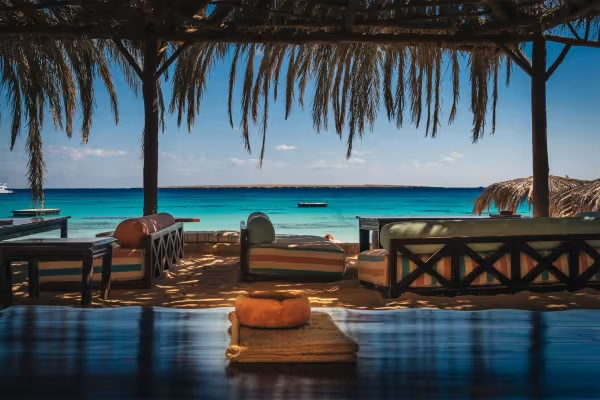 Example: Create vacation pictures that convey mood and atmosphere.
 -
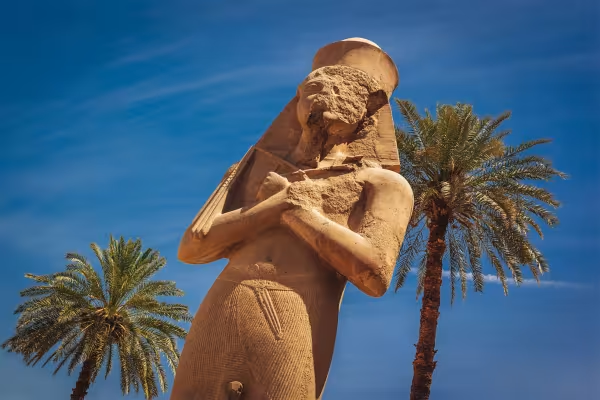 Example: Dull sky, lack of sunlight? No problem - you can change that!
 -
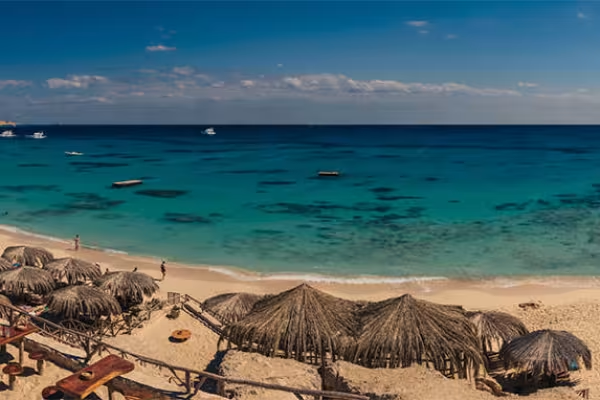 Example: Learn how to merge individual images into seamlessly beautiful panoramas.
You might also like

More style, more power, more templates!

Full power, more inspirations, maximum WOW effect!

100 presets in 5 themes · each look in .xmp, .dng, and .costyle · for desktop and smartphone

20 sets in 4K (4096 × 4096 px, 300 DPI) as JPG plus Photoshop patterns, calibrated to the fill method
Comment now „Optimal development of vacation photos“