
Logic is the heart of every intelligent decision. When working with agents, it is crucial that they correctly evaluate valuable information and execute appropriate actions. In this guide, you will learn the basic logical structures you can apply to make your agents more powerful. We will cover If/Else commands, loops, and the importance of User Approval. Let's dive right in!
The video is only loaded from YouTube when you play it – data (including your IP address) is then transmitted to YouTube/Google. More in the privacy policy
Key Insights
- If/Else statements are fundamental for the decision-making of agents.
- While loops allow processes to run until a condition is met.
- User Approval provides an additional layer of protection, requiring human approval.
Creating an Agent with If/Else Statements
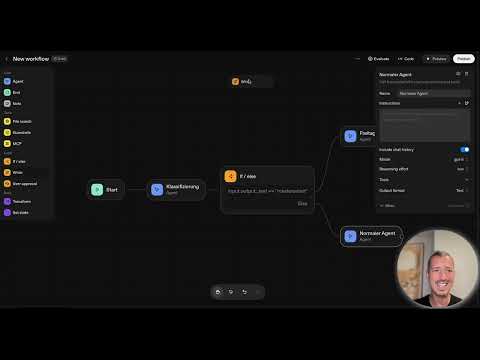
First, you should create your agent and familiarize it with the basic logical statements. In your user interface, you will find the option to set up the various conditions.

Here we start with the starting condition, which tells the agent how to process incoming information. A basic classification helps you analyze the incoming data. You must define what type of requests the agent should recognize and classify. For example, you could specify that a request is classified as "master's thesis".

Now you use the If statement to determine what should happen when a specific condition is met. For example, if the input text contains "master's thesis," the agent will send a predefined positive response. If the text does not meet expectations, you can specify that the agent should take alternative actions.

To apply the If statement, simply click on the corresponding input area and enter the conditions. This makes the logical processes flexible and adaptable.
Implementing While Loops
A While loop can be used to execute a process as long as a specific condition is met. This type of condition is particularly useful when processes are iterative and must continue until a user-defined end condition is reached.

In this case, the agent will continuously check if the sought text matches the defined tag. Only when the condition is positively evaluated will the agent continue its work and move on to the next step.
Integrating User Approval
The User Approval feature is a significant step towards ensuring the quality of the information and decisions your agent makes. When you set up a process that requires approval, the agent will only proceed once this approval has been granted.

By inserting the approval between steps, you can control the extent to which the agent issues notifications. If the approval is not granted, the workflow will be automatically halted.

You can test the approval process by asking the agent different questions and observing how it reacts to positive or negative feedback.
Reviewing and Automating the Process
Once you have implemented your classification and decision logics, you should run the process multiple times to ensure everything works as expected. Using User Approval can be helpful at first to test your agent's efficiency and effectiveness.

When the agent delivers stable and consistent results, you can remove the approval function from the workflow and allow the system to operate autonomously.
Output of Information
Your agent can provide specific information, such as data about a master's thesis. It is important that the incoming request meets the defined conditions in order to retrieve the relevant information.

The output should be designed so that the user can easily query the necessary data without the agent providing unnecessary information.
Summary – Logic for Agents: Your Guide to If/Else and User Approval
You have now learned the basic elements to equip an agent with logical statements. You know how to set up If/Else statements, apply while loops, and implement the User Approval function. This is the key to an intelligent, effective agent that can not only process information but also make decisions with human review in mind.
FAQ
What conditions can I use with If/Else?You can define conditions for any incoming text or data, such as "master's thesis" or other relevant keywords.
How do I test my agent?You can run the agent through the same requests multiple times to check functionality.
What does the User Approval function do?It checks whether certain steps in the process need human approval before proceeding.
Can I remove the approval process?Yes, after successful test runs, you can disable the approval function.
What happens if no conditions are met?In this case, the agent will perform alternative defined actions or output an error message.

