
Here you dive into the essential components of the Agent Builder. When you start a new workflow in the Builder, the basic elements are always already integrated to make your work easier. Understand how to effectively use the "My Agent" node, notes, and the start node to keep your workflows clear and structured.
The video is only loaded from YouTube when you play it – data (including your IP address) is then transmitted to YouTube/Google. More in the privacy policy
Key Insights
- The Builder contains three core components by default: the start node, "My Agent," and notes.
- Notes are a valuable tool for making complex workflows easier to understand.
- The "My Agent" node allows you to configure and control ChatGPT according to your wishes.
Step-by-Step Guide
Start a New Workflow
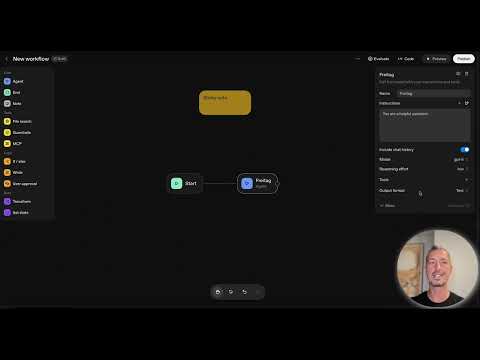
To begin your workflow in the Agent Builder, start with a new workflow. You will notice that the start node and the "My Agent" node are already present.

Here, the start node is the starting point where your workflow begins. The input text is used to convey information to the agent. "My Agent" is the core of your workflow that should not be ignored.
Add Notes
One of the most useful features in the Builder is the ability to create notes. You can add notes to help you capture important information.
These notes can easily be scaled to meet your needs. They are especially significant in larger and more complex workflows. Remember that they help not only you but also other users keep track of things.
Understand the Start Node
Now let's talk about the start node, which is essential for the beginning of any workflow. Here you define the conditions for the workflow and specify how the agent should respond.

This node serves as the input point where the user can enter information to interact with the agent.
Customize My Agent
Customizing your "My Agent" node is crucial for the proper execution of your workflow. You can set various parameters to tailor the agent to your needs.
Naming your agent is the first step. Change the name to make it easier to identify. Additionally, you can give specific instructions to the agent that govern its behavior.
Instructions and Chat History
When you give instructions to your agent, ensure that you make clear and precise guidelines. This improves the quality of the responses you receive.
Activating chat history is also important as it helps the agent remember previous conversations and requests.
Model and Logic Settings
In the Agent Builder, you can also select different models and adjust the agent's thinking times, which is important for the efficiency of your workflow.
Here you can choose from different models and, if necessary, adjust the agent's thinking time to control the quality of the response.
Add Tools
Finally, you should explore the useful tools in the Agent Builder. These tools significantly expand the functionality of your agent.

You can enable the web search or file search, among other things, which allows your agent to access external information and provide more comprehensive answers to user requests.
Summary – Understanding Core Elements in the Builder for ChatGPT Assistants
With the Agent Builder, you now have a solid foundational understanding of the core elements, with which you can structure and customize your workflows. Take a close look at the various options to design your personal ChatGPT agent, which does exactly what you can expect from it.
FAQ
What are the core elements in the Agent Builder?Start node, My Agent, and notes.
How can I use notes in the workflow?To capture important information and explain complexity.
Can I customize my agent's behavior?Yes, through specific instructions and model selection.
Which model can I use in the Agent Builder?You can choose from various models, including the latest ChatGPT5.
Do I need the chat history for my agent?Yes, it helps the agent remember previous interactions.

