
The use of Artificial Intelligence is becoming increasingly accessible and simplifies the development of smart projects for many of us. At the center of this process is the Open AI Agent Builder, a powerful tool that allows you to create intelligent agents. This guide takes you through the user interface of the Agent Builder and explains the basic functions as well as the available tools and templates.
The video is only loaded from YouTube when you play it – data (including your IP address) is then transmitted to YouTube/Google. More in the privacy policy
Key insights
- The Open AI Agent Builder offers a clean and intuitive user interface.
- The ability to effectively design workflows and templates is particularly user-friendly.
- Insight into core elements and various tools for customizing agents.
Step-by-step guide
Basics of the interface
You have now arrived at the homepage of the Open AI Agent Builder. Here you can start creating your first workflow. Visually, you can immediately recognize the main options: “Create Workflow”, “Templates”, “Draft”, and “Completed Workflows”. This is the starting point of your creative journey to build intelligent agents.

Creating new workflows
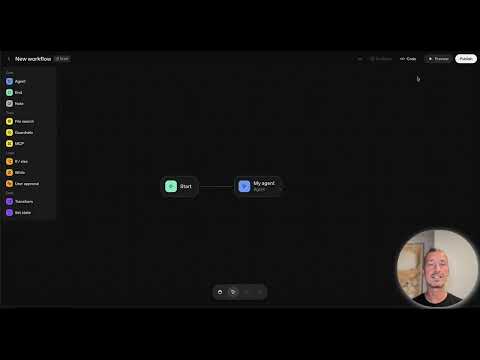
When you click on “Create Workflow”, you will be confronted with a blank interface that gives you the chance to start completely anew. By default, you already have two nodes at the beginning – the start node and the first agent node. These nodes are crucial for building your agents and the structure of your workflow.
Using existing templates
In the “Templates” section, you will find a selection of six sample templates that can serve as inspiration for you. These templates are pre-made structures that help you reach your goals faster. You should keep these templates in mind while creating your project ideas.
Drafts
The “Draft” section shows you incomplete works that you have not yet finished. Here you can work on your ideas, save them, and come back later to complete them. It’s a great way to work on multiple project ideas simultaneously without losing anything.

Managing completed workflows
In the section for completed workflows, you will find all your finished projects. Here you can access existing agents to test them or make adjustments. This allows for easy access to everything you have already created.

Navigation through the core elements
On the left side of the Agent Builder, you see a menu with the core elements. Here you will find categories like “Agent”, “Notes”, “Tools”, “File Search”, “Guard Rails”, and “MCP”. This structure is essential, as it forms the basis for the complexity of your agents. From here, you can select various building blocks and integrate them into your workflow.

Tools for logic design
Another important component of the interface is the logic elements that you find under “Logic”. These include “If-Else” statements and other logical structures that help you implement branches in your agent’s processes. These elements are fundamental to making your agent “intelligent” and enabling logical sequences.
User-friendly interface
The interface of the Open AI Agent Builder is designed to be very user-friendly. You will find familiar navigation options like “Undo” or “Redo” to easily manipulate changes. Additionally, you can drag & drop elements to different places within your interface to optimize your personal workflow.

Visualization of workflows
Visualizing your workflows is crucial for development. The ability to customize everything and orderly sort it helps maintain an overview, especially when the workflow becomes more complex. You can change different nodes and their arrangement to maximize your agent's efficiency.

Delete and change options
If you no longer need an element or want a different arrangement, you can easily delete or change it. This is an essential function for efficiently editing your agents. Keep experimenting and optimizing – that’s how you achieve the best results.
Conclusion and support offer
If you still have questions despite the intuitive user interface, it is no shame to seek help. Contact me if you have problems or need additional explanations. The test mode is also excellent for experimenting on your own and exploring the functions according to your preferences.
Summary - Open AI Agent Builder: The interface in detail
In this guide, you have learned the basic functions and the user interface of the Open AI Agent Builder. You now know where to find the necessary tools to successfully create intelligent agents and tackle your projects.
FAQ
What is the Open AI Agent Builder?The Open AI Agent Builder is a tool for creating intelligent agents.
How do I create a new workflow?Click on “Create Workflow” and start editing.
Can I use templates?Yes, there are several pre-made templates to choose from.
How can I save a draft?You can save a draft by working in the draft section and then saving the workflow.
What should I do if I have questions?You can contact me anytime for support.

