
Sketch tutorial - become a UI and UX designer

- Become a UI and UX designer: create user interfaces for websites and apps with Sketch
- For a quick start: learn the basics of Sketch, UI and UX design
- For your progress: Learn advanced design techniques such as Boolean operators
- Practical tutorial: Create a modern user interface using an app as an example
- Better team play with developers: Provide them directly with developable prototypes
- Understand the concept of UI and UX in 5 hours: trainer Luca Kiedrowski shows best practice examples
- How to remember what you've learned: Including work materials to join in with
Google and Apple also rely on Sketch - do it like the big boys and learn now how to create simply beautiful, user-friendly and, on top of that, development-ready UI designs.
24 Videos, 315 minutes
Introduction
Sketch tutorial: 1.1 Intro
3 minWelcome to the Sketch tutorial: Learn how to use the program to design your own apps. Here is an overview of the course.
Sketch tutorial: 1.2 What is Sketch?
2 minA brief introduction to the "Sketch" program and how to get access to it.
Sketch tutorial: 1.3 Program interface
6 minHere you will get to know Sketch better. I'll show you the complete program and you'll learn how to work with it effectively.
Sketch tutorial: 1.4 Tools
3 minSketch wouldn't be such a great program if you couldn't use tools. Here you can find out how to add these tools.
Sketch tutorial: 1.5 The most important plugins
5 minPlugins help you to work even better and faster with Sketch. I'll show you which plugins can help you best.
Sketch tutorial: Installing 1.6 libraries
3 minWith libraries, you can transfer standardized designs from Apple or Android directly into your project.
Sketch tutorial: 1.7 InVision
4 minInVision is a tool that makes your Sketch project much easier. You can create "wireframes" there to structure your project.
Design fundamentals
Sketch tutorial: 2.1 Colors
19 minColors offer you the opportunity to fill your app with life. Here is a brief introduction to the world of colors.
Sketch tutorial: 2.2 Fonts
18 minThe social network "Medium" shows how much fonts can influence the user experience. Fonts in your app can be very important.
Create prototypes
Sketch tutorial: 3 Prototyping
18 minNow let's start with the actual app.
Screen design
Sketch tutorial: 4.1 Home screen and design templates
25 minNow let's move on to our real project and start with the home screen. You will also learn here how we can create design templates.
Sketch tutorial: 4.2 Create groups and text styles
18 minIn this lesson, you will learn how to create groups and save text styles to save time.
Sketch tutorial: 4.3 Finding, creating and customizing icons
16 minIcons are a big part of an app. In this video, you will learn where to find the best icons and how to integrate them into your project.
Sketch tutorial: 4.4 Designing chat, working with layers
16 minNow let's move on to the chat of our app. There we work with layers, which you should also use to save yourself time.
Sketch tutorial: 4.5 iPhone X design
11 minThe iPhone X has changed a lot in app design. Designers now have to work with a new screen shape. Find out the basics here.
Sketch tutorial: 4.6 User profile, blur effect
18 minYou can use effects to give your app an interesting design. We use the blur effect in your user profile.
Sketch tutorial: 4.7 Using design as a tool
18 minIn this video, you will learn how you can use design as a tool to fine-tune your app.
Sketch tutorial: 4.8 Using libraries & creating action sheets
6 minNow we use the iOS library to build an action sheet. Libraries not only save you time when designing, but also during development.
Provide designs
Sketch tutorial: Provide 5 designs in InVision
13 minIf your app is to be developed, the developers need your designs. In this lesson, you will learn how to provide your designs to InVision.
Provide important info
Sketch tutorial: 6 Insert help into the app
22 minApp users often can't find the right buttons or have other questions that are not obvious. That's why we are creating a Q&A section.
Professional design
Sketch tutorial: 7.1 Create flat design graphics
14 minIf you have tough deadlines for your projects, you often don't have the time to design everything yourself. Here you can find out how and where to get help.
Sketch tutorial: 7.2 Home redesign
25 minWe still have a lot of room for improvement on the home screen. That's why we're redesigning our first screen.
Sketch tutorial: 7.3 User experience purchase process
27 minA user's purchase process must run smoothly, as this is one of the most delicate moments in the user flow.
Innovations in Sketch
Sketch Tutorial: 8 Prototyping in Sketch
6 minIn the new version of Sketch, you have the option of creating a prototype directly in Sketch.
Examples of use
-
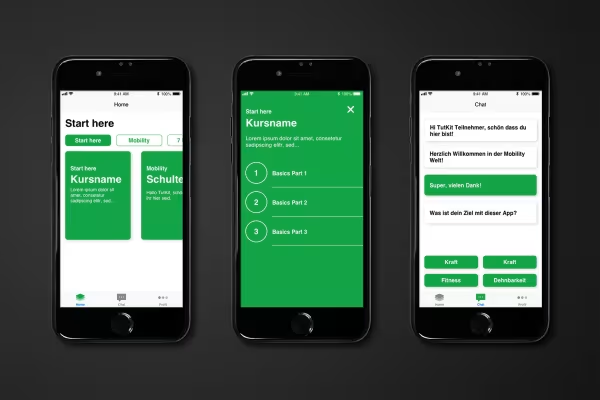 Example: In the tutorial, you create a developable app with the help of Sketch.
 -
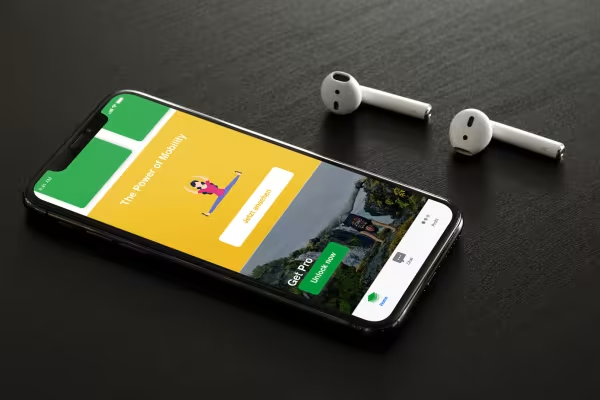 Example: Your trainer gives you tips and tricks on modern UX and UI design.
You might also like

More style, more power, more templates!

Live your layout now!

20 sets in 4K (4096 × 4096 px, 300 DPI) as JPG plus Photoshop patterns, calibrated to the fill method

Full power, more inspirations, maximum WOW effect!
Comment now „Sketch tutorial - become a UI and UX designer“