

Imagine you're standing on the eve of your presentation. The slides are half finished, the numbers still need to be displayed cleanly, and you wonder whether you've even chosen the right program. This is exactly where this text comes in. It explains the fundamental differences between PowerPoint and Prezi, shows you the advantages and disadvantages of both programs, and helps you assess which tool is better suited for which purpose.
The video is only loaded from YouTube when you play it – data (including your IP address) is then transmitted to YouTube/Google. More in the privacy policy
Key Takeaways
PowerPoint works linearly and is particularly suited to data-heavy presentations with lots of numbers, tables, and charts. Prezi works non-linearly on a large canvas and relies on zoom and camera movements to tell stories. Both programs have clear strengths and weaknesses, and the choice always depends on the content and goal of your presentation.
Step-by-Step Guide
Step 1: Understanding PowerPoint as a Starting Point
PowerPoint is by far the best-known presentation program. The video cites a market share of over 95 percent, and the software is installed on almost every computer. That makes it the first port of call when you want to create a presentation that you can save directly on your hard drive and share without detours. PowerPoint is a particularly good fit when you work with complex numbers and formulas, for example in a business report.

Step 2: Using Design Control in PowerPoint
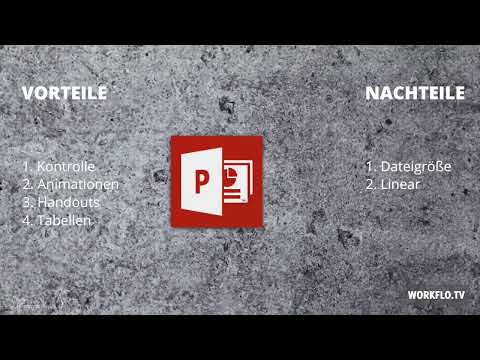
The first major advantage of PowerPoint lies in the control over the design. You'll find a huge selection of graphics, backgrounds, fonts, and colors. Every slide can be customized down to the last detail, so you can implement your corporate design exactly. Especially when precision matters, this freedom is a real gain.

Step 3: Using Animations, Transitions, and Handouts
The second advantage concerns animations and transitions. PowerPoint offers you a variety of effects that you can use selectively to support your statements. Use them sparingly, because too many effects distract from the content. The third advantage is handouts: you can print your slides so that the audience can make their own notes on the individual slides during the talk.

Step 4: Building Charts and Tables Purposefully
If you want to present your data in the form of complex tables and charts, PowerPoint is particularly strong. The data visualization tools are mature, and you can prepare series of numbers clearly. Make sure that each chart conveys a clear message and doesn't just collect data.
Step 5: Recognizing the Limits of PowerPoint
PowerPoint also has weaknesses you should know about. The first concerns file size: an image here and a video there are quickly inserted, and the file soon grows to over six megabytes. Such files often can no longer simply be sent by email. The second weakness is the linear way of working. The slides are played one after another, which doesn't correspond to how our brain links information. Listeners therefore often have to translate content into their own structure first, and that is harder for them.

Step 6: Understanding Non-Linear Working in Prezi
Prezi takes a different approach. The biggest difference from PowerPoint is the non-linear way of working. You place your elements as you like on an infinitely large canvas and can move freely between them. This creates not a rigid sequence of slides but a spatial relationship between the contents. That makes Prezi especially suitable when you want to make connections visible or tell a story.

Step 7: Using Zoom and Camera Movements Purposefully
The second advantage of Prezi is the zoom function. With zoom you can work with an element of surprise: you start with an overview, such as a map, and then zoom into individual areas to reveal details. This device looks elegant when you use it deliberately. It's best to begin directly with an overview so the audience knows where the journey is headed.

Step 8: Using Collaboration and the User Interface
Prezi also scores points when it comes to sharing. Presentations can easily be sent to colleagues, and according to the video, up to ten people can work on a project at the same time. The user interface is kept slim and is intuitive to use, so even newcomers quickly find their way around.

Step 9: Keeping Prezi's Weaknesses in Mind
Prezi has disadvantages as well. When exporting as a PDF, the result is often not convincing. Sometimes a section is missing, sometimes individual areas are not formatted correctly. Another problem is the so-called motion sickness. If you move from one object to the next too quickly or the rotation angle is too large, the audience quickly becomes dizzy. Beginners in particular tend to overuse zooms and camera pans. So use rotations and zooms with care.
Step 10: Choosing the Right Tool for Your Purpose
The most important question is: What should your presentation achieve? For a business report with lots of figures and complex charts, PowerPoint is recommended. If, on the other hand, the aim is to promote a service or to stage a brand, Prezi is better suited. Ultimately, both programs are just tools. What remains decisive are your idea and your message.

Summary – Prezi vs. PowerPoint: Strengths, Weaknesses, and the Right Use
PowerPoint is the established tool for linear, data-intensive presentations with a high degree of design control and good print functionality. Its weaknesses lie in the rapidly growing file size and the rigid sequence of slides. Prezi relies on a nonlinear canvas, zoom, and camera movements, is well suited for collaboration, and is easy to learn. Its weaknesses show in PDF output and in the excessive use of motion effects. Which program you choose depends on your project. Your message remains the most important thing in any case.
FAQ
Which program is suitable for a business report with lots of figures?PowerPoint is better suited because it presents complex tables and charts clearly and offers a high degree of design control.
When is Prezi the better choice?Prezi is ideal when you want to promote a service, stage a brand, or tell a story using zoom and camera movements.
Why does a PowerPoint file get large so quickly?Images and videos inserted without compression make the file quickly grow to several megabytes, which makes sending it by email difficult.
What does linear working mean in PowerPoint?The slides are shown one after another in a fixed order, which does not always match the way people connect information.
What is motion sickness in Prezi?This refers to the dizziness the audience feels when zooms are used too quickly or rotations too strongly.
Can several people work on a Prezi presentation at the same time?According to the video, joint editing with up to ten people at the same time is possible.
How should I use zooms in Prezi?Use zooms deliberately and sparingly, ideally start with an overview, and avoid too many camera pans, especially as a beginner.

