

You're facing a choice and wondering which Linux you should install? Then you've come to the right place. There is no single "Linux", but over 1000 different distributions, and each has its own strengths. In this guide you will learn what a distribution consists of, how the best-known ones differ, and which one suits your use case, whether for a home computer, a server, enterprise use, or secure browsing.
The video is only loaded from YouTube when you play it – data (including your IP address) is then transmitted to YouTube/Google. More in the privacy policy
Key Takeaways
A Linux distribution consists of the Linux kernel and a collection of programs, interfaces, and packages. The fundamentals are the same for almost all distributions, so you can switch between them easily. For the private desktop, Ubuntu, Linux Mint, and openSUSE are good starting points. For servers, CentOS, Debian, and Ubuntu Server are suitable, and for businesses, Red Hat Enterprise Linux and SUSE Linux Enterprise with commercial support. For brief trials or anonymous browsing, there are live systems such as Knoppix or Tails.
Step 1: What exactly is a Linux distribution?
Before you decide on a version, you should understand what is behind it. The kernel, that is, the part that controls the hardware, is developed and driven forward by Linus Torvalds. A distribution is the compilation built around this kernel: it supplies the operating system with its basic functions, an interface, programs, and a package manager with which you install and update software. Think of the kernel as an engine; the distribution is the finished car with interior and controls.

So if you are wondering why there are so many variants, the answer lies right here. Different teams assemble the engine differently and adapt it to different needs.
Step 2: How distributions differ
Distributions differ primarily in four areas: the installed programs, the user interface, the packages and source code, and documentation and support. Each distribution maintains its own packages and provides its own source code. Documentation and support are also organized by each distribution itself.
So pay attention to how well a distribution can help you when problems arise. A large community with active forums and extensive documentation is often more valuable for beginners than any technical detail.
Step 3: Getting to know the derivatives
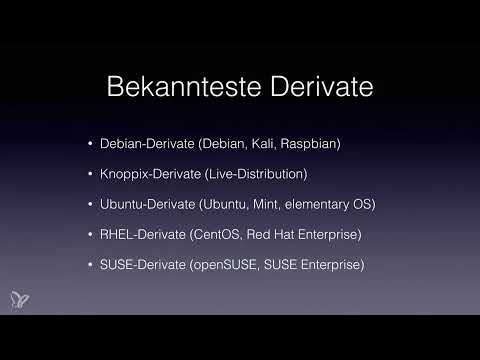
Many distributions are so-called derivatives, meaning derived systems that build on an existing base. This is not a disadvantage, but usually a sign of stability, because the foundation is already proven.
Among the best-known derivatives of Debian are Raspberry Pi OS, formerly Raspbian, for the small mini computer Raspberry Pi, and Kali Linux, which is used primarily for security analysis.
Step 4: Understanding live systems
A special form is live distributions. You can start them directly from a USB stick or a CD without installing anything on your computer. Knoppix is a well-known example of this. Many Ubuntu derivatives also offer this option.
This is ideal if you want to try out Linux without commitment first. Your existing system remains untouched.
Step 5: The Ubuntu and Mint family
Ubuntu itself is one of the most popular distributions of all. It is also based on Debian, using its base system and the same package manager. Therefore, guides and packages can often be used interchangeably.
Linux Mint is an Ubuntu derivative that is particularly well suited to desktop environments and is very beginner-friendly. Elementary OS, on the other hand, draws heavily on the Mac operating system in its graphic design and is aimed at anyone who appreciates an elegant interface.
Step 6: The Red Hat family for businesses
The Red Hat Linux derivatives are widespread in the enterprise environment. Among the best known are CentOS as a free variant and Red Hat Enterprise Linux as a commercial version. The most important difference lies in the commercial support and the area of application. If you work in a company with enterprise systems, Red Hat Enterprise Linux is the usual choice, because in an emergency you receive professional assistance.
Step 7: The SUSE family in German-speaking countries
SUSE is very well known in German-speaking countries, as the company originates from Germany and is headquartered in Munich. There are two variants: openSUSE is available free of charge, while SUSE Linux Enterprise offers professional support. In an emergency, you can hire specialists who helped develop SUSE. This help is, however, costly and is more worthwhile for companies.
Step 8: Finding the right recommendation
For the private desktop, that is, as a replacement for your current computer, Ubuntu, Linux Mint or openSUSE are recommended. For server systems, CentOS, Debian or Ubuntu Server are suitable. For enterprise solutions, Red Hat Enterprise Linux and SUSE Linux Enterprise come into consideration, although Ubuntu variants are also used in the corporate environment.
If you are wondering which one to choose, start with Linux Mint or Ubuntu. Both are widespread, well documented and easy to use.
Step 9: Short-Term Use with Knoppix
If you only want to try something out briefly, you can use Knoppix as a live system. You start it from a USB stick or CD and test Linux without making any changes to your computer. This is a straightforward way to gain initial experience.
Step 10: Browsing Anonymously with Tails
For especially secure browsing, there is Tails. This customized Linux distribution is specialized in masking your IP address and thus ensuring extensive anonymity on the internet. You can use Tails on other people's PCs without leaving traces, or use it on your own computer.
Step 11: Finding a Complete Overview
The distributions presented here are only a selection of the best-known and most widespread ones. You can find a comprehensive list on the Wikipedia page on Linux distributions. There you can see how many variants exist and what priorities they set.

Step 12: Mastering the Basics
Regardless of the distribution you choose, you should master the basics. They are the same on almost all systems because they are based on the same kernel. If you know the basics, you will quickly find your way around any new environment. Later, when you install Ubuntu and use the terminal, you will see why this is so.

Summary – Which Linux Distribution Is Right for You?
A Linux distribution is the complete system built around the Linux kernel, with a user interface, programs and package management. For a private start, Ubuntu, Linux Mint and openSUSE are very well suited. For servers, CentOS, Debian and Ubuntu Server are suitable, and for enterprises Red Hat Enterprise Linux and SUSE Linux Enterprise. Live systems like Knoppix are suitable for non-committal testing, Tails for anonymous browsing. Choose the distribution according to your intended use and master the basics, because they remain the same across all variants.
FAQ
What is a Linux distribution?A Linux distribution is a complete operating system consisting of the Linux kernel, a user interface, programs and a package manager.
Which Linux distribution is suitable for beginners?For beginners, Linux Mint and Ubuntu are well suited, as they are easy to use and well documented.
Can I try Linux without installing it?Yes, with a live distribution like Knoppix you start Linux directly from a USB stick or CD without changing anything on your computer.
What is the difference between CentOS and Red Hat Enterprise Linux?Both are based on the same foundation; CentOS is free of charge, while Red Hat Enterprise Linux offers commercial support.

