

If your OpenVPN server only has a local IP address, no connection can be established to it from the outside. The cause usually isn't the server itself, but your router or firewall, which blocks incoming requests. With port forwarding, you specify which requests the router passes on to which computer in your home network. This guide shows you step by step how to create this rule.
The video is only loaded from YouTube when you play it – data (including your IP address) is then transmitted to YouTube/Google. More in the privacy policy
Introduction
Many guides to OpenVPN assume that your server is reachable from the internet. However, this only applies if it has its own public IP address. If you run the server at home, for example in a virtual machine under VirtualBox or on a Linux computer in your home network, it usually only has a local address such as 192.168.0.17. This address is unknown outside your network.
The solution is a rule in your router. It tells the device: All requests that arrive at my port should be forwarded to the OpenVPN server. If, on the other hand, you have rented your server from a provider, it already has a public address, and you can skip this step.

Key Takeaways
Port forwarding connects your external IP address with the internal IP of your server. Without this rule, a request from the internet will not reach the server. The interface of each router looks different, so you should specifically look for the menu item "Port forwarding".
Step-by-Step Guide
Step 1: Check whether the server has an external IP address
Before you change anything, clarify where your server is located. If it only has a local address and runs at your home, you need port forwarding. If, on the other hand, it is with a hosting provider, it is already reachable from the outside. This distinction saves you unnecessary work.
Step 2: Log in to the router
Open your router's configuration page. You can usually reach it via the browser and the address of the default gateway. Log in with your administrator account. Without this login, you cannot change any rules.
Step 3: Find the Port Forwarding menu item
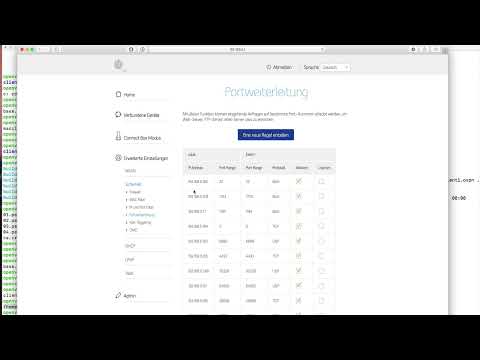
In the settings, you will usually find the section for port forwarding under WLAN or LAN. On some devices, it is also located under Network, Firewall or Advanced. The term "Port forwarding" appears with almost all manufacturers, so you can search for it specifically.
Step 4: Create a new rule
In the port forwarding section, you create a new entry using a button such as "New rule" or "Add". Each rule describes a single forwarding. You can create a separate rule for each service you want to use from the outside.
Step 5: Enter the internal IP address of the server
In the field for the target, you enter the internal IP address of your OpenVPN server. You can find this address in the router's network overview or directly on the server using the command ip a under Linux. A typical example is 192.168.0.17. Make sure that the address is assigned statically. If it changes after a restart, the forwarding will no longer work.
Step 6: Set the port
Next, you set the port that is addressed from the outside and the port to which the request is forwarded in the internal network. Use the port that you did not change during the installation of the server. For OpenVPN, this is usually port 1194. If you have changed it, enter your own value instead. Both fields should contain the same port, unless you are planning a special redirection.
Step 7: Select the protocol
In the next field, you select the protocol. The options are usually UDP and TCP. OpenVPN often runs over UDP, but can also be operated over TCP. In the video, both protocols were activated because the speaker often adjusts his settings. If you are unsure, choose the protocol that is stored in the configuration of your OpenVPN server. It specifies which protocol the server uses.
Step 8: Understand the relationship between external and internal IP
After saving, the router recognizes incoming connections by your external IP address and the port. It then forwards them to the internal address. Your connection from the internet therefore first hits the public address of your router and then ends up on the server. To find out your public address, you can open the router's status page or use an IP check service in the browser.
Step 9: Forwarding Other Services Such as SSH
The same method works for other services. If you also want to access your OpenVPN server from outside via SSH, you create an additional rule. For this, you use the SSH port, usually 22, and the internal IP of the server. Each service needs its own rule with its own port.
Step 10: Adapting the Settings to Your Router
The interface differs on every router and firewall. Some devices call the function "Port Forwarding", "NAT" or "Virtual Servers". So if you can't find "Portweiterleitung", search for these terms. Always enter the values as described above: external port, internal IP, internal port and protocol.
Summary – Setting Up Port Forwarding for a Local Server
Port forwarding makes your local OpenVPN server reachable from the outside, even though it only has an internal IP address. You log in to the router, create a rule in the port forwarding menu and enter the internal IP, the port and the protocol. The same procedure applies to SSH and other services. Since every router is structured differently, it is worth searching for the appropriate terms in the interface.
FAQ
Do I need port forwarding if my server is a rented root server from a provider?No, a rented server already has a public IP address and is directly reachable.
What happens if I don't set up port forwarding?The router discards incoming requests from the internet, and you cannot connect to your OpenVPN server.
Where do I get the internal IP address of my server?You can find it in your router's device list or with the command ip a on a Linux server.
Which port do I need to enter for OpenVPN?The usual port is 1194, unless you changed it during installation.
Should I choose UDP or TCP?Choose the protocol that is specified in the configuration of your OpenVPN server. If you are unsure, you can enable both protocols.
Can I forward multiple services through one router?Yes, you create a separate rule for each service with its own port and the appropriate internal IP.
Why does my rule no longer work after a restart?The server has probably been assigned a new internal IP address. Therefore, assign it a static address.

