
Creating videos - the great videography course

- Create your own videos: 8-hour course on videography by Matthias Butz
- Preparation and basics: from the idea to planning; important technical terms explained
- Equipment: What you should look out for with your camera, lens, lighting and sound recording
- Mobile workflow: recording and video editing with your smartphone
- DSLR/DSLM: How to set the Blender, ISO, focus and exposure time correctly
- Light and sound: variants of scene lighting and techniques for high-quality sound recordings
- The basics of video editing, tips and tricks for marketing and comprehensive practical examples
Whether you're using a smartphone or more sophisticated equipment, learn how to create videos that will be seen. Start the course now and learn more about videography.
72 Videos, 544 minutes
Intro to the video training
What you can expect in the video training course "Creating videos - the great videography course"
You will learn how to achieve the best possible film quality with your equipment.
What you can expect in the video training course "Creating videos - the great videography course"
3 min OpenIntroduction
Videography course: 1.1 | Welcome
Welcome to the videography course. Find out here what you can expect.
Videography course: 1.2 | What do you need for a good video?
Would you like a quick start? No problem. A video for you with the most important tips in a nutshell and what you need for a good video.
Videography course: 1.3 | The right video
The right video? How do I find it? What does it take to create a video that others like? You need more than just equipment.
Preparation
Videography course: 2.1 | Intro to the "Preparations" chapter
The intro to the Preparations chapter.
Videography course: 2.2 | The idea
How do I find new ideas for my videos? I'll show you my strategy.
Videography course: 2.3 | Your plan
Before you start shooting your video or movie, you first need one thing: a plan and a strategy.
Videography course: 2.4 | Important equipment
Our video has to be recorded somehow. What equipment do I need exactly?
Videography course: 2.5 | How much material do I need?
A question that is not so easy to answer: How much do I need to film for my video? Here are my experiences.
Equipment
Videography course: 3.1 | Intro to the "Equipment" chapter
Let's start with the equipment chapter.
Videography course: 3.2 | Which camera do I need?
Choosing the right camera is always difficult. Let me help you a little with your search.
Videography course: 3.3 | Which lens do I need?
In addition to the camera, the lens is of course also extremely important. I'll show you what I use to film my videos.
Videography course: 3.4 | The right light for filming
The light is actually more important than the camera. Light provides the perfect basis for the shot. But what is good light and what is bad light?
Videography course: 3.5 | How do I record the sound correctly?
Now that we've learned so much about all the important topics, we can't forget about sound.
The basics
Videography course: 4.1 | Intro to the "Basics" chapter
Welcome to the next chapter, in which we look at the basics.
Videography course: 4.2 | Resolution
What does the resolution of a video mean for the quality? The answer to this will be different than you think. We answer all your questions about video resolution.
Videography course: 4.3 | How many frames per second?
One of the most frequently asked questions from my participants: Which frame rate is the right one for my videos? I explain the topic in detail here.
Videography course: 4.4 | Bit depth & compression
There is more than just the resolution of a video. Depth can make for completely different shots.
Videography course: 4.5 | When is it worth filming in the LOG?
When should you really use LOG and what disadvantages does it have? I explain this in this video.
Filming with the smartphone
Videography course: 5.1 | Intro to the chapter "Filming with the smartphone"
Welcome to this chapter, which is all about filming with your smartphone.
Videography course: 5.2 | Filming with the webcam
A webcam can also be used to create a video. There are a few more things to consider here, but it is possible to create a great video with any webcam.
Videography course: 5.3 | Filming with the smartphone
You don't need an expensive movie camera to film. It also works with a smartphone if you know how to ...
Videography course: 5.4 | Adobe Rush
Filming with your smartphone can be made a little more professional if you use the right app. I'll show you how to create better videos with Adobe Rush.
Videography course: 5.5 | FiLMiC Pro
Filming with your smartphone can be made a little more professional if you use the right app. I'll show you how to create better videos with FiLMiC Pro.
Videography course: 5.6 | Editing and grading with the smartphone
The smartphone can also cut and grade your videos ...
DSLR/DSLM Basics
Videography course: 6.1 | Intro to the chapter "DSLR/DSLM basics"
The prelude to the chapter with the basics of DSLR/DSLM.
Videography course: 6.2 | Exposure time when filming
Exposure time plays a special role in filming and ensures the right look for our videos.
Videography course: 6.3 | Blender when filming
Blender is a great way to work with blur when filming. However, there are a few things to bear in mind here ...
Videography course: 6.4 | ISO when filming
We've already covered two of the three important values for your camera. Now it's time for the settings that are particularly useful in the dark: ISO.
Videography course: 6.5 | White balance when filming
There is also a white balance when filming. This is even more important here than in photography, for example.
Videography course: 6.6 | Autofocus or manual focus?
When filming, the question always arises: should I focus manually or automatically? It depends on the situation at the time, but let me explain this in more detail in this video.
Videography course: 6.7 | How do I focus manually on video?
Autofocus can be a support, but not in every case. When it comes to manual focus, you shouldn't miss this video.
Videography course: 6.8 | Creating stable recordings
What makes a video look professional: moving, but also stable shots, as if the camera is flying. I'll show you how this works even without expensive equipment.
Light
Videography course: 7.1 | Intro to the "Light" chapter
In this chapter, we look at the topic of light.
Videography course: 7.2 | Why do we use light?
Before I explain the different types of light and what they can be used for, I want to show you why we need light or certain types of light in the first place.
Videography course: 7.3 | Hard vs. soft light
Which light should I use for my videos? Learn about the differences and advantages/disadvantages of hard and soft light.
Videography course: 7.4 | Artificial light
Artificial light in films has a number of advantages. But how do we use it to make our video look the way we want it to?
Videography course: 7.5 | Natural light
You don't necessarily need a video light to film. You can also use natural light. However, there are a few things you should bear in mind.
Videography course: 7.6 | Lighting setup - only one light source
You can do a lot with just one light source. It is not always necessary to invest in an over-the-top setup. Sometimes just one light source is enough.
Videography course: 7.7 | Lighting setup - 3 Point Light
The three-point light is one of the most famous light setups from the movie. I'll show you how to use it and why it looks so good.
Tone
Videography course: 8.1 | Intro to the "Sound" chapter
The following chapter deals with the topic of sound.
Videography course: 8.2 | What microphones are available?
Even if it often looks like it: Not every microphone is the same. There are standard differences and areas of application that you should be aware of.
Videography course: 8.3 | Microphone leveling
The level is crucial for a proper sound recording. A lot can be adjusted here in the editing process, but with the right basis, the right level, the quality is significantly better.
Videography course: 8.4 | Minimize Hall
Reverb on a soundtrack quickly looks unprofessional. It is also difficult to remove in post-production. That's why we have a few tips for you on how to avoid reverb from the outset.
Videography course: 8.5 | Synchronize sound
It's not uncommon to use different devices for recording video and recording sound. I'll show you how to combine the two again.
Video editing
Videography course: 9.1 | Intro to the "Video editing" chapter
In this chapter, we will take a look at video editing.
Videography course: 9.2 | Import and organization
After filming, our material must of course be backed up. I'll show you my strategy and the best way to organize your recordings.
Videography course: 9.3 | Editing I - A-Roll
Let's get down to practice. I have a video project for you that we will complete together. From import to publication.
Videography course: 9.4 | Editing II - B-Roll
In the second part, we refine our video and add the B-roll material.
Videography course: 9.5 | Grading
Do you want that certain something in the post-production of your videos? Then color grading is the perfect option. Let me show you how I grade my videos.
Videography course: 9.6 | Sound editing
Not only the image in a video is important, but also the sound. This can also be edited to make it just as high-quality as the image.
Videography course: 9.7 | Effects and animations
Animations in your videos are not rocket science. You can animate effects in your videos using keyframes.
Videography course: 9.8 | Music
Music creates the right mood in your videos. But where do you get the right music for your video? I'll show you my (also free) sources.
Videography course: 9.9 | The right export settings
When exporting your videos for upload, you should note a few settings. They should look the way you want them to.
Marketing
Videography course: 10.1 | Intro to the "Marketing" chapter
Welcome to the Marketing chapter.
Videography course: 10.2 | Tips for more reach
We want our videos to be seen by as many people as possible. How exactly do you do that? I'll tell you about my experiences.
Videography course: 10.3 | Growing with a YouTube channel
Have you finished your video and want it to reach as many people as possible? You can definitely achieve this with these tips.
Bonus
Videography course: 11.2 | Eye tracking
Image composition is not only used in photography. You can also produce significantly better videos when filming by paying attention to certain things.
Videography course: 11.3 | Drone
Drones are becoming increasingly popular. But what do you need to consider? I'll show you the legal and creative options.
Videography course: 11.4 | Glidecam
Floating tripods ensure stable videos, but are not easy to handle. With a little practice and my tips, you can create impressive videos.
Videography course: 11.5 | Gimbal - what's the point of a Ronin?
Gimbals can help you create stable videos. But how do you use them and what is important?
Videography course: 11.6 | 4k or HD?
4k is the current standard for many - or is it? Maybe it's worth filming in HD after all. I'll show you the pros and cons.
Practice
Videography course: 12.1 | Intro to the practice chapter
Welcome to the practical chapter.
Videography course: 12.2 | Camera settings for filming
What do you need to consider when filming with a DSLR/DSLM or smartphone? Which camera settings are important here?
Videography course: 12.3 | How to create my videos
Today I want to give you an insight into my office and how I work.
Videography course: 12.4 | Film hacks I
What should you bear in mind to create a brilliant video? I have summarized a few very simple tips for you here and even show you how it works with your smartphone.
Videography course: 12.5 | Film Hacks II
Filming doesn't always have to be expensive. Today I have a few almost free tips for great videos that you can implement right away.
Videography course: 12.6 | 4k is not 4k - smartphone vs. cinema camera
Can a smartphone replace a DSLR or DSLM? Can cell phones ever replace real cameras? That's what this video is about.
Videography course: 12.7 | How do I edit my videos?
I have often been asked how I cut, grade and edit the sound in my videos. Of course, I would like to answer these questions and have therefore created this tutorial.
Videography course: 12.8 | Stable videos from the free hand
It is not always possible to use a gimbal or a steadycam. But I'll tell you something: it's not always necessary. Today I have a few cool tips for you on how you can create shake-free videos freehand.
Examples of use
-
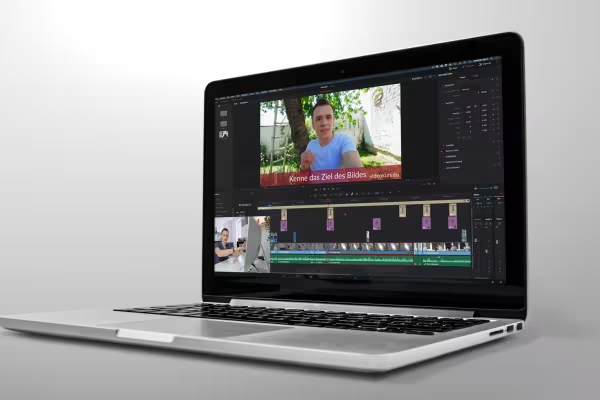 Basics, tips and tricks for videography - how to create high-quality videos.
 -
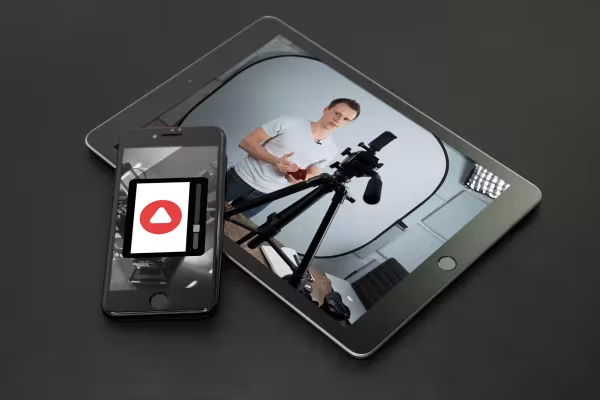 Learn how to create videos with your smartphone and apps in a mobile workflow.
You might also like

Edit films, transitions, animations, and more
Produce high-quality videos
How it works. What options exist.

Practical applications for companies
Comment now „Creating videos - the great videography course“