
Your ad groups are set up, and now all that's missing is the ad copy that convinces customers. This is exactly where this guide comes in. You'll learn how to create multiple ads within an ad group in Google Ads (formerly AdWords), how to sensibly differentiate them from one another, and why Google then figures out on its own which variant works best. A campaign about teeth whitening (Bleaching) serves as the example.
The video is only loaded from YouTube when you play it – data (including your IP address) is then transmitted to YouTube/Google. More in the privacy policy
Key Takeaways
Create three ads per ad group so that Google can automatically test which variant converts best. Change the ads only in nuances so that you can later understand which wording works. Stick to simple language rules: no exclamation marks and end sentences with a period. If you change an existing ad, its previous statistics will be reset. And as soon as a clear winner emerges, pause the weaker ads.
Step-by-Step Guide
Step 1: Open the Right Campaign
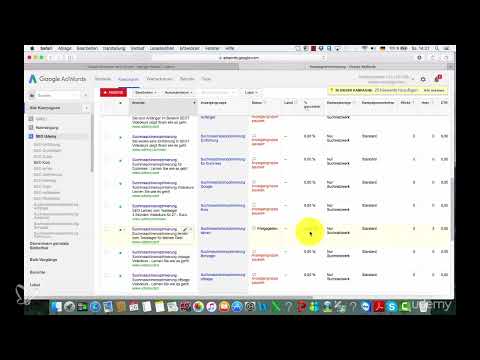
Log in to your Google Ads account and open the campaign containing your ad group. In the example, this is the "Bleaching" campaign. Then click into the ad group until you see the view with keywords and ads. Pay attention to the status of your keywords, because paused keywords are marked differently in the overview than active ones. This way, you keep track of everything from the start.


Step 2: Check the Starting Point
You will usually already have created a first ad. It is the basis for all further variants. Before you start, read it carefully and check whether the headlines and descriptions match your keywords. The first ad in the example has the headline "Bleaching mit Erfahrung" ("Bleaching with experience"). It serves as the starting point that you now expand step by step.

Step 3: Understand Why Multiple Ads Are Worthwhile
A single ad gives you no basis for comparison. With multiple ads within the same ad group, Google automatically tests which wording resonates best with users. You don't have to configure anything else for this. The ad that performs better is shown more frequently over time. This is exactly how you increase the performance of your advertising without having to constantly intervene manually.

Step 4: Create a Second Ad Using the Plus Icon
To create another ad, click the plus icon for new ads in the ad group. Google opens a form that offers you the existing ad as a basis. Initially adopt it unchanged, because this is exactly what your test variant will be built from. You make the changes in the next step.

Step 5: Change the Headline Deliberately
Now the variant gets interesting. In the headline "Bleaching mit Erfahrung", replace the addition with a different benefit, for example "Bleaching kostengünstig" ("Affordable bleaching"). The main message stays the same, but the message shifts. It is precisely such small differences that later show you which argument is most likely to get users to click.

Step 6: Use Punctuation Correctly
When wording your texts, you should observe two rules. Do not use exclamation marks, because Google doesn't like them. In addition, end sentences correctly with a period. The headline "Bleaching kostengünstig" is a good example of this: it does without an exclamation mark and still comes across as clear and convincing. Pay attention to these details before you save the ad, because they affect the quality of your advertising.
Step 7: Phrase a Third Variant as a Question
The third ad differs the most. Phrase the headline as a question, such as "Suchen Sie ein Bleaching?" ("Are you looking for a bleaching?"). Questions address users directly and often arouse stronger interest than plain statements. This shows you that the three ads may well differ in tone and approach, as long as their common core is preserved.

Step 8: Add a Local Reference
As another building block, you can add a local element, for example "Bleaching from the specialist in Berlin." A location reference makes your ad more tangible, especially for services tied to a specific location. Make sure the addition really fits your offer, because only then is it worthwhile.

Step 9: Check the Spelling
Before you save the ad, read through all the texts carefully once more. The video shows how quickly a typo can creep in, for example in the spelling or capitalization of "Bleaching". Mistakes look unprofessional and can significantly reduce the click-through rate. So deliberately take the time for this check.
Step 10: Save the Ads
Once all three variants are fully written, you save them. Google then includes the new ads in the test. Afterwards, check in the ad group overview whether all three ads were created correctly and are active.

Step 11: Read Google's Evaluation
In the ad overview, you can see the probability with which Google serves each ad. In the example, one ad is served at 87.5%, while another is served only at 12.5% because it performs worse. Google therefore automatically favors the better-performing variant. This is exactly the effect you want to use, without having to control the distribution yourself.

Step 12: Understand the Consequences of a Change
If you change an existing ad afterwards, its previous settings and statistics are lost. The ad practically starts over, and the overview initially shows zero values. Therefore, plan changes deliberately instead of constantly rewriting a running ad. It is better to create a new variant when needed and pause the old one.

Step 13: Be Patient with New Ads
A newly created ad needs time before meaningful values emerge. At first, you often see only a few impressions, an average position, and no clicks or conversions yet. In addition, there are external factors such as season or search behavior. In the example, the tutorial was recorded shortly before Christmas, when hardly anyone is searching for an SEO course. Therefore, only evaluate results once enough data is available.

Step 14: Let Winners Run and Pause Losers
The last step is the most important for ongoing operation. For every ad group, always create three variants that you modify in nuances, and let Google test. As soon as one ad clearly performs better, you let it keep running and pause the others. This keeps your advertising lean, and your budget flows into the wording that actually wins customers.

Summary – Creating and Testing Google Ads Correctly
With three ads per ad group, you give Google the basis to determine the best wording on its own. Vary headlines and tone only in nuances, pay attention to punctuation and spelling, and plan changes deliberately, since existing statistics are lost in the process. Evaluate the results only after sufficient runtime and pause the weaker ads as soon as a winner emerges.
FAQ
How many ads should I create per ad group?You should create at least two, ideally three ads. This way, Google can reliably compare which variant converts best.
Why should I avoid exclamation marks?Google does not like exclamation marks in ad texts. Instead, write in a factual and convincing way, without overdoing punctuation.
What happens if I change a running ad afterwards?The previous settings and statistics are lost, and the ad practically starts over. It is better to create a new variant if you want to change the content significantly.
How do I know which ad is the best?The overview shows you the probability with which Google serves the ads. An ad with a significantly higher share generally performs better. Pause the others once the difference is clear.
Why do new ads show hardly any values at first?New ads need time to gather impressions. In addition, season and search behavior influence the results, which is why you should wait a little with the evaluation.


