
A running campaign quickly looks confusing: numbers in every column, plus ad groups that differ greatly. This is exactly where it is decided whether you waste budget or specifically improve results. In this guide, you will learn how to evaluate each ad group individually and derive from that what you change and what you leave alone. You will also learn why you should never adjust Context Hints and bid at the same time, and how to tell what actually worked despite small amounts of data.
The video is only loaded from YouTube when you play it – data (including your IP address) is then transmitted to YouTube/Google. More in the privacy policy
Key Takeaways
- Evaluate each ad group individually before you change anything in the overall campaign.
- Never change Context Hints and bid in the same step. Otherwise, you won't know later which measure triggered the effect.
- An ad group that converts consistently should be left as unchanged as possible, and you should rather give it more budget.
- With little data, don't react hastily. Let the changes run for at least about ten days before you pass judgment.
- Properly set up pixel tracking with correctly defined conversions is the foundation for every decision.
Step-by-Step Guide
Step 1: Review the overall campaign and put the cost per conversion into context
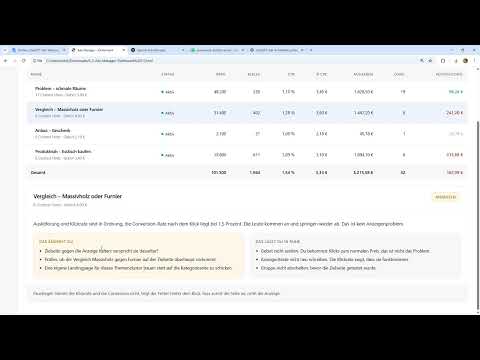
Start in the campaign overview. There you can see impressions, clicks, click-through rate, spend, and conversions. The cost per conversion column is important, but it only appears if your pixel and your conversions are set up correctly. If this column is missing, check your tracking first, especially if you run an online shop. Then compare the value with your upper limit. If your value, as in this example, is €162 and thus above the €150 that you can accept at most, that is the reason to look further into the individual ad groups.

Step 2: Compare ad groups with each other
Now open the ad groups and compare them side by side. Pay attention to spend, conversions, and click-through rate. A group with many conversions and acceptable cost per conversion is a strong signal. A low click-through rate alone does not have to be a problem if the conversions are right. In the example, the first group spent almost €1,800 and achieved 19 conversions. That is a very good result, even though the click rate is only about one percent. Such a group is a candidate for being left untouched.

Step 3: Don't change a well-performing group without a reason
When an ad group works well, it is tempting to turn all the dials. Don't do it. The Context Hints evidently fit the landing page and the search queries well, the bid is reasonable, and the ad texts deliver results. So don't change the bid up or down, leave the texts as they are, and don't add any new Context Hints. The most sensible lever here is the budget. Increase it for this group and observe over about two weeks how the cost per conversion develops. Alternatively, you can also test the proven Context Hints in another group, provided they fit thematically.

Step 4: Analyze a weak group and move exactly one lever
Not every group performs this well. Another group in the example delivers a higher click rate, but only six conversions at very high cost. Here it is worth first looking at the landing page. Check whether the target page matches the promise of the ad, whether it loads quickly, and whether the page appeals to the right target audience at all. When in doubt, the landing page is the lever you should start with. You should not touch the bid at the same time in this phase, even if an increase on its own would make little sense. The ad texts also remain unchanged as soon as you work on the landing page. Only this way will you later recognize which measure caused the change.

Step 5: Adjust the bid if a group is barely being served
Sometimes the problem lies not in quality but in the bid. In the example, there is an ad group with a maximum bid of €2.18 per click. This value is fully used up, the group has achieved only a single conversion, and impressions are only about 2,000. The ad therefore simply receives too few impressions to allow reliable conclusions. Here, raising the bid is the right step. However, change only the bid and leave the Context Hints untouched. A single cheap conversion can be a coincidence, so you then have to patiently collect data.

Step 6: Review or switch off expensive groups with a high click-through rate
A group with a very high click-through rate shows that the ad is catching users' interest. However, if these clicks do not lead to conversions, something is wrong further down the funnel. First check whether the landing page fits. If you are convinced that the page is not the problem, you can switch off the group and direct the budget into the profitable group instead. The clicks do show potential, but they do not justify high costs without results.

Step 7: Filter individual ads and pay attention to dependencies
At the ad level, you can evaluate texts and images individually. Filter by cost per conversion to identify the cheap ads. You should scale these, while you rather adjust or switch off more expensive ads. Pay attention to dependencies here: if you deactivate an ad group, all ads within it are deactivated as well, because they are only served within that group. Therefore, check whether there is a winner in the group after all before you switch it off. Ads with too little data you leave alone until the next evaluation.

Step 8: Be patient and plan the evaluation timing
The last step is probably the hardest: waiting. After only a few days, the amount of data is often too small to make reliable decisions. Therefore, let your changes run for at least about ten days before you form an overall picture. Only then will you recognize patterns that are not based on chance. Document every change with a date so that you can later understand which measure had which effect.

Summary – Optimizing a ChatGPT Ads campaign: Evaluating ad groups correctly
You optimize a ChatGPT Ads campaign best by evaluating each ad group individually. Good groups you keep and, if anything, give more budget. Weak groups you first analyze with regard to the landing page before making further changes. You never change bid and Context Hints at the same time, so that you can trace the effect of each measure. With little data, you specifically increase the bid and wait until at least ten days of data are available.
FAQ
Why shouldn't I change Context Hints and bid at the same time?If you change both values at the same time, it is no longer possible to say later which measure caused the success or failure. Therefore, always change only one lever per step.
What do I do with an ad group that delivers very good results?You leave it as unchanged as possible, because it works. A sensible measure is to allocate more budget to it and observe the development over about two weeks.
How can I tell that an ad group has too little data?One indication is few impressions and few conversions. If the bid is fully exhausted but the ad is hardly served, that is a clear sign.
How long should I let changes run before I evaluate them?Plan for at least about ten days. After only a few days, the data is usually not sufficient to make reliable decisions.
What happens if I switch off an ad group?All ads within this group are deactivated as well, because they are only served on the basis of the group. Therefore, check beforehand whether there is a well-performing ad text in it.
Why is the Cost per Conversion column sometimes empty?The column only appears if the pixel and conversions are set up correctly. If it is missing, you should first check your tracking.


