
Imagine you run your first ChatGPT ad and after a few days all you know is how many clicks and costs have accrued. Where the visitors came from and which ad triggered the sale remains unclear. UTM parameters close exactly this gap. You don't need a developer or any pixel code, just a few minutes and a clean landing page URL.
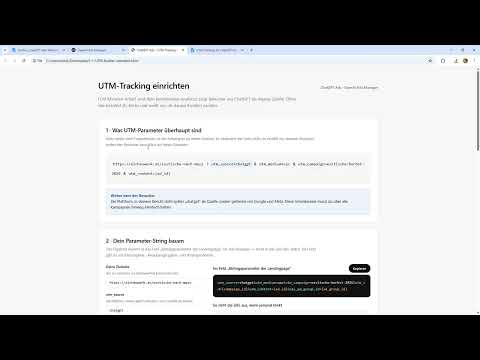
The video is only loaded from YouTube when you play it – data (including your IP address) is then transmitted to YouTube/Google. More in the privacy policy
Key Takeaways
- UTM parameters are additions at the end of your landing page URL that tell analytics where a visitor comes from.
- The source (
utm_source), the medium (utm_medium) and the campaign (utm_campaign) are mandatory; ad ID and ad group ID are optional but very helpful. - Spaces in the campaign name are not allowed. Use hyphens or underscores instead.
- You enter the finished URL in the Ads Manager at the ad group level.
- Analytics then shows visitors from ChatGPT as a separate source, including clicks, views and sales.
Step-by-Step Guide
Step 1: Define the Landing Page as the Basis
Everything starts with the target page your ad links to. In the video, this is a product page that you use as the basis for the campaign. Write down this address in full, including https://. You will append the UTM parameters to exactly this URL later, without changing it.

Step 2: Understand the Basic Principle of the Parameters
After the landing page address, you put a question mark. This is followed by parameter pairs in the form name=value, with an & between the pairs. To get started, three mandatory parameters are enough: utm_source for the source, utm_medium for the medium and utm_campaign for the campaign name. In the video's example, the medium has the value cpc, i.e. cost per click. This value indicates that you pay for clicks.
Step 3: What Analytics Automatically Receives as a Result
As soon as the parameters are in the URL, Google Analytics picks up the information on its own. The source shows where the click came from, the medium shows that it is paid advertising, and the campaign shows which name is behind it. You don't have to configure anything in Analytics; it simply flows into the report. That is exactly what makes UTM tracking so practical: you learn not only that traffic arrived, but also where it came from and through which measure.
Step 4: Use the Interactive Generator
Assembling the URL by hand can be error-prone with long names. In the accompanying material, you will therefore find an interactive HTML template. You enter your landing page there, choose the parameters, and the template builds the complete URL for you. Note that the field labels in the video are partly in English, because the parameter names are defined internationally.

Step 5: Set the Campaign Name and Spaces Correctly
This is where most mistakes happen. Suppose your campaign is called "Black Friday". As the parameter value, you then write black-friday or black_friday. A space must not be used, otherwise the URL becomes invalid or the analysis breaks into unusable pieces. Choose one spelling and stick to it consistently across all campaigns so that the values can be filtered cleanly later.

Step 6: The Ad ID as the Identifier of the Specific Ad
If you run multiple ads, the campaign alone is not enough. You want to know which specific ad generated the sale. For this, you use the parameter utm_content and append the ad's ID there. This way you can see in the analysis which ad brought visitors who actually buy. The video shows this procedure using the example of an ad that generated a sale.

Step 7: Add the Ad Group ID and Account ID
In addition, you can include an ad group ID if you work with multiple groups. According to the video, ChatGPT adds the account ID automatically, so you generally don't have to enter it yourself. You mainly need the ad group ID when you want to compare different target audiences or bids within a campaign. Incidentally, if you have already entered a campaign ID in the field, it is often sufficient. Parameters and plain IDs can therefore be combined or used individually, depending on the input field.

Step 8: Enter the finished URL in the Ads Manager
Copy the finished URL in full into your destination field. At the ad group level, you will find fields for the campaign ID and the ad ID. Enter the appropriate values there so that the attribution is also correct in the Ads Manager. Afterwards, check that your landing page opens without errors with all parameters before you start the campaign.

Step 9: Verify success in Analytics
You can see whether everything works in your existing Analytics account. As soon as a click, a page view, an impression, or a purchase takes place, the visitor appears with the source ChatGPT. You do not need to create a new report for this. Take a look at the source and medium reports once the first data has come in, and check whether the campaign names are displayed correctly.
Summary – Setting up UTM tracking for ChatGPT Ads: Your first measurement step
With just a few parameters, you build a measurement foundation before you even spend any budget. You append source, medium, and campaign to your landing page, add ad and group IDs for detailed analysis, and enter the finished URL in the Ads Manager. Analytics then shows ChatGPT as its own source and provides you with clicks, views, and sales that the Ads Manager alone does not break down. A short test before launch prevents the most common errors, especially spaces in the campaign name.
FAQ
Do I need to hire a developer for UTM tracking?No, you need neither a developer nor a pixel code. You create the URL yourself and enter it in the Ads Manager.
Which parameters are absolutely necessary?To get started, utm_source for the source, utm_medium for the medium, and utm_campaign for the campaign name are enough.
Why must the campaign name not contain spaces?Spaces can break the URL or cause Analytics to split the name into several parts. Use hyphens or underscores.
What is the ad ID for?The ad ID shows you which specific ad triggered a visitor, a click, or a sale, even if several ads are running in parallel.
How quickly do I see the data in Analytics?As soon as a visitor arrives via the tracked link, they appear in your Analytics account with the source ChatGPT. The first reports usually show up after a short time.


