
Before you plan any budget for ChatGPT Ads, you need to clarify whether your offer may be advertised at all. Similar to Google and Facebook, there are rules that change regularly. For example, as of now (August 2026), financial service providers have only been permitted for a few days. In this guide, you check your industry against the allowed and blocked categories. You will also learn which conversation contexts do not receive advertising, and you apply for your ad account at ads.openai.com.
The video is only loaded from YouTube when you play it – data (including your IP address) is then transmitted to YouTube/Google. More in the privacy policy
Key Takeaways
- Allowed categories include household and consumer goods, local services, travel and experiences, as well as digital products and education.
- Financial services, healthcare, and legal services are currently subject to case-by-case review only in the USA. Europe is likely to follow.
- Blocked categories include alcohol, tobacco, drugs, gambling, political content, 18+ content, dating, weapons, and housing and job listings.
- In sensitive conversations, such as about depression, weight problems, or controversial topics, ChatGPT does not serve ads.
- Three questions determine your eligibility: blocked category, sensitive context, landing page.
- Country, currency, and time zone cannot be changed after creation. So check them carefully.
- Submit the application now. You can add the billing address and logo afterwards at your leisure.
Step-by-step guide
Step 1: Check the allowed categories
First, get an overview of who may advertise in ChatGPT. The rules change constantly, so you should re-check them before every launch.
The allowed categories include household and consumer goods. This covers practically every e-commerce shop, but also providers such as Walmart or Target, meaning everything related to groceries, daily necessities, and entertainment. Local services such as trade businesses, hairdressers, and restaurants are also allowed. In addition, there are travel and experiences as well as digital products and education. These include books, video courses, audiobooks, further training, and workshops, whether digital or on-site.

Step 2: Know the blocked categories and case-by-case review
Next, check whether your offer falls into a restricted or blocked area. Financial services, healthcare, and legal services are currently reviewed case by case only in the USA. This rule is likely to gradually arrive in Europe as well.
Currently blocked are alcohol, tobacco, and drugs, gambling and betting, and political content. The same applies to 18+ content (such as pornography), dating, weapons, and housing and job listings. Misleading or fraudulent offers are also excluded. How well this can be verified in cases of doubt is another question. For most of these industries, the ban is expected to remain in place.
Step 3: Understand sensitive conversation contexts
It is not just your industry that matters, but also the context in which your ad would appear. Suppose someone asks about cooking recipes or a vacation. Then an ad would be an obvious fit. But if the person mentions during the conversation that they need the vacation because of depression or are looking for the recipe for drastic weight loss, that changes. The same applies if the conversation becomes politically or socially controversial or a vulnerable, sensitive, or risky situation arises. In all of these cases, ChatGPT stops displaying ads.
This is a sensible safeguard. Many people use AI today like a personal therapist, and such a situation should not be exploited. For you, this means: don't plan on reach in conversations that slip into such areas.

Step 4: Make the decision in three questions
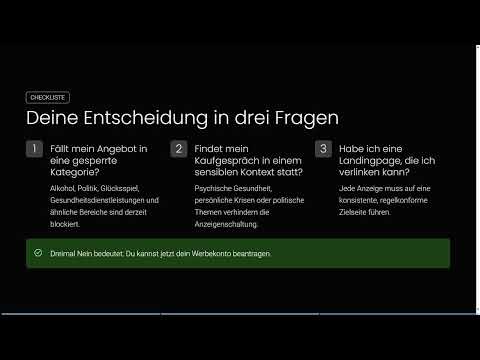
Summarize your check in three questions:
- Does my offer fall into a blocked category? If not, go to question 2.
- Does my purchase conversation take place in a sensitive context?
- Do I have a landing page I can link to?
The third question is important, because you need a website that the ad links to via click. If you can answer all three questions with "No" (for the third, meaning: a landing page exists), you can apply for your ad account.

Step 5: Register at ads.openai.com
Go to ads.openai.com and sign in. In the video, a Google account is connected for this, but you can also use a different email address. The interface is in English. In the example, it is a completely new account so that all steps are visible from the start.

Step 6: Enter company details, country, currency, and time zone
In the form, you enter information about your company, for example the website address and your industry (in the example "Media"). Then you set the country, currency, and time zone. These fields are usually pre-filled automatically. Still, check them carefully, because country, currency, and time zone cannot be changed later. If they do not match your company, you would have to create a new account.
Then click the button to create the account. This takes a few seconds. After that, your ad account is created with the basic data.
Step 7: Skip the first ad and payment details
Right after the account is created, the system automatically creates an ad draft for you. You don't need it right now. Click "Skip for later" at the bottom to skip this step.
After that, you will be asked for the email address for receiving invoices and for your payment details. You can enter both right away or also skip them and set them up later. For the first application, it is enough to provide the basic data.
Step 8: Check the setup status in the Campaign Manager
After skipping, you land in the Campaign Manager. That's how quickly the account is created. However, this does not mean that you are automatically approved. This applies especially in the current beta phase, which is still running in some countries.
At the top of the Campaign Manager, you will find the message "Finish Setup". In the example, the billing address and a logo are still missing. Depending on the country and account, an identity verification may also be required. Still, submit the application early so that the review is running while you prepare the billing address, logo, and campaign content.

Summary – Applying for a ChatGPT Ads ad account: industry check & guide
You have checked whether your industry belongs to the permitted categories or whether it is blocked or only allowed on a case-by-case basis. You also know that ChatGPT does not show ads in sensitive conversation contexts. With the three decision questions, you have clarified your eligibility: no blocked category, no sensitive purchase context, and a linkable landing page. After that, you created the account on ads.openai.com, entered company details, and set the country, currency, and time zone. You skipped the first ad and the payment details and saw the "Finish Setup" status in the Campaign Manager. You will add the billing address and logo in the next step.
FAQ
Who is allowed to advertise in ChatGPT?Permitted are, among others, household and consumer goods, local services, travel and experiences, as well as digital products and education.
Are financial service providers allowed?Yes, since a few days ago as of August 2026, currently in the USA with case-by-case review.
Which industries are blocked?Blocked are alcohol, tobacco, drugs, gambling and betting, political content, 18+ content, dating, weapons, as well as housing and job ads.
When are no ads shown in ChatGPT?In sensitive contexts such as depression, weight issues, political or socially controversial topics, and other situations deserving protection.
Do I need a website for ads?Yes, you need a landing page that is linked from the ad via click.
Can I change country, currency, and time zone later?No, this information cannot be changed after the account is created. Check it before submitting.
Do I have to enter payment details immediately?No, you can skip payment details and the first ad with "Skip for later" and add them later.
Am I automatically approved after creating the account?No, especially in the beta phase, approval may still be pending in your country. First you must complete the setup.


