

After an incident, almost every team knows what it would do better next time. A playbook makes sure you have this knowledge at hand beforehand: it describes predefined action steps for known incident types such as phishing, ransomware, or malware infections. The problem is well known. Playbooks take a lot of time, are rarely maintained, and gather dust somewhere in the file system. With ChatGPT, the basic framework can be created in a few minutes. This guide shows you how to generate a complete playbook, adapt it to your environment, and keep it up to date over the long term.
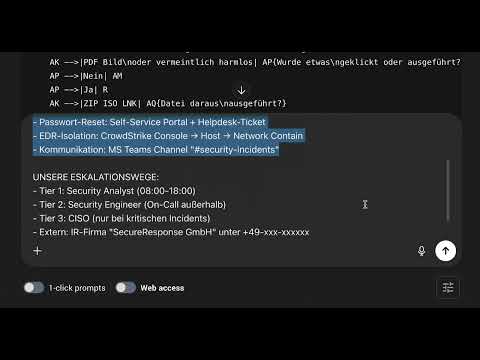
The video is only loaded from YouTube when you play it – data (including your IP address) is then transmitted to YouTube/Google. More in the privacy policy
Key Takeaways
- A good playbook follows a fixed structure: metadata, trigger and scope, triage, containment, eradication, recovery, post-incident, and references.
- ChatGPT takes care of the wording, but you have to provide the environment, the tools, and the contacts yourself.
- Decision trees make playbooks usable even for junior analysts.
- A playbook is never finished. An AI-supported quarterly review keeps it up to date without you having to start from scratch every time.
Step-by-Step Guide
Step 1: Clarify the Purpose of the Playbook
Think back to the last incident in your team. It was probably stressful and chaotic, and many decisions had to be made under time pressure. That is exactly what playbooks exist for: they define the instructions for known incident types in advance so that you don't have to improvise in an emergency. Plan around 30 minutes for creating it, because with ChatGPT most of the work is done quickly.

Step 2: Understand the Structure of a Playbook
Before you instruct ChatGPT, you should know what a usable playbook contains. The metadata states the incident type, the severity, the last update, and the people responsible and to be informed. The trigger and scope describes when the playbook is activated and which alerts or symptoms apply. The triage checks whether it is a real incident and how critical it is. Containment limits the damage, for example by isolating affected systems or deactivating accounts. Eradication removes the threat completely and eliminates the cause. Recovery brings the systems back to normal operation. Post-incident covers lessons learned, documentation, and reporting. Finally, the references follow with contacts, tools, and further links.

Step 3: Formulate the Prompt for the Basic Framework
Now comes the prompt. In it, describe the incident type, for example phishing, and provide the context of your environment. Name the tools, processes, and roles in use. Make sure to use only information that you would also be allowed to share externally. You should anonymize sensitive data beforehand. Also define the desired structure, that is, metadata, trigger, triage, containment, eradication, recovery, post-incident, and references. Add the format: Markdown for easy maintenance, checklists with checkboxes, decision trees where useful, and time frames for each step. The more precise the prompt, the more useful the result.

Step 4: Review the Generated Playbook
Once ChatGPT has created the playbook, go through it section by section. Check whether all building blocks are present and whether the decisions in the triage are comprehensible. Add your own contacts and links to the references. The result can be transferred directly into Confluence, Word, or onto paper. But remember that every change to systems or responsibilities must lead to an update of the playbook. The recommendation at the end of the generated playbook is also important: in incident response, it is not speed that wins, but discipline. A deliberately conservative approach is the foundation on which automation can be built later.

Step 5: Have Decision Trees Created
Junior analysts in particular need clear instructions on which step comes next. Therefore, have a detailed decision tree created that leads from the start, for example the report of a suspicious email, to a clear recommended action. Make sure that this tree takes the format of your playbook into account.

ChatGPT often delivers the decision tree as flowchart code. You can paste this code into common diagramming tools or UML tools, export it there as an image, and then embed it in the playbook. This makes the basis for decisions visually comprehensible.

Step 6: Adapt the Playbook to Your Own Environment
A generic playbook is a good start, but a customized one is far more useful. Therefore, give ChatGPT further details about your environment: specific system names, information about responsibilities, your escalation paths, and the tools used in the individual steps. This turns general instructions into concrete action steps. Then have the playbook updated and copy the new version. After that, it is ready for use without you having to think everything through yourself again.

Step 7: Create Additional Playbook Variants
A phishing playbook alone is not enough, because every incident type needs its own guide. Use the phishing playbook you created as a template and ask ChatGPT for a short version for other incident types. With just a few inputs, several basic frameworks are created within a few minutes. You should then still adapt these to your circumstances.


Step 8: Use Markdown and Transfer It into Systems
Ask ChatGPT to output the playbook in Markdown format. Markdown is a simple markup language for headings, lists, and checkboxes. The advantage: wiki systems such as Confluence or other platforms display Markdown correctly, and the playbook remains easy to read and maintain. If the term is new to you, simply have ChatGPT explain the format to you and then transfer the text into your system.
Step 9: Keep Playbooks Up to Date with an AI Review
Playbooks become outdated quickly. You can automate your maintenance by having ChatGPT regularly review the existing playbook. To do this, paste in the full text and ask for a check for outdated information, tools, and processes, missing steps, efficiency, and the clarity and comprehensibility of the instructions. You can also request specific suggestions for improvement. Such a quarterly review does not replace a professional examination, but it prevents you from having to start from scratch every quarter.

Step 10: Build a Playbook Library
In the end, individual documents grow into a library. As a minimum, you should have playbooks for phishing, ransomware, Business Email Compromise, malware infections, Compromised Accounts, and Data Breaches. Maintain the documents centrally, update them when systems and processes change, and review them regularly with AI support. The next lesson shows you how to create incident documentation and timelines for clean reports and lessons learned.

Summary – Creating Playbooks with ChatGPT: Step-by-Step Guide
You have seen how, with a clear structure, specific details about your environment, and precise prompts, you can get a complete playbook in a short time. Decision trees make it usable even for inexperienced analysts, and variants for additional incident types are created with just a few inputs. Maintenance remains crucial: if systems, responsibilities, or contacts change, you must update the playbook. A regular AI review supports you in this. In this way, a playbook library gradually emerges that actually helps in an emergency.
FAQ
How long does it take to create a playbook with ChatGPT?With good preparation and suitable prompts, you need around 30 minutes for a complete playbook; additional variants can often be created in a few minutes.
What information should I include in the prompt?Specify the incident type, your environment with tools, processes, and roles, as well as the desired structure and format. You should anonymize sensitive data beforehand.
Why is Markdown useful?Markdown is easy to maintain and is displayed correctly in many wiki systems, so the playbook remains easy to read.
How often should I review my playbook?An AI-assisted review is recommended regularly, for example quarterly, as well as whenever systems, tools, or responsibilities change.
Do I need additional aids for junior analysts?Yes, decision trees help them arrive at a clear recommendation for action step by step.
Should I build automation directly into my playbook?No, clear, manually traceable processes should come first. Automation can be added later.

