

The malware is identified, the incident is analyzed. And then comes the question that many teams only ask late: Who is actually behind it, how does the group operate, and what will it do next? This is exactly where threat intelligence comes in. It doesn't just describe the malicious software, but the adversary itself: its approach (TTPs), its goals, and its motivation.
The video is only loaded from YouTube when you play it – data (including your IP address) is then transmitted to YouTube/Google. More in the privacy policy
In this guide, you will learn which public sources are particularly valuable for threat intelligence, how to build a threat actor profile with ChatGPT, derive detection recommendations, and turn them into a shareable report. Using the ransomware group LockBit as an example, I will show you step by step how to bundle information that is otherwise scattered across blogs, reports, and feeds in just a few minutes. The timestamps refer to the accompanying video tutorial.
Key Takeaways
- Threat intelligence answers the questions Who, How, Whom, and Why, and shifts your defense from reactive to proactive.
- The most important OSINT sources range from vendor reports (Mandiant, CrowdStrike, Microsoft) to government agencies (CISA, BSI) to knowledge bases such as MITRE ATT&CK Groups, Malpedia, and the Ransomware Wiki.
- ChatGPT is well suited to consolidating scattered information, provided you verify the sources afterwards.
- Concrete detection recommendations with log sources, example queries, and expected false-positive rate can be derived directly from the TTPs.
- A report is created in minutes if you give the AI the structure and then take on about 30 percent of the work yourself: reviewing, contextualizing, and refining it personally.
Step 1: Get to Know the Right OSINT Sources
Before you work with the AI, you should know where good information comes from. Threat intelligence begins with public reports. Major security vendors such as Mandiant, CrowdStrike, and Microsoft regularly publish detailed analyses of threat groups. These reports usually contain attack chains, tools used, and indicators that can be transferred directly into your detections.
In addition, you should keep an eye on warnings from government agencies. The US CISA publishes current advisories, while the German BSI provides warning notices relevant to the German market.

Step 2: Use Knowledge Bases on Groups and Malware
Besides reports, you need structured reference knowledge. The MITRE ATT&CK Groups list known threat groups with their techniques and link to the respective sources. This is the ideal basis for translating behavior patterns into a common vocabulary.
For malware, Malpedia is suitable as an encyclopedia where you can find malware families, variants, and references. If you are dealing with ransomware, the Ransomware Wiki is helpful. There you will find information on extortion groups and published leaks, that is, on which data has already been exfiltrated.


Step 3: Include Current News and IOC Feeds
Reports often appear with a delay. For speed, you therefore need news sources such as BleepingComputer, The Record, or SecurityWeek. Security researchers on social media also often publish new findings first. The speed comes at a price: not every report is fully verified, so the rule is: cross-check first, then adopt.
For technical indicators, you use feeds such as AlienVault OTX, abuse.ch, or VirusTotal. There you will find IP addresses, domains, and hashes. This data is well suited for infrastructure research.

Step 4: Solve the Problem of Scattered Information
The real problem lies in the distribution. One report is here, a tweet there, an entry in the wiki somewhere else. This is exactly where ChatGPT helps to consolidate the information. You don't get a finished truth, but a first, structured foundation that you then verify.
Start with a clear role description. Word the prompt so that the AI acts as a trade intelligence analyst, and specify the desired outline: Overview, Targeting, Tactics and Techniques, Tools and Infrastructure, Recent Activity, Indicators of Compromise, Detection Opportunities, and References. A predefined structure ensures that the result remains comparable.

Step 5: Deliberately Control Web Access and Check Sources
With web search enabled, ChatGPT accesses current web content and incorporates information beyond its training date. This takes longer but delivers more up-to-date results because more sources are evaluated. So decide in advance whether you need current data or want to work with the knowledge already available.
Make sure the response contains links. Only then can you trace every statement and look it up yourself if necessary. Treat time references such as 2023 or 2024 critically and check whether they match the current state. Especially with groups that rename themselves or reorganize, a lot can change.


Step 6: Evaluate the Trade Actor Profile
The finished profile usually contains aliases, period of activity, structure, and motivation, for example financially motivated extortion. In the targeting section, you see preferred industries, geographic focus areas, and typical victim sizes. The technical part describes tactics, techniques, and procedures, tools used, infrastructure, and the most recent activity. In addition, there are Indicators of Compromise and references for further study.
Don't just read through the profile, but mark the points that are relevant to your environment. A group that exclusively attacks manufacturing companies must be assessed differently for a software company than for a mechanical engineering firm.

Step 7: Derive Concrete Detection Recommendations
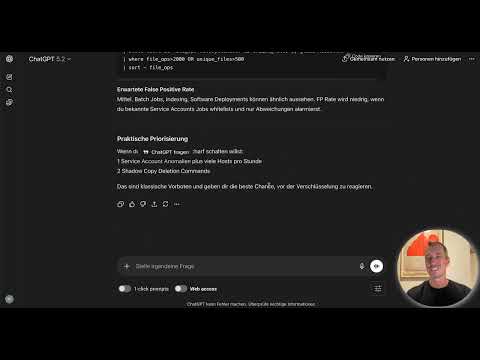
The real value of threat intelligence arises during implementation. To do this, you build a prompt that refers to the TTPs identified earlier. For each technique, request what should be monitored and which log sources are needed, and have example queries generated as pseudocode or in Splunk SPL. Add the expected false-positive rate and limit the answer to the five most important detection options.
Typical results include the abuse of valid accounts, lateral movement via remote services and admin shares, data staging and exfiltration via upload tools, and the deletion of shadow copies. Then test the recommendations against your own environment. Not every query fits your log sources, and syntax often needs to be adapted.


Step 8: Create the Threat Intelligence Report
Once the profile and detections are in place, it's time for distribution. A report for the internal team or management should be concise, clearly structured, and easy to understand. Therefore, give the AI a format: professional tone, sections, a classification such as "Internal" in the header, and information on relevance to your own organization.
Typical sections are Executive Summary, Trade Overview, Relevance to the Organization, Analyzed TTPs, Indicators of Compromise, Mitigation Recommendations, Detection Options, Intelligence Gaps, and References. The finished report can be exported as a PDF or copied directly into a document.


Step 9: Apply the 70-30 Rule
Let the AI do the main work, but revise the result yourself. As a rough rule of thumb: ChatGPT takes on about 70 percent, and about 30 percent stays with you. Check facts, correct errors, adapt terms to your team's language, and add context from your own experience. Only then do you send the report.
This review is not a nice-to-have. Language models can misrepresent details or shorten sources. A report that goes to management must be reliable.
Step 10: Compare Multiple Threat Actors
For prioritization, comparing multiple groups is particularly helpful. You can, for example, compare the three most active ransomware groups of a year. Formulate the prompt precisely: time period, number of groups, and desired comparison dimensions such as duration of activity, ransomware family, initial access, and double extortion.
The result is a comparison matrix with recommendations on which group should be monitored as a priority and why. Note that such analyses require more computing time, since many sources are evaluated.


Step 11: Integrating Threat Intelligence into Your Workflow
Threat intelligence is only valuable if it makes its way into everyday work. Use AI to generate concrete use cases: a short briefing for the Security Operations Center, a detection engineering backlog with prioritized cases, a vulnerability management prioritization, or an awareness training. Realistic scenarios can also be created for tabletop exercises.
When prioritizing vulnerabilities, real attacker behavior matters more than a pure CVSS score. A vulnerability that is actively exploited by the observed group deserves priority, even if its severity is rated lower.

Summary ??? Threat Intelligence with ChatGPT: Understanding Attackers
Threat intelligence answers the question of who your adversary is and how they operate. You gather knowledge from public sources such as vendor reports, government advisories, knowledge bases, and IOC feeds. ChatGPT helps you consolidate this information into a Trade-Actor profile, derive detection recommendations with example queries, and create a report. Your review remains crucial: verify sources, put results into context, and refine the report with your own expertise. This way you shift your defense from reaction to targeted preparation.
FAQ
What is the difference between threat intelligence and incident analysis?Incident analysis describes what happened in your network. Threat intelligence describes who is behind it, how the group operates, and what to expect next.
Which sources are most important for getting started?A good starting point is reports from Mandiant, CrowdStrike, and Microsoft, the advisories from CISA and the BSI, the MITRE ATT&CK Groups, as well as Malpedia and the Ransomware Wiki.
Can I use ChatGPT for a threat intelligence report without verification?No. The AI provides a structured foundation, but you have to check facts, sources, and timeframes yourself. As a rule of thumb, the 70-30 rule applies, meaning around 30 percent of your own revision.
What does the false positive rate of a detection mean?It indicates how often a rule triggers incorrectly even though there is no attack. A high rate means a lot of unnecessary work for the team and should be taken into account during prioritization.
Why should I enable web search in ChatGPT?With web search enabled, more current information that emerged after the model's training cutoff is included. The response then takes longer, but more often contains links that you can verify.
How do I know which detection fits my environment?Check whether the required log sources exist in your environment and whether the queries can be adapted to your syntax and data structure. Test each rule in monitoring mode first before you activate it.

