

Imagine you are sitting in front of a suspicious process on your Windows system and quickly ask the AI for help. The answer is sobering: the AI only asks counter-questions. This is exactly where this lesson comes in. You will learn why vague requests fail and how, with four simple building blocks, you can turn an unusable question into an instruction you can actually work with.
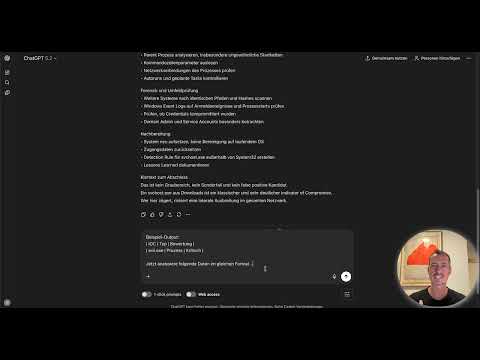
The video is only loaded from YouTube when you play it – data (including your IP address) is then transmitted to YouTube/Google. More in the privacy policy
The foundation is a simple observation: the quality of your results depends to a large extent on the prompt and only to a smaller extent on the model. In practice, a well-formulated prompt with a standard model often beats a bad prompt with a powerful model. This guide shows you step by step how to use this for your security work.
Key Takeaways
A prompt is a work instruction. The more context, precision, and guidelines you provide, the more useful the answer will be. The framework of role, context, task, and format forms the basic structure for this. With few-shot examples, chain-of-thought instructions, and clear constraints, you can control the output even further, and through targeted follow-up questions you refine the result step by step.
Step-by-Step Guide
Step 1: Understanding the Beginner Prompt as a Starting Point
The typical first attempt looks like this: "Help me with a security problem." The sentence sounds harmless, but it contains no information whatsoever. The AI cannot know whether it is about a suspected phishing attempt, a ransomware infection, or a misconfigured firewall. It therefore reacts like a good colleague who asks questions first before answering. This is not a flaw of the model, but an indication that your prompt does not yet provide enough material.
Go ahead and enter the sentence once and read the follow-up question carefully. It shows you exactly which information is missing. You will close exactly these gaps in the next step.


Step 2: Formulating a Specific Case
In the second attempt, the prompt becomes somewhat more concrete: "I found a suspicious process. What should I do?" This is already better, because the AI now delivers an answer with general steps, such as staying calm, documenting the process cleanly, and checking the context. Anyone who has ever handled an incident knows that this approach makes sense. Still, it is not enough for your specific case.
The answer remains generic because it is not tailored to any particular environment. It does not know which system, which process, or which network environment is involved. This intermediate step is important because it shows you: a correct question alone is not enough. The AI needs context to place it.

Step 3: Getting to Know the Four Building Blocks
To get from general advice to targeted analysis, you work with four building blocks. The first is the role. It determines from which perspective the AI should answer, for example as an experienced SOC analyst or as a Windows forensics expert. The second building block is the context. Here you describe the system, the environment, and steps already taken. The third building block is the task. Formulate it precisely: demand an analysis, a listing, an explanation, or a creation, instead of just writing "help me." The fourth building block is the format. Specify what the answer should look like, for example as a table, as a bullet list, or with a prioritization from 1 to 5.
Remember the short form RCTF: Role, Context, Task, Format. You should use this framework as a checklist for every security prompt.

Step 4: Rebuilding the Beginner Prompt with the Framework
Now you apply the framework to the same case. The new prompt begins with the role: "You are an experienced Windows security analyst." Next comes the context: On a Windows 10 workstation in a domain-joined corporate environment, a process named svchost.exe was discovered that starts from the directory C:\Users\Public\Downloads instead of from C:\Windows\System32. The task is to analyze whether this is an indicator of compromise. As the format, you request an assessment with the levels critical, high, medium, or low, a justification, and recommended next steps.
The difference is immediately visible. The answer now addresses exactly this case, names concrete recommendations for action, and assesses the suspicion. Make sure you specify the path and the process name correctly, because it is precisely these details that make the analysis valuable. A process from a download directory is a much stronger warning sign than a process from the system directory.

Step 5: Use Few-Shot Prompting for Consistent Outputs
If you regularly need results in a fixed schema, for example for a ticketing system or an import into Excel, few-shot prompting helps. Here you give the AI an example of what the response should look like. An example output could be: IOC type, assessment, justification, priority, for example "Evil Excel Process, critical". After that, you write something along the lines of: Analyze the following data in the same format.
This way, the AI adopts not only the content but also the structure. You can additionally specify whether the fields should be separated by semicolons so that you can import the output directly into another tool. Many systems expect exactly this format, and with an example you avoid subsequent rework.
Step 6: Make the Thought Process Visible
A second tool is the chain-of-thought technique. You ask the AI to proceed step by step and explain its analysis. One additional sentence in your instruction is enough, for example: "Think step by step and explain your analysis." The AI then shows you in a comprehensible way which considerations led to its assessment.
This is particularly valuable in security work. You can check whether the logic is sound and identify assumptions that don't fit your environment. Never trust an assessment blindly, but verify it against your own experience and data.

Step 7: Set Constraints
A third pro tip is constraints, meaning clearly defined boundaries. You specify what the response should focus on and what it may leave out. An example would be: "Focus only on Windows-specific artifacts and ignore network-related information." This way you avoid the AI flooding you with hints about areas that are not relevant to your case at all.
Constraints are also a safeguard against misinterpretations. The more clearly you define the framework, the greater the chance that the response stays within your working context.

Step 8: Reach the Goal Through Iteration
The most important step is realizing that your first prompt doesn't have to be perfect. Iteration is the key to useful results. After the first analysis, you can follow up in a targeted way, for example by asking which MITRE ATT&CK techniques might be relevant here. Or you can ask for a PowerShell command that you can use to search for further instances of this process in the network.
The conversation builds on itself. Each follow-up question refines the result, so that you get deeper into the analysis step by step. Proceed this way until the response meets exactly your latest requirement.
Step 9: Keep the Basic Principle in Mind
In conclusion, one simple principle remains: Be specific. The more relevant details you provide, the better the response will be. Use the framework of role, context, task, and format as a scaffold, add examples, thinking instructions, and boundaries, and then refine through follow-up questions. In the next module, you will apply these techniques directly to real Windows event logs, firewall logs, and sensor alerts. There you will see how well the prompting technique proves itself in practice.

Summary ??? Prompt Engineering for Security: From Beginner Prompt to Precise Instruction
A vague prompt yields vague answers, because the AI can only work with the information you give it. With the building blocks of role, context, task, and format, you turn a question into a clear work instruction. Supplement them as needed with few-shot examples for consistent outputs, chain-of-thought for comprehensible reasoning, and constraints for a clear focus. Then refine the result through targeted follow-up questions, and you will get answers you can actually work with in your day-to-day security work.
FAQ
Do I always have to use all four building blocks?Not necessarily, but the more complex the task, the more building blocks you should use. Context in particular often determines the quality of the answer.
Why does the AI ask questions back when given a short prompt?Because it lacks the necessary information. It cannot tell which system, which process, or which environment is meant, and therefore asks.
Can I also use few-shot prompting for other output formats?Yes, you can specify any format, such as tables, CSV lines with semicolons, or structured fields for import into other tools.
Is chain-of-thought worthwhile for every request?For complex analyses, yes, because you can follow and check the thought process. For simple factual questions, the additional instruction is usually not necessary.
Should I put real hostnames or user data in the prompt?Pay attention to data protection. Anonymize sensitive information such as usernames, IP addresses, or internal hostnames before entering them into an external model.
How many follow-up questions make sense?As many as it takes until the answer meets your requirement. Each follow-up can build on the previous answer and refine the result step by step.

