

Event logs tell you what is happening on an endpoint. Firewall and proxy logs, on the other hand, show you who that endpoint is talking to. Every outbound connection, every DNS request, and every blocked connection attempt is recorded here, and that is precisely where the value for detecting attacks lies. The problem: a mid-sized company quickly generates millions of entries per day. Manually, you will hardly find anything in them.
The video is only loaded from YouTube when you play it – data (including your IP address) is then transmitted to YouTube/Google. More in the privacy policy
In this guide, you will learn about the common log formats, understand how C2 beaconing can be recognized, and use ChatGPT specifically to track down exactly this pattern in proxy and firewall logs.
Key Takeaways
- Firewall and proxy logs complement event logs because they document outbound communication.
- Squid, Blue Coat, and Palo Alto differ in structure, but ChatGPT recognizes all common formats as long as you name the format.
- Beaconing shows up as regular intervals with small variation, always the same destination, similar data volumes, and activity at night or on weekends.
- Blocked connections reveal port scans, port hopping, and lateral movement, which often remain invisible in allowed traffic.
- The AI speeds up the analysis, but it does not replace your own review of the results.
Step-by-Step Guide
Step 1: Understanding the Value of Network Logs
Before you analyze, you should know which questions the logs answer. Event logs show actions on the system, while firewall and proxy logs show outbound connections. Especially when malware is active on a machine, it leaves traces here, because it has to communicate with its operator. So you get a picture of which systems are talking to which destinations.

Step 2: Recognizing the Common Formats
Every proxy and every firewall writes logs in its own format. In the Squid proxy, you find fields such as timestamp, client IP, status code, transfer size, HTTP method, destination URL or destination IP, and content type. Blue Coat uses a similar logic but arranges the fields differently. There, the date, user, method, status code, and the browser used are among the main items. Palo Alto delivers firewall traffic logs with its own fields for zones, ports, and actions.
You do not have to memorize the field names. What matters is only that you tell ChatGPT which format it is when you paste the logs. Then the AI can assign the fields correctly.


Step 3: Understanding the Principle of Beaconing
When malware infects a system, it needs a channel to the attacker. This communication is called Command and Control, or C2 for short. The typical process looks like this: the malware checks in with the C2 server at fixed intervals, for example every 30 seconds, every minute, or every five minutes. The pattern resembles a lighthouse that flashes regularly, hence the name beaconing.
Normal browsing traffic, by contrast, is irregular and user-driven. This very difference is your most important starting point.

Step 4: Knowing the Typical Characteristics
Beaconing can be identified by a few clear characteristics. The intervals between connections are regular but often show a small variation, the so-called jitter. The destination stays the same, meaning the same URL or the same IP. The data volumes are also similar, both in the request and in the response. Added to this are unusual times: the connections run at night and on weekends, when no one is working at the computer.
Step 5: Formulating the Analysis Prompt
Open a new ChatGPT window and give the AI a clear role. A prompt like "You are an experienced Network Security Analyst specializing in C2 detection" creates the appropriate context. Then paste in your proxy logs and formulate the task precisely. The AI should find beaconing patterns, identify suspicious domains or IPs, and calculate the intervals between requests. You should also ask it to rate each finding as normal traffic or potentially C2.
Have the results output in a clear table. Useful columns are interval analysis, risk rating in critical, high, medium, and low, and recommended next steps.


Step 6: Evaluating the Findings
After submitting, ChatGPT usually returns several findings. In the example, a client from the internal network stood out that contacted a domain every five minutes. The timestamps were at night, around 3:14, 3:19, and 3:24 a.m. A workstation normally doesn't behave like this at that time, and that is exactly what makes the case suspicious.
Also pay attention to the username. If it ends with a dollar sign, it is a computer account and not a human. If such an account nevertheless sends HTTP requests, you should be alert. Another indicator is nearly identical data volumes, such as 1237 to 1255 bytes. Normal browsing usually fluctuates much more. Always compare the results with the behavior of other users. A user who browses irregularly to known Microsoft domains during working hours is much less conspicuous.


Step 7: Investigating the Suspicious Domain More Closely
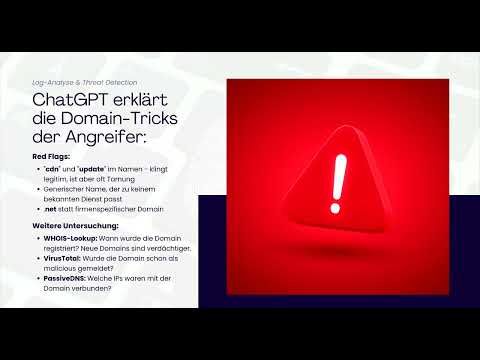
Once a target looks suspicious, a detailed analysis is worthwhile. Ask ChatGPT specifically about three points: Which red flags do you see in the domain name? Which techniques do attackers use when choosing domains? And how would you investigate the domain further?
In the example, the name "cdn-static-updates" initially seemed legitimate, but that is exactly a typical disguise. Attackers like to choose terms such as CDN or update that sound trustworthy but don't match any known service of the company. For further investigation, you can check the domain's registration, because newly registered domains are suspicious. Entries in threat intelligence platforms and passive DNS data are also helpful, as they show which IP addresses the domain was associated with in the past.


You can additionally ask ChatGPT to write a cURL command or a Python script that automates these checks. Review the code before running it, especially if it communicates with third-party services.
Step 8: Analyzing Blocked Traffic
Allowed traffic reveals only part of the story. The firewall logs also contain the blocked connection attempts, and these are often revealing. To do this, open a new chat window and define the role as a firewall analyst. The task is to examine blocked connection attempts and find patterns that indicate malware, port scans, or lateral movement.
In the example, the AI identified two different threats. One machine repeatedly tried to reach port 4444, the default port of the Metasploit framework. It then tried other ports such as 8080, 8443, and 443, presumably looking for an open way out. Another system scanned internal IP addresses on port 445. This port belongs to SMB and is a classic sign of lateral movement, in which an attacker spreads within the network.


Keep in mind: two suspicious systems do not necessarily mean a connected attack. You can initially consider both cases separately. However, it is equally conceivable that an attacker got past the firewall and then spread internally. Such connections are difficult to recognize manually, but with AI support they become visible much faster.

Step 9: Applying the Workflow in Practice
In the end, you have a repeatable process. Export the logs and filter the relevant time period. Give the data to ChatGPT together with the format and clear tasks. Then investigate suspicious domains and IPs further, extract the IOCs, that is, the Indicators of Compromise, and document them properly. This way you build a traceable chain of findings that you can use later in the incident report.

Summary ??? Understanding Firewall and Proxy Logs: Detecting C2 Beaconing with ChatGPT
Firewall and proxy logs show you a network's outbound communication and are therefore a valuable source for detecting attacks. You can spot beaconing by regular intervals, consistent destinations, similar data volumes, and activity outside working hours. Added to this are conspicuous domain names, port hopping, and internal scans on port 445. With a clearly worded prompt, the right format name, and a precise task, ChatGPT can quickly make these patterns visible in large volumes of logs. Your own review remains indispensable.
FAQ
What is C2 beaconing?C2 beaconing is the regular contact of malware with its command-and-control server, usually at fixed intervals with small jitter.
Why are firewall and proxy logs so important?They show which destinations systems communicate with, even when no clear warnings appear on the endpoint itself.
Do I have to specify the log format when I give logs to ChatGPT?Yes, you should, because although ChatGPT recognizes many formats, it assigns the fields more reliably when you name the format.
How can I tell that a computer account is suspicious?Usernames ending in a dollar sign usually belong to computer accounts. If they send HTTP requests, that is unusual and should be investigated.
Why are blocked connections revealing?They show port scans, attempts to find a way out, and lateral movements that often do not appear in allowed traffic.
Can ChatGPT take over the analysis completely?No, the AI speeds up the analysis and provides indications, but the assessment of the findings and the decision on measures are up to you.

