

You probably already know chatbots like ChatGPT. Grok from xAI, Elon Musk's company, takes a different approach, however: the AI is integrated directly into X, formerly Twitter. As a result, it has access to posts, news, and trends in real time. This is particularly interesting for cybersecurity, because new phishing waves or security vulnerabilities are often discussed first on social networks, long before they appear in a report. This guide walks you step by step through the interface, shows you the pricing models, and explains where Grok is useful and where you should be especially critical.
The video is only loaded from YouTube when you play it – data (including your IP address) is then transmitted to YouTube/Google. More in the privacy policy
Key Takeaways
- Grok accesses content from X and websites in real time and is therefore particularly suitable for current topics.
- With an existing X account, a separate login is not needed; sign-in runs through the existing system.
- There are several modes that use different models: automatic, fast (Grok 3), Expert (Grok 4), and Heavy.
- The chat supports text input, voice, files, code, and images. In addition, Deep Search and a source view are available.
- Since Grok is strongly shaped by X content, frequently shared false reports can also be reflected in its answers. You must therefore always cross-check security-relevant statements.
Step-by-Step Guide
Step 1: Understanding Grok
Before you start, you should know what distinguishes Grok from other AI systems. Grok is an AI chatbot from xAI and is firmly integrated into the X platform. Its main advantage is access to current discussions. For your security research, this means: if a new fraud attempt or vulnerability appears on social networks, Grok can often pick up on these signals earlier than models with older knowledge.

Step 2: Exploring the xAI Website
Start on the xAI website. It is clearly designed, with elaborate animations in the background, and bundles all the important information. Using the input field on the home page, you can try Grok directly. Further down you will find sections on the latest announcements, the API, and the models. There, Grok 4 is described, for example, as the most intelligent model in the world. However, you should not accept this claim unchecked, but verify it yourself using independent benchmarks.

Step 3: Understanding the API and Pricing
If you want to use Grok not only in the chat but in your own tools or scripts, the way to do so is through the API. On the website, you will find details on modalities, context length, rate limits, and prices for each model. Billing is per million tokens, separately for input and output. According to the video, Grok 4 costs about 3 US dollars per million input tokens and 15 US dollars per million output tokens. In the video, the Grok 3 model is priced at about the same level, while the mini variant is significantly cheaper. For initial experiments, the mini model is therefore worthwhile, because it lets you quickly estimate what costs to expect. However, prices change frequently, so always check them on the current page before making a calculation.

Step 4: Opening the Chat and Understanding the Modes
Via the "Try Grok" button, you get into the chat. There you can choose between different modes. The "Automatic" mode decides by itself which model fits your question best, similar to what you know from ChatGPT. The "Fast" mode uses Grok 3 for quick answers. The "Expert" mode works with Grok 4 and generally delivers more thorough results. The "Heavy" mode is paid and offers the highest computing power. For complex analyses, the Expert mode is therefore worthwhile, while for quick questions the fast mode is usually enough.

Step 5: Registering and Logging In
To use the full range of functions, you need to sign in. You can do this via email, Apple, Google, or directly via your X account. In the video, sign-in with Google was chosen. If you already have an X account, the effort is almost entirely eliminated, since Grok is integrated via this system. After signing in, a tidy interface appears that matches the layout of other AI chats.

Step 6: Using the Input Options
The chat works as usual: you enter a question and receive an answer. Grok recognizes spoken language very reliably, so you can also use voice mode. In addition, you can upload files, add text content, and draw sketches. You can also connect cloud services such as Microsoft OneDrive. Keep in mind that you should not enter confidential company data into an external service without authorization.
Step 7: Deep Search, Current News, and Personal Details
Below the input field, you will find additional options. The "Deep Search" function prompts Grok to think through the request more thoroughly and research more extensively. With the "Current News" option, the answer focuses more strongly on up-to-the-minute events. In the "Personal" section, you can store additional details so that the answers fit your situation better. Remember to enter sensitive personal information only sparingly.
Step 8: Analyzing Documents, Images, and Code
Grok can process documents, code, images, and datasets. In the video, HTML code is used as an example. You can upload or paste the code directly and ask Grok to analyze it. The AI also takes care of creating code, right up to complete solutions. For security practice, this is suitable for a first review pass, for example to find conspicuous patterns or possible vulnerabilities. However, it does not replace a professional security audit.

Step 9: Researching Current Situations
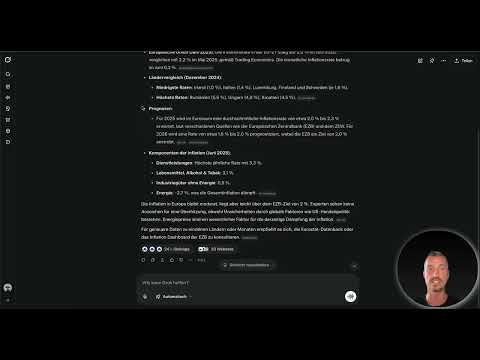
Its real strength shows in questions about current events. In the video, the question is asked what the current state of inflation in Europe is. Grok draws its answer from posts on X and from websites, states the annual inflation rate, and even provides forecasts. Applied to cybersecurity, you could ask, for example: Which phishing campaigns are currently being discussed on X? This gives you a quick overview before a topic shows up in professional reports.

Step 10: Viewing and Verifying Sources
Below the answer, Grok shows how many posts were analyzed and which websites were consulted. You can open individual sources and trace where a piece of information comes from. Use this function consistently. For security-related topics, the source is often more important than the answer itself, because only the source allows you to put it into context.

Step 11: Understanding Tone and X Integration
Grok is deliberately phrased in a casual and at times provocative way. This can be entertaining, but it should not distract you from the factual quality of an answer. A practical advantage is the integration with X: you don't need an additional login, but can work directly with your existing account. This form of login corresponds to a single sign-on procedure.

Step 12: Typical Use Cases
Grok is well suited for news analysis because current reports feed directly into the answers. Developing content ideas also works well, since trends on X are already captured. With a bit of practice, you can build your own trend monitor that shows you which topics are currently gaining momentum. This can be especially valuable for cybersecurity awareness campaigns.
Step 13: Critically Reviewing Results
Grok is strongly shaped by the content on X. A false report that has been shared often enough can therefore make its way into an answer. For technically complex questions, you should always verify the results before passing them on. Cross-check statements with official sources such as federal agencies, CERTs, or vendor reports. This discipline is indispensable in the security environment.

Step 14: Weighing Subscription Models
The free version offers access to Grok 3 with limited scope. According to the video, SuperGrok costs 30 US dollars per month and extends access to Grok 4, Deep Search, and a larger memory. SuperGrok Heavy costs 300 US dollars per month and is aimed at very intensive users. Before taking out a subscription, check whether you will actually use Grok regularly; otherwise the price is hardly worth it. The information from the video may have changed in the meantime and should be verified before making a decision.

Step 15: Grok Compared to ChatGPT and Perplexity
In the video, ChatGPT is stronger in general knowledge and creativity, but it falls behind on up-to-the-minute information unless browsing is used. Perplexity excels at web search and source citation, but offers no direct connection to social networks. Grok combines real-time data with social media content, which makes it unique in this form. Therefore, think about what type of information you actually need, and choose the tool accordingly.

Step 16: A Mini-Challenge to Try Out
If you have a corresponding subscription, ask Grok a question about a current trend or a news item that interests you. Then compare the result with a classic Google search. Pay attention to how quickly the information is available in the social media area, how precise it seems, and where the sources come from. This way you develop a sense of when Grok is the right helper and when it is not.

Summary ??? Using Grok: Real-Time Research on Current Cyber Threats
Grok combines a powerful AI with direct access to current discussions on X. You simply log in, choose the appropriate mode, and ask your questions, whether about news, trends, or code. What remains crucial is that you check the sources, cross-check the answers, and keep an eye on the costs. Used correctly, Grok is a fast early warning system that helps you detect new threats early, before they appear in classic reports.
FAQ
What distinguishes Grok from ChatGPT?Grok is directly integrated into X and accesses posts, news, and trends in real time. ChatGPT is stronger in general knowledge and creativity.
Do I need an X account to use Grok?No, Grok can also be used without an X account. With an X account, however, the additional sign-up effort is eliminated.
What modes are there in the chat?There is the automatic mode, the fast mode with Grok 3, the Expert mode with Grok 4, and the paid Heavy mode.
Can Grok analyze files and code?Yes, you can upload or paste documents, code, images, and data and have them analyzed.
Are Grok's answers always correct?No, since Grok is strongly shaped by content on X, frequently shared false reports can also creep in. You should always verify important statements.
How can I check the sources of an answer?Below the answer, Grok shows which posts and websites were used. You can open them directly and verify the information.
Can Grok be used for free?There is a free version with limited scope. Extended features are available through subscription models, whose prices may change.
What is Grok particularly well suited for?Grok is particularly suited for news analysis, trend checks, content ideas, and the early detection of current threats in social networks.

