

In the past, you spent hours searching Stack Overflow, copying snippets together, and then painstakingly debugging them. Today, an AI assistant can deliver a first draft in seconds. The catch: AI-generated code is not automatically secure, complete, or correct. This is exactly where this guide comes in. You will learn how to formulate precise requirements with a structured prompt template, critically review the code, and improve it iteratively. In the end, you will have three practical scripts: a PowerShell script for threat hunting for suspicious scheduled tasks, a hardening check for Windows, and a triage script for incident response. In addition, you will create a Linux hardening check in Bash.
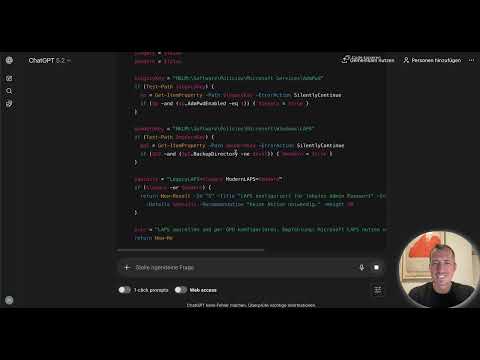
The video is only loaded from YouTube when you play it – data (including your IP address) is then transmitted to YouTube/Google. More in the privacy policy
Key Takeaways
- A good result depends on the precision of the prompt. Describe the purpose, input, output, environment, permissions, quality criteria, and error handling.
- Always demand error handling, logging, and comments in German.
- Never run code blindly. Check it for security problems, unsafe functions, and edge cases.
- Improve the code iteratively by specifically asking about weaknesses and extensions.
- Test every script in a lab environment before it goes into production.
Step 1: Understanding the Prompt Template
The foundation of every usable script is a structured prompt. Your template should clearly state the task, purpose, inputs and outputs, target environment, required permissions, and quality criteria. Also add requirements for error handling, logging, and comments in German. Constraints are important too: no external modules, no hardcoded credentials, idempotence on repeated execution, and sanitization of the output. With this framework, you get production-ready code instead of a hastily thrown-together quick-and-dirty script.

Step 2: Threat Hunting Script for Suspicious Scheduled Tasks
Attackers like to abuse scheduled tasks for persistence. Your first prompt therefore describes a PowerShell script that finds typical malware indicators in task schedules. As detection criteria, you specify tasks with suspicious executables, tasks created in the last seven days, and tasks created by unknown users. The output should be a CSV containing all suspicious tasks with a risk assessment and recommended action. You specify Windows Server as the environment and administrator rights as the permission, and you demand error handling and logging.

ChatGPT then delivers an extensive script that covers the relevant Windows areas. Don't let it dazzle you: the code is a starting point, not a finished product.

Step 3: Critical Review and Iterative Improvement
Before you run the script, review it. A sensible follow-up prompt is: Check the script for security problems, unsafe functions, performance problems, and missing edge cases. Then name possible improvements and implement them. In the example, a whitelist for legitimate tools such as SCCM or backup software, an option for remote execution on multiple servers, and an additional HTML report were added. Make sure that ChatGPT outputs the complete code again. That way, you don't have to painstakingly piece together individual components.


The revised version now contains the whitelist logic and a function for loading the rules. Review this version again as well. If you are unsure, have individual sections explained or ask follow-up questions until you can understand every line.
Step 4: Hardening Check for Windows
The second script checks whether security settings are configured correctly. For this, you write a new prompt with the purpose of a compliance check, the desired output as console output and an HTML report, and the target systems Windows 10/11 Enterprise and Windows Server 2019 and 2022. You can run such a script automatically every day and get an assessment without manually checking every setting.

The generated solution is usually finished quickly and ready for immediate use, provided you subsequently compare it against your policies. This comparison is exactly the part you should not delegate.

Step 5: Triage Script for Incident Response
When a system may be compromised, every minute counts. A triage script collects the most important artifacts quickly and without making changes to the system. Your prompt should therefore capture running processes with command line and parent process, active network connections, listening ports, scheduled tasks, suspicious autostart entries in registry Run keys and in the Startup folder, recently created files in the Temp directory, as well as logged-on users, installed software, the last 100 Windows Event Log entries, and the ARP cache. All data should end up in separate CSV files. In addition, you request a summary HTML dashboard and automatic ZIP creation for transport. Important requirements are an execution time of under two minutes and the demand that no changes be made to the system.

The result is a script that secures all relevant traces in a short time. Test it in a lab environment before you use it in a real emergency, and check in particular whether it actually changes nothing on the system.

Step 6: Linux Hardening Check in Bash
The same principle also works for Linux. A short prompt is enough: Create a Bash script for a security hardening check. Check whether SSH root login is disabled, the firewall is active, and unattended upgrades are set up. Also verify that only the root user has UID 0, the temp directory is mounted with noexec, and a password policy is configured. The output should appear in color on the console and additionally be written to a log file.

Bash scripts are often shorter and more concise than PowerShell code. Whether that suits you, however, depends heavily on your experience. What matters is that you understand the code before you use it.
A practical tip: Run the script as root. Without root privileges, you lack the necessary permissions for the SSH configuration and firewall queries, and the result would be incomplete. The password policy is deliberately checked conservatively, so deviations may appear that are uncritical in your environment. You should take this into account during evaluation.

Step 7: Best Practices for Handling Generated Code
The most important rule is: Don't adopt code without reviewing it. Test every script first in a lab environment. Version your scripts, for example with Git, so that changes remain traceable. Also document exactly what a script does. If needed, ask ChatGPT to include detailed explanations as comments in the code. This helps you and your colleagues later with maintenance.

Never store credentials in the code. Instead, use a credential manager or pass credentials as parameters.
Summary ??? Creating Security Scripts with ChatGPT: Prompt Template for Threat Hunting, Hardening, and Incident Response
You have learned how a precise prompt is structured with purpose, input, output, environment, permissions, and quality criteria, and why error handling, logging, and constraints belong in it. You have created three scripts: a threat hunting script for suspicious scheduled tasks, a Windows hardening check, and a triage script for incident response. You also know the Linux hardening check in Bash. The most important point remains critical review. Code is not executed blindly, but questioned, tested, documented, and versioned. The next lesson covers detection rules for Sigma, Splunk (SPL), and CrowdStrike queries.
FAQ
Why shouldn't I run AI-generated code without reviewing it?AI-generated code can contain security vulnerabilities, insecure functions, missing edge cases, or incorrect assumptions about your environment. Therefore, always review it and test it in a lab environment.
What information should a good prompt for security scripts include?A good prompt describes purpose, input, output, target environment, required permissions, quality criteria, error handling, logging, language of the comments, as well as constraints such as no external modules or no hardcoded credentials.
What does idempotence mean for a script?Idempotence means that a script delivers the same result when run multiple times and does not produce unwanted side effects.
Why does the Linux hardening check have to be run as root?Without root privileges, the script lacks the permissions to read SSH configurations and firewall settings. The result would therefore be incomplete.
How do I handle credentials in scripts?Do not store credentials in the code. Use a credential manager or pass the data as parameters.
How can I improve a generated script?Ask ChatGPT to review the script for security issues, performance issues, and edge cases, and request the complete, revised code. If anything is unclear, ask follow-up questions or have individual sections explained.

