
One billion monthly active users are an audience that no advertiser ignores. That is why there are now ads in ChatGPT. If you plan or manage campaigns, you should know what these ads look like, where they appear, and who actually gets to see them.
The video is only loaded from YouTube when you play it – data (including your IP address) is then transmitted to YouTube/Google. More in the privacy policy
In this guide, you will go step by step through a concrete ChatGPT ad. You will learn about its structure, placement, and labeling, and find out which user groups do not see advertising. You will also learn why you should create a free secondary account to check your own ads.
Key Takeaways
- According to the figures cited in the video for 2026, ChatGPT and Gemini each reach around one billion monthly active users worldwide.
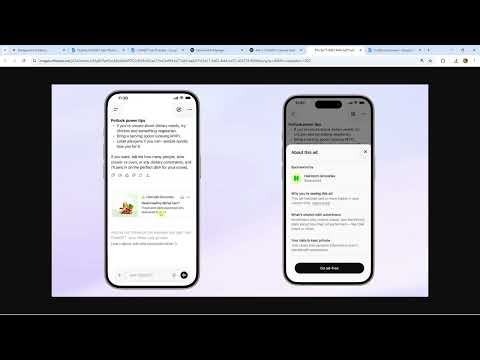
- The ad appears below the ChatGPT response, not in the input field and not in the middle of the text.
- The format is minimalist: company name, ad title, short description, and an image. There are no sitelinks or rotating descriptions as with Google.
- Via the ad, you reach an info window with explanations about why it is shown, shared data, and data protection. A paid subscription is also offered there.
- Ads are seen by users of the free version and the cheapest subscription. Plus and Pro users never see advertising.
- Users with a free account can turn personalized advertising on or off. The more they leave enabled, the more precisely you can target.
- With a free secondary account, you check your ads the way real users see them.
Step-by-Step Guide
Step 1: Put ChatGPT's Reach into Perspective
Before you look at the ad, it helps to consider the scale. ChatGPT was the first AI model to truly break into the mainstream. Many people use it daily, or at least weekly or monthly. For 2026, the video cites around one billion monthly active users worldwide. Gemini, Google's AI, is in a similar range. Wherever many people ask questions, ad space emerges, and that is exactly why the topic is interesting for businesses.

Step 2: Distinguish Deliberate AI Use from Incidental Use
The comparison with Google shows why ChatGPT ads should be assessed differently. When you type something like "how much does bread weigh" into Google, an AI Overview often appears automatically. That is not an intentional AI request, because you only wanted to google. People only truly use AI deliberately when they click on AI Mode or specifically call up Gemini.
ChatGPT, on the other hand, you have to open actively. There you create projects, generate images, and can also do research, for example with the same question about the weight of bread. Because more and more people use ChatGPT this way, advertising there becomes worthwhile for businesses. Anyone who opens ChatGPT has a clear intent, and that makes the context valuable.

Step 3: Recognize the Placement of the Ad
Pull up a sample image of a ChatGPT ad. At the bottom you see the input field, and above it the output area with the response. The ad sits directly below the response. In the example, "High Loom Groceries" is advertising, a virtual ordering service that works roughly like Lieferando.
Remember: The ad is clearly separated from the response and appears only after the result. Your creative therefore does not compete with the response text but complements it.

Step 4: Analyze the Structure of the Ad
The format is deliberately simple. The ad consists of:
- the company name,
- the ad title,
- a short description,
- an image.
As with Google, there are neither sitelinks nor further links or rotating descriptions that can be combined. There is usually too little space for that. For you, this means: title, text, and image must be convincing on their own. Therefore, formulate your message precisely and choose a meaningful visual.
Step 5: Open the Info Window for the Ad
If you click on the ad, a window with additional information opens. It answers the question "Why are you seeing this?", that is, "Warum siehst du das?". You learn what was shared and how the data is handled. This is the transparency layer of the labeling. Check it for your own ads, because this is also how your target audiences see the background of the placement.
You will also find the "Ad free" option there. It lets you take out a paid subscription to get rid of the advertising.
Step 6: Clarify Who Sees the Ads
Not every user gets advertising. Ads are seen by everyone who uses ChatGPT for free, as well as by users of the cheapest subscription. Anyone who doesn't want advertising has to switch to a more expensive plan. Plus and Pro users never see ads. So you won't reach this group with your campaigns. Plan your reach accordingly and don't calculate the target audience as larger than it is.
Step 7: Create a Free Second Account for Monitoring
A practical consequence follows from Step 6. If you have a Plus or Pro account yourself, you will never see your own ads. Therefore, create a free second account right away. With it, you can check whether and how your ads appear, how the title, text, and image look beneath the answer, and whether the labeling is displayed correctly. Ask questions there that fit your offering and observe which placements follow.

Step 8: Understand Personalized Advertising as an Influencing Factor
Users with a free account can set whether they want to see personalized ads. You already know this from Facebook. For you as an advertiser, this applies: the more users leave personalization enabled, the better you can match the ads you serve. Therefore, take into account that part of the target audience turns this option off. Your targeting then only works to a limited extent, and the message must also work without strong personalization.

Summary – Recognizing a ChatGPT Ad: Format, Placement, and Labeling
A ChatGPT ad appears directly beneath the answer and consists only of the company name, title, short description, and image. The info window tells you why an ad is displayed, what data is shared, and how to avoid advertising with a subscription. Ads are seen by users of the free version and the cheapest subscription, whereas Plus and Pro users never see them. Therefore, create a free second account to monitor your campaigns. Also note that users can turn off personalized advertising.
FAQ
Where does an ad appear in ChatGPT?It appears below the ChatGPT answer, separate from the answer text and above the input field.
What elements does a ChatGPT ad consist of?Company name, ad title, short description, and an image. There are no sitelinks or rotating descriptions.
How can I tell why I am being shown an ad?Click on the ad. In the info window, under "Why are you seeing this?", you can see why it appears, what was shared, and how the data is handled.
Who sees ChatGPT ads?Users of the free version and the cheapest subscription. Plus and Pro users never see advertising.
How do I get rid of the advertising?Take out a paid subscription via the "Ad free" option and choose a more expensive plan.
Why do I need a free second account?With a Plus or Pro account, you never see your own ads. A free second account shows you how they look to real users.
Can I turn off personalized advertising as a user?Yes, with a free account you decide for yourself whether you want to receive personalized ads, similar to Facebook.
Do ChatGPT ads have the same additional formats as Google?No, the format is minimalistic. There is usually too little space for sitelinks or combined descriptions.

